

Finding the right wall control for your heating and cooling setup is rarely exciting, but it shapes how comfortable your home feels every single day. This roundup walks through nine thermostats worth comparing, from basic non-programmable units to learning models that adapt to your routine. Use it as a shortcut when the choices feel overwhelming.
The Choices Worth Comparing
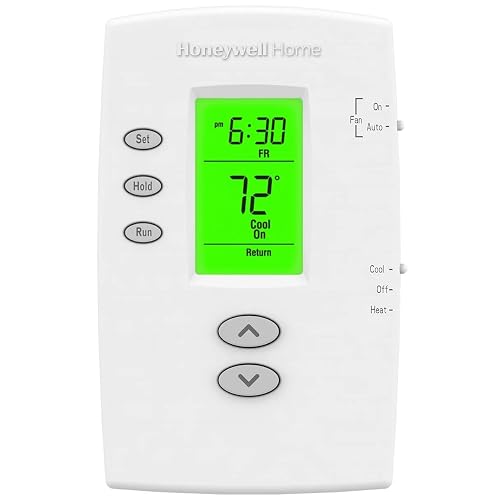
Honeywell TH2110DV1008 PRO 2000 Vertical Programmable
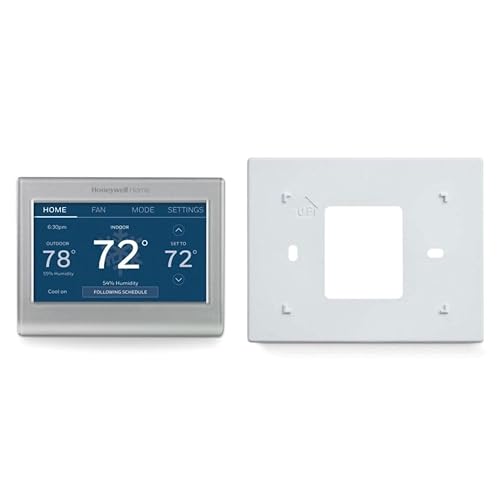
Honeywell Home RTH9585WF Wi-Fi Smart Color Thermostat
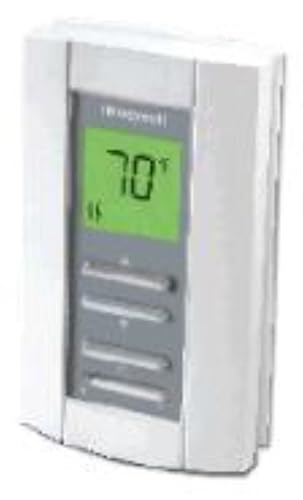
Honeywell TL7235A1003 Line Volt Pro Digital Thermostat
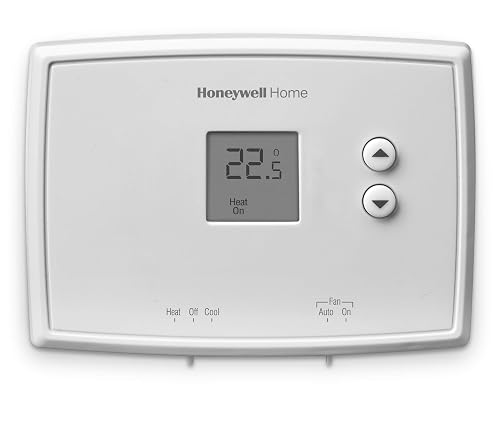
Honeywell Home RTH111B Digital Non-Programmable Thermostat

Honeywell Home X2P Programmable Thermostat
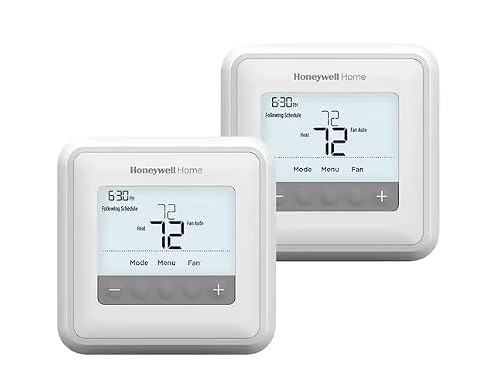
Honeywell Home T4 PRO 2-Day Programmable Thermostat

Honeywell TH3210D1004 Non-Programmable Digital Thermostat

Google Nest Learning Thermostat 4th Gen Obsidian

Google Nest Learning Thermostat 4th Gen Silver
More Details On Our Top Picks
The PRO 2000 sits in that comfortable middle ground where programming meets simplicity, and the vertical layout makes it a natural fit for narrow wall sections where wider models feel oversized. You get separate weekday and weekend schedules, so a standard Monday-through-Friday routine plus a more relaxed Saturday and Sunday program lands in just a few button presses.
Compared to the basic RTH111B covered later, this model actually remembers what temperature you want and when, which matters for anyone tired of manual adjustments every morning. The backlit display keeps the current room reading visible, and an early-start function nudges the system earlier than the scheduled time on cold mornings, depending on how your home responds.
Notable Gains
- Separate weekday and weekend blocks let you match real routines without overcomplicating the setup
- Early-start feature pre-warms the house so comfort arrives close to the scheduled time
- Backlit display is easy to read in dim hallways and bedrooms
- Permanent and temporary override options handle the occasional late night or early departure
Things To Consider
- Vertical orientation requires more wall height than the square faceplates on the T4 PRO
- No Wi-Fi, so remote adjustments from a phone are not part of the package
Feature Snapshot
Who It Suits Best
Homeowners with predictable weekday and weekend routines who want real scheduling without paying for app connectivity.
Where Another Pick Suits Better
Step up to the Honeywell Home RTH9585WF if you want Wi-Fi control and a color touchscreen to manage the system from a phone.
This is the pick when you want the wall control to feel like part of the connected home rather than a relic from the 1990s. The full-color touchscreen swaps backgrounds and accent colors, so it blends with most paint schemes and finishes. App-based scheduling means you can tweak a setting from the office if plans change.
Where the PRO 2000 keeps things analog, the RTH9585WF adds the kind of flexibility utility rebates sometimes require, including peak-rate programming that shifts setpoints when power is most expensive. Compatibility spans forced-air gas, oil, and electric systems, plus hot water, steam, and heat pumps with electric backup, which covers most North American households.
A Few Highlights
- Customizable color screen helps the unit feel like a deliberate design choice
- Flexible programming supports time-of-use and peak-rate pricing plans
- Wide HVAC compatibility covers forced-air, hot water, steam, and heat pump setups
- Remote access through the companion app means no walking back to the hallway to make changes
Worth Noting
- Does not work with 120-240V electric baseboard heat, so baseboard owners should look at the TL7235A1003
- Wi-Fi setup requires a stable home network and a small time investment for initial pairing
Made For
Connected homeowners on standard central systems who want app control, color-screen aesthetics, and flexible weekly scheduling.
Skip It When
You heat with electric baseboards, in which case the Honeywell TL7235A1003 line-voltage unit is the safer wiring match.
The TL7235A1003 is purpose-built for a specific crowd: anyone with 240-volt electric baseboard or fan-forced heat, which is exactly the setup most low-voltage smart thermostats cannot handle. Think of it as the specialist in a lineup dominated by generalists. It runs the heating wire directly rather than signaling a furnace, so correct voltage matching is non-negotiable.
An on-demand backlight only lights the screen when you’re pressing a button, which keeps the room darker at night. A small heating indicator confirms at a glance that the system is actually drawing power, useful in homes where breakers trip or zones act up.
Useful Touches
- 240V line-voltage compatibility covers baseboard and fan-forced convection heaters
- On-demand backlight keeps the wall dark during sleep hours
- Visible heat-on indicator answers the “is it actually working?” question without walking to the heater
- Soundproof operation reduces the audible clicking common in mechanical line-voltage stats
Points To Note
- Not a fit for low-voltage central systems, so central-air households should pick something else on this list
- No scheduling features, which means manual adjustment for every routine change
Quick Facts
Best Suited To
Owners of 240V electric baseboard or fan-forced heating systems who need a digital upgrade over an old dial thermostat.
Not Your Match When
You run a low-voltage central furnace or heat pump, in which case the Honeywell Home RTH9585WF gives you app control on the right wiring.
When the goal is replacing a tired old analog dial with something accurate and simple, the RTH111B keeps the learning curve shallow. The soft-touch buttons respond with a clear click, and the display shows only what you actually need: the current temperature and your setpoint. No menus to navigate, no apps to install.
Compared to the programmable picks above, this model trades scheduling for ease. For households where nobody wants to program a thermostat, that trade is usually welcome. You may find it a refreshing step up from a basic manual dial without entering the world of Wi-Fi connectivity.
Practical Advantages
- Large, easy-to-read digital display cuts out clutter for users who prefer minimal information
- Soft-touch buttons are comfortable to press and intuitive for first-time users
- Precise temperature control helps eliminate the drifting common with older mechanical stats
- Low-fuss installation makes it a common weekend replacement project
Room For Improvement
- No scheduling means you adjust the setpoint manually as the day changes
- No remote access, so forgetful departures require a return trip to the wall
Perfect Match For
First-time thermostat shoppers, rental property owners, and anyone who just wants the temperature set without thinking about it.
A Better Fit Elsewhere
Pick the Honeywell Home T4 PRO instead if you want a programmable schedule with adaptive recovery that learns your home’s heating curve.
The X2P is one of those rare models that lets you choose how scheduling works, instead of locking you into a single format. You can run a 5-1-1 day plan, a 5-2 day plan, a full 7-day plan, or just skip programming entirely if you change your mind later. That flexibility matters for households whose schedules are not stable from week to week.
Built for single-stage heating and cooling systems, the X2P targets the most common residential setup in North America. Filter reminders, display adjustments, and a clean white face let the unit blend into most interiors without drawing attention.
What Stands Out
- Multiple schedule formats accommodate shifting work and family routines
- Optional non-programmable mode for households that change their minds
- Air filter reminders help you stay ahead of routine HVAC maintenance
- Designed specifically for single-stage 1 heat/1 cool systems common in many homes
Small Caveats
- Limited to single-stage systems, so multi-stage homes should look at the T4 PRO
- No Wi-Fi connectivity means phone-based control is not part of the package
Core Details
Who Will Love This
Single-stage system owners with irregular weekly schedules who want the option to reprogram as life changes.
Look Elsewhere When
You want learning behavior that builds a schedule on its own, which is exactly what the Google Nest Learning Thermostat handles best.
The T4 PRO pushes comfort a step further with adaptive intelligent recovery, a feature that figures out how long your specific heating system needs to reach the target temperature and starts earlier when it has to. The push-button controls and on-screen installation menus make setup more approachable than older pro-grade stats that assumed HVAC experience.
Memory retention during a power outage is a quiet but useful detail: the schedule stays put, and a real-time clock that adjusts for daylight saving time keeps things on track. The universal mounting system helps when the existing wall box is an unusual size.
The Helpful Details
- Adaptive recovery learns your system’s timing so comfort arrives close to the scheduled hour
- Memory holds the program through power outages, so you don’t have to reprogram after a storm
- Daylight saving adjustment runs automatically, with no manual clock resets twice a year
- Universal mounting system tolerates older wall openings and replacement projects
Honest Caveats
- No Wi-Fi, so all adjustments happen at the wall or through compatible remotes
- 2-day programming is simpler than the 7-day options on the X2P, which some users prefer
Who Should Grab It
Homeowners who want a programmable thermostat that actively manages the timing of their heating cycles, without stepping into app-based control.
Reach For A Different Pick When
You want color customization and phone control, which means the Honeywell Home RTH9585WF is the upgrade worth considering.
The TH3210D1004 is built for homes with two-stage heating and one-stage cooling, which describes a meaningful slice of North American HVAC systems. Where single-stage picks force compromises on equipment that can do more, this one lets the system actually run as designed. Precise temperature control within roughly one degree Fahrenheit keeps the comfort band tight.
The backlit digital display shows both the current room temperature and your setpoint at the same time, so the wall always answers the “what is it now and what did I set it to” question in one glance. Owners commonly report that the unit feels solid and the buttons respond predictably, which matters for daily use.
Where It Excels
- Two-stage heating and one-stage cooling support matches many mid-range residential systems
- Precise temperature control keeps comfort consistent without the drift of older dials
- Dual display of current and setpoint temperatures reduces guesswork
- Backlit screen remains readable in hallways and basements with limited lighting
A Few Limitations
- No scheduling, so the temperature stays where you last set it until a manual change
- No Wi-Fi or learning features, which limits integration with broader smart home setups
Feature Rundown
Built With In Mind
Owners of two-stage heating systems who want accurate digital control without committing to Wi-Fi or app-based scheduling.
Swap It Out When
You want a learning thermostat that builds a schedule automatically, in which case the Google Nest Learning Thermostat is the better fit.
The fourth-generation Nest is the most hands-off option in this lineup, because it builds its own schedule based on the temperatures you actually choose. Adjust the dial a few times in the first week, and the thermostat starts predicting when you’ll want heat or cooling. The included temperature sensor extends awareness to a second room, which is useful in homes with uneven heating.
Where the Honeywell models ask you to commit to a programming format, the Nest observes and adapts. The Obsidian finish leans dark and modern, which fits contemporary interiors. Compared to the Honeywell Home RTH9585WF, the learning model leans more heavily on the software side and less on manual scheduling, depending on your comfort with that trade.
Useful Highlights
- Self-learning schedule removes the programming step that most households skip
- Included temperature sensor helps balance comfort in a second room
- Obsidian finish works well with modern, darker interior palettes
- Energy-aware behavior helps reduce runtime during wasteful patterns
Factors To Consider
- Priced higher than most Honeywell options, which may stretch tighter replacement budgets
- Wi-Fi dependency means a network outage temporarily limits remote and learning features
The Right Fit
Tech-forward homeowners who prefer the thermostat to figure out the routine, and who value a modern wall-mounted design statement.
Where A Sibling Pick Shines
Pick the Honeywell Home RTH9585WF if you want manual programming control with Wi-Fi, and prefer not to rely on learning software.
The Silver version of the fourth-generation Nest delivers the same learning and remote features as the Obsidian model, with a finish that suits lighter walls and more transitional interiors. Functionally, this and the previous pick are siblings, so the choice between them really comes down to which color sits better in your space.
The learning curve is forgiving, because the thermostat observes and adjusts rather than demanding upfront programming. The included temperature sensor extends the awareness into a second zone, which helps when the hallway reads ten degrees warmer than the bedroom.
Benefits That Matter
- Polished silver finish complements a wider range of paint colors and design styles
- Self-learning schedule means less time configuring and more time enjoying steady comfort
- Included temperature sensor helps balance multi-room comfort
- App control and remote adjustments are part of the standard package
Some Limits To Know
- Higher cost compared to most Honeywell programmable alternatives
- Learning behavior takes a week or two to feel dialed in, depending on how often you adjust manually
Whose Shelf It Belongs On
Style-conscious renovators who want a learning thermostat and a finish that matches lighter or more neutral wall palettes.
Another Choice May Suit
Choose the Honeywell Home T4 PRO if you want scheduling without learning software and a more traditional wall-mounted appearance.
What Matters Most Before Choosing Honeywell Thermostats Near Me
Match The Wiring Before Anything Else
Low-voltage thermostats, the kind most central HVAC systems use, send a small signal to the furnace or air handler. Line-voltage thermostats, like the TL7235A1003, switch the full 240 volts that electric baseboards draw directly. Picking the wrong category is the most common reason a new thermostat refuses to power on, so confirm what your system actually uses before anything else.
Decide How Much Scheduling You Really Want
Non-programmable models like the RTH111B and TH3210D1004 keep things manual, which works for set-and-leave households. Programmable picks like the PRO 2000, X2P, and T4 PRO require you to commit to a routine, but they save the effort of daily adjustments. Learning thermostats like the Nest go further and build a routine on their own, depending on how often you tweak the dial.
Consider The HVAC Stages And Backup Heat
Single-stage systems work with most picks on this list. Two-stage heating, common in mid-range equipment, points you toward the TH3210D1004. Heat pumps with auxiliary or electric backup heat need compatibility confirmation, and the RTH9585WF explicitly supports that setup, while excluding 120-240V electric baseboard heat entirely.
Think About Connectivity And Sensors
Wi-Fi thermostats add app control, peak-rate programming, and remote adjustments, at the cost of setup time and network dependency. The included Nest temperature sensor extends awareness to a second room, which can help balance comfort in homes where the thermostat location is not representative.
Key Considerations Across These Picks
Common Shopping Slip Ups
The most frequent error is buying a low-voltage thermostat for a 240V baseboard system, or vice versa. Always confirm whether your system is line-voltage or low-voltage before anything else. Another common slip is choosing a model with more scheduling flexibility than your routine actually uses, which just adds setup time without paying off in comfort.
What The Higher Tier Buys
Stepping up to a learning or Wi-Fi model adds remote access, software-driven schedule building, and the ability to participate in utility demand programs. You may find those features worth the higher cost if your hours vary week to week, or if you want the system to react automatically to whether anyone is home. The upgrade is most valuable for irregular schedules, less so for steady ones.
Frequently Asked Questions
Are All Honeywell Thermostats Compatible With Every HVAC System?
No, compatibility depends on whether your system uses low-voltage or line-voltage wiring, the number of heating and cooling stages, and whether you have electric baseboard heat. The RTH9585WF covers most central systems but excludes 120-240V baseboards, while the TL7235A1003 is built specifically for those high-voltage setups.
What Is The Difference Between Programmable And Learning Thermostats?
Programmable thermostats follow a schedule you set in advance, while learning thermostats observe your manual adjustments and build a schedule automatically. Learning models reduce the upfront setup work, but programmable units give you direct control over every period.
Can I Install A Honeywell Thermostat Myself?
Many homeowners handle the swap themselves, especially when replacing an existing low-voltage unit on a compatible system. The T4 PRO includes on-screen installation menus, and the RTH111B is a common DIY project. Line-voltage work on 240V baseboard heaters carries more risk and may warrant a licensed electrician.
Do Wi-Fi Thermostats Work Without An Internet Connection?
Most Wi-Fi models still function as ordinary thermostats on the wall without an active connection, but remote app control and learning features typically pause until the network returns. Schedule memory and basic temperature control usually continue, depending on the model.
How Many Temperature Sensors Do I Actually Need?
A single sensor works fine in most homes where the thermostat sits in a central, representative location. The Nest kit’s second sensor helps in homes with hot or cold spots, or in larger layouts where the hallway reading does not match the bedroom.
Closing Remarks
The right thermostat usually comes down to matching your system, your routine, and your appetite for technology. Basic Honeywell models cover reliable scheduling at approachable price points, while the Nest learning models fit households that prefer the software to handle the schedule. Pick the one that fits how you actually live, and the wall control becomes something you barely think about.


