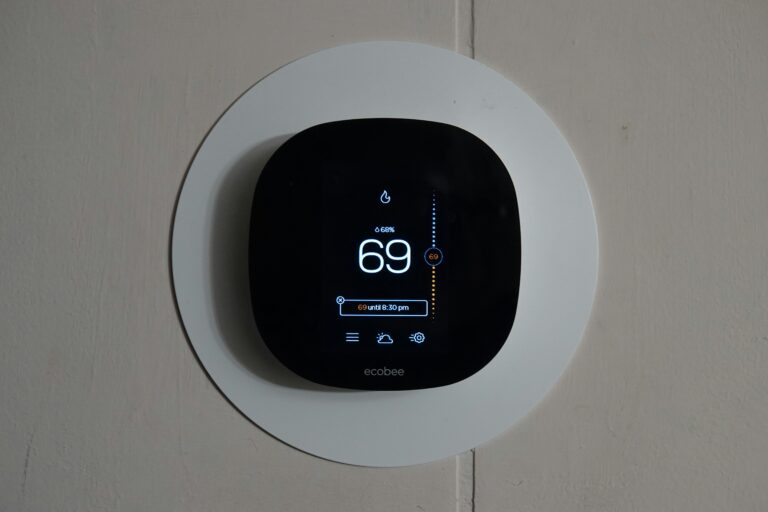
To answer directly, do digital thermostats have batteries is a common homeowner question because nearly every wall-mounted unit contains at least one. Entry-level programmable models run on AA or AAA alkaline cells you replace by hand, while smart thermostats such as the Nest Learning Thermostat, Ecobee, and Emerson Sensi rely on rechargeable lithium-ion packs topped up by the HVAC wiring. Identifying which kind yours uses protects your schedule and prevents surprise shutdowns.
The walkthrough below covers battery basics, common cell types, realistic lifespan, safe replacement steps, and the warning signs that point to a wiring issue rather than a dead battery. You will leave with a clear plan for your specific unit.
Most Digital Thermostats Run on Some Form of Battery
Open the faceplate on a basic Honeywell, White-Rodgers, or Pro1 thermostat and you will usually find one or two AA cells nestled behind the screen. Those alkaline batteries run the entire unit, including the display, the relay that triggers your furnace, and the memory chip storing your weekday and weekend settings.
Many models from Lux Products and Braeburn pair those AA cells with a small CR2032 coin cell that keeps the clock alive during a swap. Pull both at once and the schedule resets to factory defaults, which forces you to reprogram every weekday temperature by hand.
Hardwired Units Still Rely on Cells
Hardwired does not mean battery-free. A thermostat drawing 24V from the HVAC control board often houses a coin cell to ride out brief power interruptions. That lithium watch battery keeps the schedule and time stamp intact when a breaker trips or the utility cuts service for a few minutes.
Snap a photo of the schedule before pulling the faceplate. Restoring a 7-day program from memory on Monday morning rarely goes well.
Why a Hardwired Thermostat Still Needs Batteries
The 24V AC supplied by the HVAC transformer is enough to flip relays, but it often lacks the steady current a backlit display and radio module demand. Manufacturers bridge that gap with internal batteries or with a dedicated common wire that delivers continuous low-voltage power.
Without that common wire, the thermostat steals brief current pulses from the heating and cooling circuits every time it calls for the fan. That arrangement works, but it stresses the system and drains any backup cell faster than its rated life.
The Role of the C-Wire
Twenty-four volts of continuous power flow through this thin conductor, letting the thermostat draw current whenever it needs it. Most new HVAC installations include one, while homes built before roughly 2012 often lack the fifth conductor. Add a C-wire and the rechargeable lithium-ion pack inside a Nest or Ecobee rarely has to do real work, often extending service life into the 5 to 10 year range.
Smart Features Change the Power Math
Wi-Fi radios, color touchscreens, and occupancy sensors draw far more current than a passive keypad. Smart thermostats handle that demand with built-in lithium-ion packs that recharge through the system wiring. A smart thermostat that asks for a fresh battery every spring is signaling a deeper wiring issue rather than normal end-of-life behavior.
Battery Types Found Inside Common Digital Thermostats
Three families dominate the category, and each behaves differently once installed.
| Battery Type | Common Locations | Typical Service Life |
|---|---|---|
| AA or AAA alkaline | Budget Honeywell, White-Rodgers, Pro1, Lux models | 1 to 2 years |
| CR2032 or CR2450 coin cell | Memory backup across most brands, including Braeburn | 3 to 5 years |
| Rechargeable lithium-ion pack | Nest Learning Thermostat, Ecobee, premium smart models | 5 to 10 years |
Alkaline cells power the unit end-to-end and need the most attention. Coin cells sit quietly in standby until a power event wakes them. Lithium-ion packs live inside smart thermostats and draw a maintenance trickle from the HVAC wiring that keeps them topped off for years.
Triple Redundancy in Premium Models
Some flagship thermostats layer all three technologies at once. A hardwired feed supplies steady current, a rechargeable pack smooths voltage dips, and a coin cell guards the clock during an outage. Lose any one of those and the device keeps working, which is why installers charge a premium for that configuration.
How Long Thermostat Batteries Typically Last
Alkaline replacements in basic programmable thermostats usually hold a charge for 1 to 2 years under normal residential use. The on-screen low battery indicator typically appears 1 to 2 months before shutdown, giving you a comfortable window to pick up replacements at the grocery store.
Coin cell backups last far longer because they only activate during a power event. A CR2032 sitting in standby is rated for 3 to 5 years of occasional drain and often outlives the thermostat itself.
What Drains a Battery Faster Than Rated
Heavy Wi-Fi traffic, large color touchscreens, and short-cycling HVAC equipment all pull more current than the engineering average assumes. A Nest thermostat in a large home with constant network pings can wear its rechargeable pack down in 3 to 4 years, well below the marketing claim of 10. Frequent alerts, voice-assistant integrations, and outdoor temperature pulls each add incremental draw.
Replacing Thermostat Batteries Without Losing Settings
Digital thermostat battery replacement only takes a few minutes, and the order of operations matters more than most homeowners expect.
- Note the current schedule: Photograph the display or write down the weekday and weekend settings before you pull anything off the wall.
- Slide or lift the faceplate: Most models release with a gentle pinch at the sides; check for tabs along the bottom edge.
- Swap the cells within 60 seconds: A small capacitor inside the thermostat holds the schedule for roughly one minute; exceed that and the clock resets.
- Match polarity carefully: The plus and minus marks are molded into the tray, and a mirrored cell is the most common reason a thermostat is not working after battery change.
- Restore the faceplate: Press until you hear the side clips engage, then confirm the display powers up with the correct time and room temperature.
A thermostat that still shows a blank screen after fresh batteries usually points to a loose C-wire or a tripped breaker at the HVAC control board, not a bad cell.
Low Battery Symptoms and Quick Troubleshooting
A dim or fading display is the earliest reliable low battery symptom, often followed by a flashing battery icon that appears one to two months before complete shutdown. You may also notice the thermostat losing time and forgetting the schedule after a brief outage, both signs the backup coin cell is exhausted.
Smart thermostats surface a different pattern. The Nest Learning Thermostat displays an on-screen help message and may shut down Wi-Fi to stretch remaining charge, while an Ecobee will throttle its sensors and reduce screen brightness. Each behavior is a deliberate conservation mode, not a defect.
When Fresh Batteries Are Not Enough
If the unit stays dark after you have replaced every cell, the wiring is the next place to look. Loose terminals at the wall plate, a missing C-wire, or a failing 24V transformer at the furnace can mimic a dead battery. An HVAC technician can measure voltage at the control board in roughly 10 minutes and pinpoint which link in the chain has failed.
Persistent Shutdowns During Wi-Fi Updates
Smart thermostats that power down mid-update usually have a rechargeable pack that no longer holds a full charge. The lithium-ion cell inside a Nest is rated for thousands of cycles, but constant deep discharges shorten that lifespan quickly. Replacement packs are available, and most homeowners find it faster to swap the whole unit once the warranty window closes.
Bottom Line
Your thermostat almost certainly has a battery, and identifying which type determines whether you are swapping AA cells every spring or forgetting about power for the next decade. Check the faceplate, the model number, and the wiring before you buy anything. A two-minute look saves an emergency hardware run and keeps your schedule intact through every outage.
FAQ
Do digital thermostats have batteries that need to be replaced?
Most do, but the replacement interval varies by battery type. AA alkaline cells in basic programmable thermostats typically need swapping every 1 to 2 years, while coin cell backups can last 3 to 5 years and smart thermostat lithium-ion packs are designed to outlast the device itself.
What happens when a digital thermostat battery dies?
The display goes blank and the HVAC system stops responding to calls for heat or cooling. Schedules and clock settings may also reset, depending on whether the unit has a backup coin cell or C-wire power to preserve memory.
Can a digital thermostat work without a battery?
Hardwired models with a common wire can run on 24V transformer current alone, though many still rely on an internal coin cell to retain settings during outages. Battery-only units will not power on without a working cell.
What kind of battery does a digital thermostat take?
Entry-level programmable models take AA or AAA alkaline batteries. Many thermostats, including smart options, add a CR2032 or CR2450 coin cell for memory backup, and premium smart units contain a rechargeable lithium-ion pack charged by the HVAC wiring.
Where is the battery located in a digital thermostat?
Batteries sit behind the front faceplate, either in a tray on the front of the wall plate or in a compartment along the bottom edge. Pull the faceplate straight off the wall mount to access the cells in most models.
Are thermostat batteries rechargeable or disposable?
Both types appear in modern thermostats. Alkaline AA cells are disposable, coin cells are usually disposable, and smart thermostat lithium-ion packs are rechargeable through the HVAC wiring. A thermostat asking for frequent disposable replacements likely has a wiring issue worth investigating.