

Your ductless mini-split keeps the bedroom tolerable in August, the office stays cozy all winter, and the attic fan hums along through shoulder seasons. None of that “just works” on its own, though. The wall controller or smart add-on sitting next to each unit decides whether you save energy or waste it, and the right choice depends entirely on how each space gets used.
This list covers nine options that pair with Daikin systems or handle the same jobs around the home, from a basic wall remote and simple programmable dial to a learning thermostat with room sensors. Each pick is matched to a clear use case so you spend less time guessing and more time getting comfortable.
A Side-By-Side Look

Daikin White Remote Control with Wall Holder 2531835
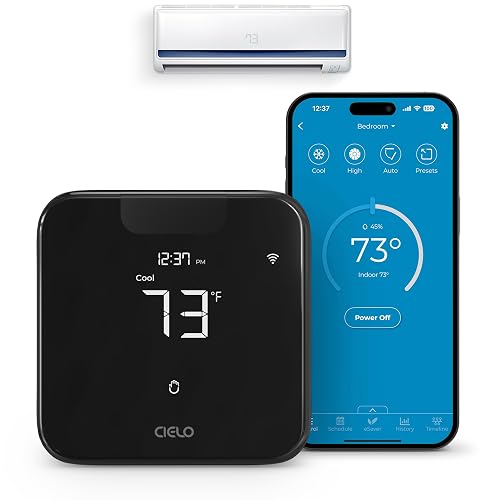
Cielo Breez Max Smart WiFi Thermostat for Mini-Split AC
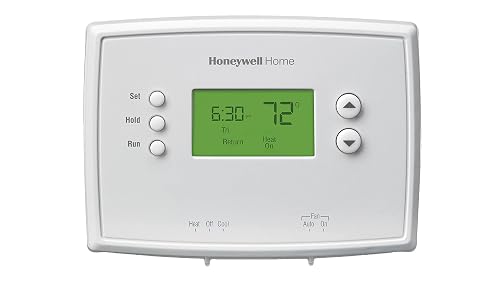
Honeywell Home RTH2300B1038 5-2 Day Programmable Thermostat
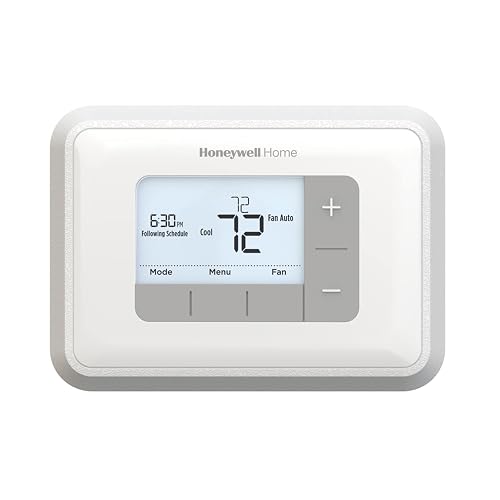
Honeywell Home RTH6360D1002 5-2 Programmable Thermostat
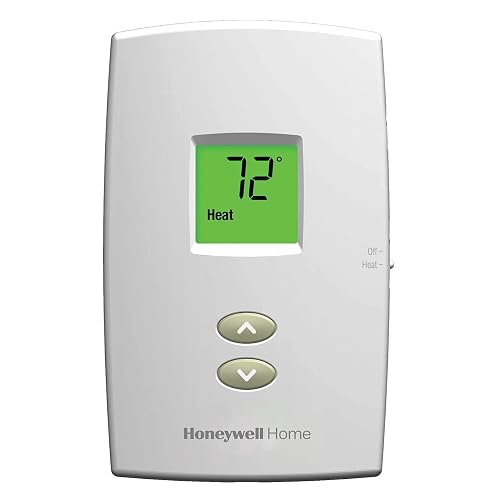
Honeywell TH1100DV1000 Pro-Digital 2-Wire Heat Only

Ventamatic XXFIRESTAT Adjustable Thermostat for Attic Ventilators

BN-LINK Digital Cooling Thermostat Outlet Controller

Google Nest Learning Thermostat (4th gen) with Sensor – Obsidian

Google Nest Learning Thermostat (4th gen) with Sensor – Silver
What Each Pick Brings To The Table
Daikin’s own infrared remote ships with a wall-mount cradle, which is a small detail that solves the all-too-familiar problem of a hand-held controller sliding behind a sofa cushion. If you already run a Daikin mini-split and need a clean replacement or a spare, this is the unit that matches the brand’s stock interface, so there’s no learning curve.
The included wall holder keeps the remote at a fixed eye level, which can matter in rooms where temperature is adjusted often. The unit runs on common batteries and stays light enough to pull off the cradle with one hand. Compared to the Cielo Breez Max covered later, this is the no-frills factory option rather than a smart bridge.
What Works In Its Favor
- Factory-matched to Daikin mini-splits, so pairing is straightforward.
- Wall cradle keeps the remote visible and reduces the “lost remote” cycle.
- Light enough for anyone in the household to grab and adjust.
- No app, account, or Wi-Fi needed, which keeps setup minimal.
Things To Consider
- Batteries are not included, so you may need to grab a pair before first use.
- Infrared means line-of-sight to the indoor unit, which can be awkward in open layouts.
- No scheduling, geofencing, or app control if you want automation.
Who It Suits Best
Anyone replacing a lost or broken original remote on a single Daikin mini-split zone will find this a no-fuss match.
Consider Something Else When
Shoppers who want app-based scheduling should look at the Cielo Breez Max further down the list, which adds Wi-Fi control without replacing the existing remote.
The Cielo Breez Max sits in front of your existing mini-split, window unit, or portable AC and gives it a brain. It works through infrared, so you keep using the original remote as a fallback. For homes that already have Daikin wall units but no central smart thermostat, this little black puck fills the gap nicely.
Setup leans on a 2.4 GHz Wi-Fi network and the free companion app, with no monthly subscription attached. You get temperature and humidity sensing you can calibrate from the app, plus the option to wire it into routines through major voice and smart-home platforms. If the original remote is awkward to aim at the indoor unit, the Breez gives you an easier on-wall control point.
Standout Benefits
- Works with virtually any ductless or window AC that has an IR remote, which covers most Daikin splits.
- Free companion app covers scheduling, geofencing, and comfort history.
- Plays nicely with popular voice and automation ecosystems for hands-free control.
- Calibratable onboard sensors make temperature readings more trustworthy than a wall thermostat on the other side of the room.
Points To Keep In Mind
- Requires a steady 2.4 GHz Wi-Fi signal at the installation spot, which can be weak in older homes.
- Touch controls can occasionally need a second tap, depending on the unit paired.
- Out-of-the-box compatibility covers most brands, but rare Daikin model codes may need a quick support ticket.
Feature Snapshot
Made For
Daikin mini-split owners who want app and voice control without paying for a full system replacement will get the most out of this add-on.
A Better Fit Elsewhere
Renters who just need a hand-held controller should stick with the Daikin White Remote Control, which costs less and adds nothing to the wall.
The RTH2300B1038 is a wall-mounted, dial-style programmable thermostat aimed at people who have never programmed one before. The 5-2 schedule means you set a five-day weekday plan and a separate two-day weekend plan, which covers most households with a predictable work routine. It is not a Daikin product, but it slots into central forced-air systems that often share living space with mini-splits.
Operation is stripped down on purpose. You get a backlit display that shows room temperature and set point, plus a manual override for the occasional lazy Saturday. The trade-off is fewer bells and whistles than the RTH6360 from the same brand, which is covered next. For someone stepping up from a manual dial for the first time, that restraint is the whole point.
What Pays Off
- Independent weekday and weekend schedules match how most families actually live.
- Backlit display is easy to read across the room in low light.
- Manual override means a quick tweak doesn’t wipe the program.
- Buttons are labeled plainly, so a houseguest can adjust without an owner tutorial.
Trade Offs
- No learning algorithm, so comfort depends on you picking the right schedule upfront.
- Single 5-2 pattern only, with no separate settings for each weekday.
- Not designed for heat-pump-only systems without a common wire, which can rule out some retrofits.
Best Suited To
First-time programmable owners in apartments or small homes with a basic forced-air system will find this a gentle starting point.
Skip It When
Households with rotating shifts or different weekday plans should look at the Honeywell Home RTH6360, which adds Smart Response and broader scheduling.
The RTH6360D1002 sits a step up from the RTH2300, layering in Smart Response Technology that learns how long your system takes to hit the set point. In practical terms, it fires the furnace or AC early enough that the room is comfortable by the time you walk through the door, not twenty minutes later. The backlit LCD shows both the measured room temperature and the set point at the same time, which keeps the math obvious.
It supports either 5-2 or a full 7-day schedule, plus auto changeover between heat and cool once the season flips. Reminder alerts nudge you when batteries run low or the filter is due. The trade-off versus the simpler RTH2300 is a slightly more involved setup, and the value is real only if your routine actually changes day to day.
Why It Works Well
- Smart Response learns your system’s lag and compensates so rooms hit target on time.
- 5-2 or full 7-day scheduling fits households with rotating shifts or hybrid weeks.
- Auto changeover takes the manual flip out of spring and fall mornings.
- Filter and battery reminders cut down on the “oh, that’s why it’s blowing hot air” moments.
Honest Caveats
- Setup takes longer than a basic dial, and the menu flow is not always obvious.
- No app or remote access, so adjustments still happen at the wall.
- Smart Response can be wrong on a mild day, firing the system earlier than you want.
Quick Facts
Who Will Love This
Anyone with a forced-air system and a slightly irregular week will get a comfort lift without giving up a simple wall interface.
Look Elsewhere When
Shoppers who want app or voice control should jump to the Google Nest Learning Thermostat, which adds remote access and deeper automation.
The TH1100DV1000 is a heat-only, non-programmable digital thermostat designed for two-wire systems like electric baseboards, convectors, or millivolt floor heaters. The whole point is simplicity. You set a temperature between 40 and 90°F on the backlit screen and walk away. Built-in compressor protection is irrelevant here, but the unit still covers a base heating setup cleanly.
This is the right pick when you have one zone, one source of heat, and no appetite for a learning curve. The trade-off is no scheduling and no cooling side, so it pairs naturally with a separate AC or mini-split handled by something like the Daikin remote or the Cielo Breez Max.
The Good Stuff
- Two-wire design drops into many older baseboard and millivolt setups without rewiring.
- Backlit display makes the set point and ambient reading clear at a glance.
- One-touch set point access keeps mid-day tweaks quick.
- Adjustable temperature scale covers both Fahrenheit and Celsius preferences.
Some Limits To Know
- No programming means consistent runs at the same set point all day.
- Heat only, so cooling must be handled by a separate device or remote.
- Plastic construction feels light compared with heavier wall-mount units.
Perfect Match For
Workshops, basements, and small additions with electric baseboard heat benefit most from this kind of no-fuss wall control.
Reach For A Different Pick When
Anyone with a forced-air furnace and central AC should look at the Honeywell Home RTH6360, which handles both heating and cooling on one schedule.
The Ventamatic XXFIRESTAT is not a living-room thermostat. It is a wall-mounted controller for power attic ventilators, with a built-in safety cutoff called a Firestat that stops the fan if the attic hits 183°F. The bi-metallic switch is adjustable with a simple screwdriver, which makes seasonal tuning accessible without calling a tech.
It can drive up to three units on a 10-amp load, which covers most residential whole-house fans. Compared with the rest of this list, it operates in a totally different environment. Where Daikin thermostats care about a comfortable room, this one protects the structure above it.
Everyday Advantages
- Firestat cutoff at 183°F adds a real safety layer in extreme attic heat.
- Adjustable bi-metallic switch keeps seasonal tuning in the homeowner’s hands.
- Drives up to three ventilator units on a 10-amp load for whole-house coverage.
- Energy-efficient range of 50 to 120°F matches typical attic conditions.
Practical Considerations
- Not a room thermostat, so it cannot replace any other pick in this list.
- Installation assumes basic comfort with line-voltage wiring in a hot space.
- Older units may need cleaning before the new thermostat picks up accurate readings.
Technical Highlights
Right Fit For
Homeowners with a power attic ventilator who want a clean replacement or an upgrade with a built-in safety cutoff get the most from this controller.
Not Your Match When
If you are conditioning a living space, the Daikin White Remote Control or the Cielo Breez Max covers that need with proper room-level sensing.
The BN-LINK is a plug-in temperature controller, which is a different category than a wall thermostat. The included probe reads the air or a surface, and the unit switches a plugged-in device, like a box fan, window AC, or fermentation fridge, on or off based on the set point. The three-button interface keeps setup quick, and a digital display supports both Fahrenheit and Celsius.
It is not a Daikin thermostat and it is not trying to be. Where it earns its place in this list is for the workshop, garage, or grow tent where a small fan or cooler needs to react to a temperature threshold. LED status lights keep the mode visible in a dark utility room.
Bright Spots
- Plug-and-play setup with no wiring, which suits renters and workshops.
- Probe-based reading is more accurate for enclosures than a wall thermostat.
- Cooling-only mode prevents the unit from accidentally heating a space.
- LED indicators stay readable in dark garages or basements.
Where It Is Less Suited
- Limited amperage handling rules out whole-home HVAC equipment.
- Single set point means no scheduling or daily routines.
- Probe placement is critical, so sloppy routing leads to false triggers.
Whose Shelf It Belongs On
Home brewers, reptile keepers, and garage tinkerers who want a fan or cooler to react to a temperature threshold will find this outlet controller surprisingly handy.
Swap It Out When
Anyone who needs to control a central air handler should look at the Honeywell Home RTH6360, which is built for the main living system.
The fourth-generation Nest Learning Thermostat is the most advanced version of the platform to date, and this bundle adds a second-generation temperature sensor for averaging or prioritizing a specific room. The display is the familiar round dial with a high-resolution bezel that makes room and set point temperatures easy to read from across the room.
After a week or two of manual adjustments, the thermostat builds a schedule that mirrors your routine without you programming anything. It also tracks when you are away and trims heating or cooling automatically. The added sensor is what makes this kit stand out for homes with a hot upstairs bedroom or a chilly nursery, where the wall reading is not the only one that matters.
The Value In It
- Learning routine trims the manual setup most programmable thermostats require.
- Second-generation sensor helps balance rooms that run hot or cold relative to the hallway.
- High-contrast round display doubles as a quick glance from across the room.
- Deep integration with major voice platforms and energy-saving dashboards.
What To Weigh
- Pulls a constant low current, so older homes without a common wire may need a power adapter or pro install.
- Learning takes a couple of weeks, so early behavior can feel inconsistent.
- Obsidian finish shows fingerprints more than lighter dials do.
Key Product Details
Built With In Mind
Homeowners with a forced-air system who want the thermostat to do the scheduling work and a sensor in a problem room will get the full benefit from this bundle.
Where A Sibling Pick Shines
Households that prefer a lighter wall finish or already own sensors should consider the Google Nest Learning Thermostat in Silver, which is the same kit in a different color.
This is the same fourth-generation Nest Learning Thermostat as the previous pick, paired with the same second-generation temperature sensor, only finished in silver. For renovations or open-concept walls where a dark dial would draw the eye, the lighter bezel blends into a wider range of paint and trim. Functionally, the two SKUs are interchangeable.
The learning behavior, app, voice platform support, and energy dashboards are identical to the obsidian version. Where the silver pulls ahead is in rooms with bright or white walls, where a darker dial would look harsh. The sensor is still the headline add-on for homes that have a chronically hot upstairs or a sun-soaked living room.
The Case For It
- Silver bezel suits bright walls and modern renovations without drawing extra attention.
- Same learning engine and sensor as the obsidian version, no functional compromise.
- Sensor bundle tackles room-by-room comfort imbalances without a second thermostat.
- App-based control replaces the wall unit for daily tweaks from the couch.
Details To Watch
- Identical installation caveats to the obsidian version, including common-wire needs.
- Silver finish shows dust and smudges more than the darker dial does.
- Learning period still takes a week or so before the schedule feels accurate.
The Right Fit
Design-led renovations and light-walled interiors get a thermostat that disappears into the room while still doing the heavy lifting.
Not Your Match When
Shoppers who prefer a darker, more sculptural wall feature should look at the Google Nest Learning Thermostat in Obsidian instead.
Picking The Right Control For Your Home
The smartest pick depends entirely on the system you are controlling. A wall remote or smart bridge makes sense for a Daikin mini-split, while a forced-air furnace and central AC call for a wall thermostat. Attic fans, baseboard heaters, and fermentation fridges each have their own category of controller, and lumping them together is where most shopping goes sideways.
Next, match the level of automation to your routine. Households with stable weekday and weekend patterns do fine on a basic 5-2 programmable dial. Rotating shifts, hybrid schedules, and travel-heavy weeks benefit from a learning thermostat or a smart bridge with app scheduling. There is no upside in paying for features you will not actually use.
Finally, think about installation. Some units, like the Cielo Breez Max or the BN-LINK, plug in or sit on a shelf. Others, like the Honeywell RTH series and the Nest, assume a common wire in the wall and may need a pro if your home is older. Reading the wiring section of the install guide before ordering saves a return trip later.
Sizing Up The Categories
The biggest jump between picks is the difference between a hand-held remote, a wall thermostat, and a learning smart unit. Hand-held remotes and smart bridges like the Cielo Breez Max control one device at a time, usually a mini-split or window AC. Wall thermostats replace an existing controller for a central system. Learning thermostats go further, building a schedule from your habits and adding remote access.
Wiring matters here, too. The Honeywell TH1100 uses two wires because it is built for simple baseboard heat. The Honeywell RTH series and the Nest assume a C-wire for steady power. Mismatched wiring is the most common reason a “compatible” thermostat fails to fire up after install.
Key Considerations Across These Picks
Where Shoppers Go Wrong
The most common mistake is buying a thermostat that does not match the system. A mini-split only works with a compatible IR remote or a smart bridge, not a standard low-voltage wall thermostat. The reverse is also true. Forcing a wall thermostat onto a baseboard heater without verifying the two-wire setup can leave you with a dead display.
Another slip-up is underestimating the wiring. Learning thermostats like the Nest and the Honeywell RTH6360 want a common wire for steady power. Older homes often lack that wire, which means a power adapter or a service call before the install is complete.
Where The Extra Money Goes
Higher-tier picks like the Nest Learning Thermostat buy three things. First, a learning engine that automates scheduling without manual programming. Second, a remote sensor that lets the system care about a specific room, not just the hallway. Third, deeper app and voice platform support that ties heating and cooling into the rest of the smart home.
For a basic forced-air system in a small apartment, those features are hard to justify. For a family home with a hot upstairs bedroom and a chillier main floor, the upgrade usually pays back in comfort within a season. The honest read is that the Nest is a comfort tool first and an energy-saving tool second.
Frequently Asked Questions
What Is a 5-2 day programmable thermostat?
It is a wall thermostat that lets you set one temperature plan for the five weekdays and a separate plan for the two weekend days, which fits most households with a steady work routine.
Do I need a C-wire for every smart thermostat?
Not every smart thermostat, but most learning models, including the Nest, expect a common wire for steady power. Older homes without a C-wire may need a power adapter or a pro to pull an extra conductor.
Can a smart bridge replace my mini-split remote?
A smart bridge like the Cielo Breez Max works alongside the original remote, not in place of it. You get app and voice control on top of the existing IR remote, which stays as a manual backup.
Are learning thermostats worth it for a small apartment?
For a studio or one-bedroom with a simple routine, a basic programmable dial covers the need. Learning thermostats earn their keep in larger homes where the schedule shifts day to day and room-by-room comfort matters.
How do I know which thermostat matches my HVAC system?
Check the existing wall plate for wire count and labels. Two wires usually means heat only, while five or more wires with R, W, Y, and G labels signal a full forced-air system. Match the new thermostat to that wire count before ordering.
Wrap Up
The right thermostat is the one that fits your system, your routine, and the wall you are mounting it on. If you run a Daikin mini-split, start with the brand remote or a smart bridge like the Cielo Breez Max. If you are controlling a forced-air system, weigh the Honeywell RTH series against the Nest. Smaller spaces, attics, and single-purpose appliances each have their own matching controller, and the goal is comfort that runs quietly in the background without asking for attention.


