

Smart climate control stops being a luxury the moment your schedule gets unpredictable. The right thermostat keeps a back bedroom cool during nap time, eases off the heat when you leave for work, and lets you nudge the temperature from the car before you walk through the door. This lineup mixes purpose-built Alarm.com gear with a few compatible companions that round out a real smart-home setup.
A Side-By-Side Look
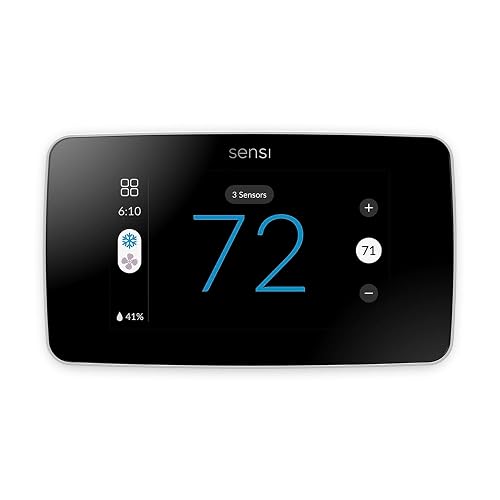
Sensi Touch 2 Smart Thermostat Wi-Fi (ST76)
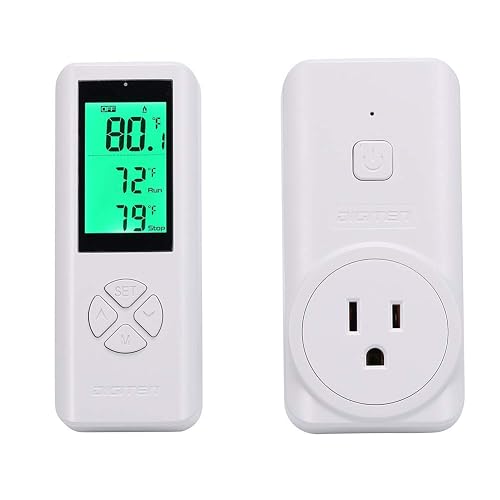
DIGITEN WTC100 Wireless Thermostat Outlet Plug-in
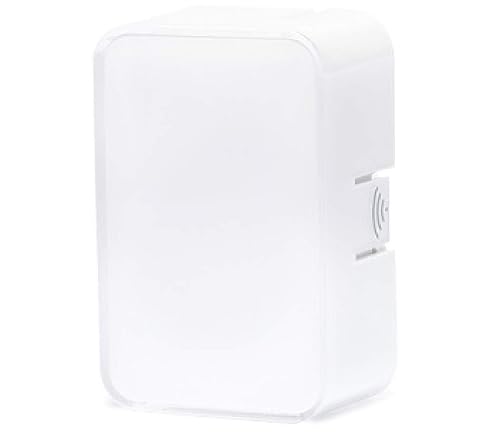
Alarm.com Temperature Sensor (ADC-S2000-T-RA)
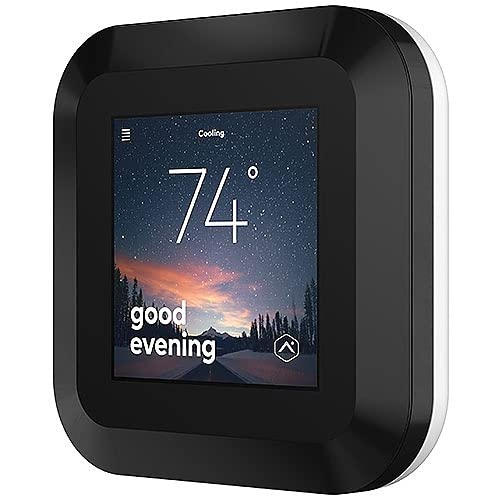
ADC-T40K-HD Smart Thermostat HD with Color Touchscreen

Google Nest Learning Thermostat (4th gen, Obsidian)

Google Nest Learning Thermostat (4th gen, Silver)

Alarm.com Smart Thermostat
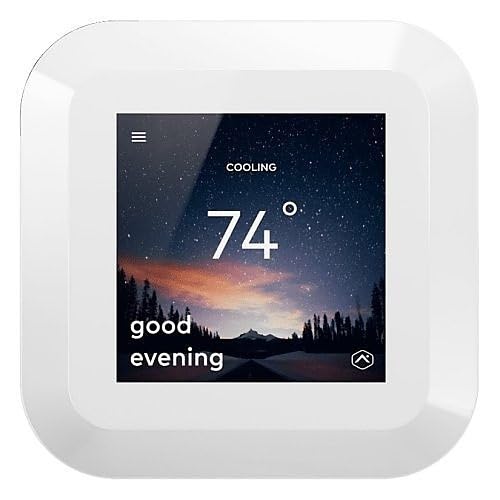
ADC-T40K-HD-W Smart Thermostat HD (White)
ADC-T40K-HD-W Smart Thermostat HD (Z-Wave, White)
More Details On Our Top Picks
The Sensi Touch 2 leans into a familiar Wi-Fi thermostat experience rather than chasing the deep automation of a security-panel hub. Its glass LCD touchscreen and dual-band 2.4 plus 5.0 GHz wireless support make it friendly for households that want straightforward app control without extra hardware.
Compared to the Alarm.com-native models coming up later, this one trades panel integration for a friendlier DIY install. For homeowners who mainly want a dependable, app-driven thermostat with voice compatibility, it covers the essentials well.
The Practical Payoff
- Color touchscreen simplifies schedule edits without pulling out a phone
- Dual-band Wi-Fi reduces dropouts common on crowded 2.4 GHz networks
- Voice control compatibility fits mixed smart-home setups
- App-driven scheduling makes weekday routines easy to automate
Things To Consider
- Lacks native Z-Wave, so it doesn’t slot into Alarm.com security panels out of the box
- Glass face can show fingerprints and may need occasional wiping in busy kitchens
Who It Suits Best
Renters and DIY homeowners upgrading from a basic programmable thermostat who value an app-first setup.
Where Another Pick Suits Better
Shoppers running an Alarm.com security panel will find the Alarm.com Smart Thermostat a more natural fit for in-panel controls.
The DIGITEN WTC100 takes a different route entirely. It plugs into a wall outlet and switches a space heater or fan on and off based on a wireless remote’s reading. There’s no app, no cloud, and no thermostat wiring to chase through the wall.
That makes it a strong fit for spaces the main HVAC never reaches. Think garage workshops in winter or a propagation tent in spring. Where the Sensi Touch 2 handles whole-home climate, this one is a focused tool for a single outlet.
Positive Takeaways
- Plug-and-play setup skips the wiring and the installer
- Handheld or wall-mounted remote measures temperature right where it counts
- Works with most common space heaters and fan-only cooling devices
Points To Note
- Listed 50 to 100 m range assumes open sightlines, which garages and basements rarely offer
- Controls only the plugged-in appliance, not central HVAC
- No scheduling or app history, so daily routines need manual adjustment
Quick Facts
Right Fit For
Anyone outfitting a garage, basement, greenhouse, or spare room with a single space heater or window unit.
Reach For A Different Pick When
Whole-home HVAC scheduling matters more, in which case the ADC-T40K-HD Smart Thermostat HD is a more capable hub.
The Alarm.com Temperature Sensor isn’t a thermostat on its own. It’s a battery-powered tabletop module that reports the temperature from a specific room back to a compatible smart thermostat. Placed on a nightstand or a nursery shelf, it tells the system what matters, not just where the hallway reading drifts.
For households already running an Alarm.com-compatible thermostat, this little sensor is the missing puzzle piece for comfort. Unlike the DIGITEN WTC100’s standalone approach, it only earns its keep when paired with a compatible hub.
Where It Helps
- Reports from the rooms you actually use, not just the hallway
- Tabletop form factor means no mounting hardware or wiring
- Battery power keeps placement flexible across the home
Worth Noting
- Functions only with a compatible Alarm.com thermostat, so it isn’t a standalone solution
- Battery replacement is a routine task, depending on reporting frequency
Feature Snapshot
Made For
Homeowners with multi-room comfort issues who already rely on an Alarm.com-compatible thermostat.
Swap It Out When
The Google Nest Learning Thermostat (4th gen) bundle pairs a similar sensor with its own learning engine for an all-in-one upgrade.
The ADC-T40K-HD pushes climate control into the same conversation as the rest of a connected home. Its color touchscreen replaces the old monochrome panels, while Z-Wave SmartStart and S2 compatibility let it join a security-panel mesh without extra hubs. Z-Wave is a low-power wireless protocol common in smart-home and security gear, and SmartStart plus S2 simply means easier, more secure pairing.
For households already running an Alarm.com panel, this thermostat feels less like an add-on and more like an extension of the wall keypad. The white ADC-T40K-HD-W version coming later offers the same core in a different finish.
The Case For It
- High-definition color screen reads cleanly from across the room
- Z-Wave SmartStart cuts pairing time during install
- S2 security layer protects the climate controls from outside tampering
- Plugs into existing Alarm.com ecosystems for unified scenes and automations
Trade Offs
- Best experience requires an Alarm.com service plan, so it’s not a drop-in DIY upgrade
- Touchscreen responsiveness can vary, depending on firmware version, in some early installs
Spec Overview
Best Suited To
Households with an Alarm.com panel who want their thermostat to live inside the same app and rules as the rest of the system.
Skip It When
You’d rather avoid service-plan commitments, in which case the Sensi Touch 2 Smart Thermostat Wi-Fi (ST76) is a friendlier starting point.
The 4th-generation Nest Learning Thermostat is Google Nest’s most advanced climate unit to date, and the Obsidian finish leans into a dark, mirror-like aesthetic. The included 2nd-gen Nest Temperature Sensor pushes the same room-level accuracy philosophy as the Alarm.com Temperature Sensor, but inside Google’s own ecosystem.
For homeowners who value learning algorithms over panel integration, this bundle is the polished option. It trades Z-Wave compatibility for a deeper app experience and routine-based automation, which is a different kind of smart than what the ADC-T40K-HD offers.
What Works In Its Favor
- Adaptive learning cuts down on manual schedule edits over time
- Dark Obsidian face pairs well with modern, minimalist interiors
- Bundled temperature sensor targets the rooms you actually use
- App-driven routines tie climate to presence, time of day, and other devices
Honest Caveats
- Doesn’t speak Z-Wave, so it won’t tie into an Alarm.com panel the way the ADC-T40K-HD will
- Glossy finish may show dust, so periodic wiping helps it stay presentable
Who Will Love This
Design-minded homeowners and Google-ecosystem users who want a learning thermostat and matching temperature sensor in one box.
Consider Something Else When
Z-Wave panel integration is a deal-breaker, in which case the ADC-T40K-HD Smart Thermostat HD delivers panel-native control.
The Silver variant of the 4th-gen Nest Learning Thermostat delivers the same learning engine and bundled 2nd-gen sensor as the Obsidian version, just in a brighter finish. The lighter tone tends to disappear against pale walls rather than anchoring the room.
Compared to the ADC-T40K-HD’s panel-tied approach, this Silver model is friendlier to homes without an Alarm.com security setup. For open-plan spaces with lots of natural light, the finish choice here matters more than the spec sheet suggests.
Practical Advantages
- Silver finish suits light walls and coastal or Scandinavian interiors
- Learning engine adapts to shifting routines without constant app tweaks
- Sensor bundle extends accuracy to bedrooms and home offices
- Voice and app control fit neatly into mixed smart-home stacks
Points To Keep In Mind
- No Z-Wave means it sits outside Alarm.com’s panel-driven routines
- Polished metal ring can show fingerprints, depending on traffic near the wall
Perfect Match For
Homeowners in bright, open-plan homes who prefer a softer metallic finish over the darker Obsidian look.
Not Your Match When
You already invest in a Z-Wave security panel, where the Alarm.com Smart Thermostat integrates more directly with existing scenes.
The original Alarm.com Smart Thermostat covers the platform’s core climate features without leaning on a fancy color screen. It supports remote access, custom schedules, critical temperature alerts, and geo-services automation, which uses your phone’s location to adjust the home as you come and go.
Think of it as the steady, no-drama option for households already invested in Alarm.com. While the ADC-T40K-HD adds a touchscreen and modern Z-Wave, this unit keeps things simple and integrates with the same panel rules.
Why It Works Well
- Critical temperature alerts help prevent frozen pipes in winter
- Geo-services automation shifts the thermostat based on real location
- Custom schedules fit around irregular work-from-home weeks
- Remote access from the Alarm.com app means no extra logins
Practical Considerations
- Display is more functional than flashy compared to the HD siblings
- Full feature set typically needs an active Alarm.com service plan
Whose Shelf It Belongs On
Existing Alarm.com households who want dependable climate control without paying extra for a color touchscreen.
Look Elsewhere When
A modern touchscreen matters, in which case the ADC-T40K-HD Smart Thermostat HD offers a step up in interface polish.
The white ADC-T40K-HD-W is essentially the same hardware as the dark ADC-T40K-HD, just in a finish that disappears into bright walls. It keeps the color touchscreen, Z-Wave SmartStart pairing, and S2 security layer that make the family appealing.
For rentals or light interior palettes, the white finish is the friendlier choice. The trade-off, if any, comes down to style, not substance.
Notable Gains
- White finish blends with light walls and rental-friendly decor
- Z-Wave SmartStart shortens the install for new panel pairings
- S2 security keeps automation rules shielded from outside access
- Color touchscreen simplifies everyday schedule edits
Some Limits To Know
- Service-plan expectations are similar to other Alarm.com thermostats on this list
- White housing can yellow over time in strong sunlight, depending on placement
Who Should Grab It
Landlords, renters, and homeowners with light interior palettes who want HD climate control in a less imposing finish.
A Better Fit Elsewhere
Households chasing a learning algorithm should consider the Google Nest Learning Thermostat (4th gen) Silver for a different kind of intelligence.
The final pick is another white ADC-T40K-HD-W variant, this one focused on straightforward Z-Wave compatibility without the SmartStart label. It still pairs into an Alarm.com panel, runs the same HD color touchscreen, and handles remote access through the platform’s app.
For multi-property owners and light-commercial spaces, the simpler pairing story is often a plus. It plays well with established Z-Wave networks where SmartStart isn’t strictly required.
Points In Its Favor
- Standard Z-Wave pairing works with established mesh networks
- Color touchscreen makes mode and schedule changes clear
- White housing suits office and rental interiors
- Remote access through Alarm.com keeps control centralized
Worth Bearing In Mind
- Lacks SmartStart shorthand, so first-time pairing takes a few extra steps
- Same Alarm.com service plan expectation as the other panel-tied picks
Built With In Mind
Property managers and small-business owners outfitting multiple Z-Wave-equipped sites with consistent climate control.
Where A Sibling Pick Shines
SmartStart pairing is a priority, in which case the dark ADC-T40K-HD Smart Thermostat HD handles installs a little faster.
What To Weigh Before Choosing alarm.com thermostats
Match The Thermostat To Your Existing System
Start with the platform you already use, not the one a marketing page flatters most. Alarm.com households get the most out of the ADC-T40K-HD family because climate, security, and scenes all live in the same app. Google Home users typically find the Nest Learning Thermostat a smoother fit, while standalone buyers may prefer the Sensi Touch 2 Smart Thermostat Wi-Fi (ST76) for app-first control without service-plan overhead. Mismatched ecosystems tend to create split routines, so decide which app you actually want to open every day.
Sensor Strategy Matters More Than People Expect
A thermostat on a hallway wall only knows the hallway. Adding a tabletop temperature sensor, like the Alarm.com Temperature Sensor (ADC-S2000-T-RA) or a Nest Temperature Sensor, pushes accuracy into the rooms that matter. For two-story homes or split-level layouts, a single sensor in the most-used room can feel like a different system entirely.
Wired HVAC Compatibility Still Rules
Even the smartest thermostat needs a C-wire, or common wire, to power its screen and radios continuously. Some older systems lack one, and adapters vary by HVAC type. Check your existing wiring before chasing a touchscreen upgrade, or budget for a power adapter if your furnace lacks the right tap.
Decide Between Panel Integration And App Independence
Alarm.com panel-tied thermostats trade flexibility for cohesion. They trigger HVAC changes from alarm states, geo-fences, and security scenes, but they typically want a service plan. App-independent picks, like the Sensi Touch 2 or the DIGITEN WTC100, are friendlier to renters and casual users who just want scheduling without subscriptions.
Smart Buying Advice For Connected Climate
Common Shopping Slip Ups
The most common mistake is buying a touchscreen thermostat for a system that can’t power it cleanly. Another is underestimating how often a single hallway reading misrepresents the rest of the home. Finally, skipping a wiring check before clicking through to a smart thermostat tends to lead to return-window regret. Plan the power, the placement, and the sensor strategy before you commit.
What The Higher Tier Buys
Spending more usually buys a sharper display, stronger wireless security, and tighter ecosystem integration. The HD Alarm.com thermostats add color touchscreens and Z-Wave S2 protections, while the 4th-gen Nest adds learning behavior and bundled sensors. The upgrade pays off most in larger homes with multiple comfort zones, where one extra sensor and a learning schedule can quietly offset the price difference across a few seasons.
Frequently Asked Questions
Do alarm.com thermostats work without a service plan?
Most Alarm.com-native models rely on a service plan for full app control and remote features. Basic on-device scheduling usually still works without one, but smart features may be limited.
Can I use an alarm.com thermostat with Google Home or Alexa?
The ADC-T40K-HD family is designed around Alarm.com’s own ecosystem, while the Google Nest Learning Thermostat is built for Google Home. Voice compatibility varies by integration path, so check your platform before pairing.
How many temperature sensors do I actually need?
A single sensor covers the room you spend the most time in, such as a bedroom or home office. Larger homes with split levels often benefit from two or three sensors, depending on floor plan and HVAC balance.
Is a C-wire required for smart thermostats?
Most color touchscreens, including the ADC-T40K-HD and Nest 4th gen, expect a C-wire for steady power. Homes without one typically need a power adapter or a professional wire pull.
Can I install these thermostats myself?
The Sensi Touch 2 and DIGITEN WTC100 are friendly to confident DIYers. Panel-tied Alarm.com models often go in smoother with installer support, especially when integrating with a security system.
Wrap Up
A smart thermostat earns its keep when it quietly handles the routines you forget to set. Match the platform first, place the sensor where life actually happens, and let the wiring decide between DIY and installer help. The right pick fades into the background and just keeps the home comfortable.


