

You want to adjust the temperature without leaving the couch, the bedroom, or the office. That is the whole pitch behind remote thermostats, and the category now stretches well beyond a wall dial you punch in a hallway. Some models pull double duty for radiant floor heat, others turn a gas fireplace into a year-round convenience, and the smart-home heavy hitters learn your routine over time. The list below sorts the strongest options across those very different jobs so you spend less time comparing and more time actually comfortable.
A Side-By-Side Look

AIRXCEL 8330-3862 T-Stat Wall Digital Heat/Cool

SunTouch SunStat ConnectPlus Smart Wi-Fi Floor Heating Thermostat 4.3″
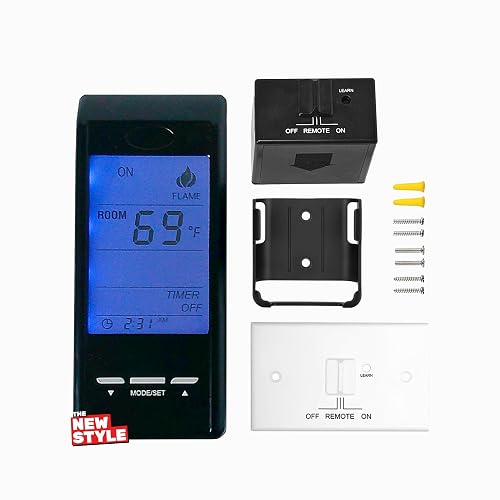
Touch Screen Programmable Thermostat Remote Kit for Millivolt Gas Valves
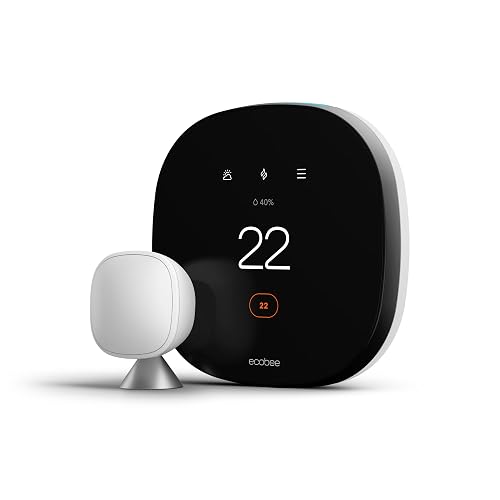
ecobee SmartThermostat with Voice Control
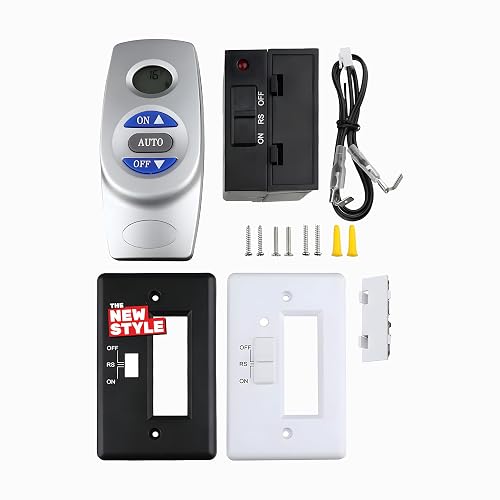
Fireplace Remote Control Kit RCST with LCD Thermostat
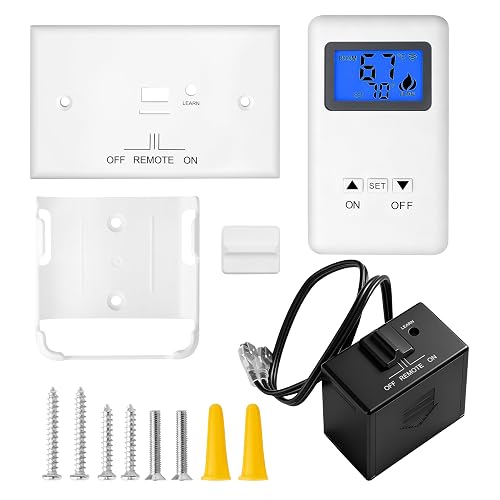
Remote Control ON/Off and Thermostatic Kit for Gas Fireplaces

SkyTech Millivolt Wireless On/Off Thermostat Remote 1001TH-A

Google Nest Learning Thermostat (4th gen) + Sensor (2nd gen) Obsidian

Google Nest Learning Thermostat (4th gen) + Sensor (2nd gen) Silver
What Each Pick Brings To The Table
This AIRXCEL unit lives in a different lane than the smart-home picks further down the list. It is a wall-mounted digital thermostat built around single-stage heating and cooling, a common setup in RVs, travel trailers, and older small homes where the HVAC system is uncomplicated. The single-stage approach means the system flips between full on and full off rather than ramping, which keeps the wiring tidy and the install approachable for anyone comfortable with low-voltage work.
For full-time RVers, weekend campers, or owners of a small guest cottage, the format makes sense. You get a familiar digital readout, simple up-and-down adjustment, and a form factor that replaces most factory RV thermostats without adapter plates. For most people running a basic rooftop AC and furnace combo, the readouts stay legible in daylight and the buttons have a positive click. The honest read is that this is a workhorse control, not a smart unit, so it is a fit for users who want dependable wall comfort without an app or a learning curve.
The Good Stuff
- Single-stage design pairs cleanly with the basic heating and cooling setups found in many RVs and older homes.
- Wall-mounted form factor slips into standard thermostat openings without an adapter plate.
- Digital readout and tactile buttons keep manual adjustment fast, even for less tech-comfortable users.
- Compact footprint leaves room for narrow wall sections near doors and cabinets.
- Wiring stays low-voltage and approachable for DIYers handling their own install.
Things To Consider
- No app, scheduling, or voice features, so all adjustments happen at the wall.
- Single-stage operation may feel coarse on multi-speed or variable HVAC equipment.
- Black finish may show dust more readily than a lighter housing in sun-exposed RV interiors.
Best Suited To
RV owners, cabin dwellers, and small-home residents running a straightforward single-stage HVAC setup who prefer simple wall control over a connected app.
Look Elsewhere When
Smart-home households who want voice control and remote scheduling will find a much better fit in the ecobee SmartThermostat further down this list.
The SunTouch ConnectPlus sits in a category of its own. It is built for electric radiant floor heating, the kind of system warming up tile in a bathroom or kitchen, rather than for a central furnace. The 4.3-inch color touchscreen is the center of the experience, and the model ships with built-in Wi-Fi for phone control. If you have ever stepped onto cold tile in January, this is the thermostat that lets you pre-warm the bathroom floor before you even get out of bed.
Homeowners finishing a remodel, or anyone tired of guessing whether the floor is actually warm, will appreciate the room-by-room scheduling. The unit pulls local outdoor temperature and weather data over the home network, which helps it avoid wasteful heating when a warm afternoon is on the way. Unlike the AIRXCEL above, this is a connected device, so expect to spend a few minutes on the app during setup. Once paired, the daily routine is simple: set a schedule, let the floor hit the right temperature, and tweak from your phone when plans change.
Notable Upsides
- 4.3-inch color touchscreen makes floor temperature readouts easy to glance at across the room.
- Built-in Wi-Fi enables remote scheduling from a phone, useful for variable routines.
- Weather-aware operation pulls outdoor temperature to skip heating during warm spells.
- Direct support for radiant floor systems means a more accurate floor reading than a generic thermostat.
Points To Note
- Setup is more involved than a basic wall thermostat, with floor-sensor wiring to land correctly.
- Best results require a working home Wi-Fi network at the install location.
- Limited usefulness for whole-home forced-air HVAC since it targets electric floor systems specifically.
Key Product Details
Who Will Love This
Homeowners with electric radiant floor heating, especially in bathrooms and kitchens, who want phone-based scheduling and accurate floor temperature control.
Swap It Out When
Anyone outfitting a whole-home forced-air system should look at the ecobee SmartThermostat or Google Nest Learning Thermostat for a more central fit.
This remote kit turns a standing pilot gas fireplace or stove into a touch-controlled appliance. Where the AIRXCEL above deals with whole-home HVAC, this one’s job is narrower and more tactile: a millivolt gas valve (the type found in many Ambient, Majestic, Vermont Castings, and Monessen hearth products) gets paired with a small receiver hidden behind the unit, and a touchscreen remote handles on, off, and thermostat setpoint from across the room. The blue backlight on the display is a small but appreciated touch during a late-night flicker.
For households that actually use their gas stove or fireplace as a primary heat source in a den or basement, the upgrade is meaningful. You set a temperature, walk away, and the unit cycles the flame to maintain it. Compared to the simpler SkyTech model coming up, this one adds the touchscreen interface and a thermostat mode that holds a specific room temperature. The trade-off is a slightly more involved install since the receiver has to be wired into the millivolt valve, and the kit ships with the wiring and wall plate you need to do that work yourself.
Notable Gains
- Touchscreen interface with blue backlight keeps settings readable in a dim living room.
- Thermostat mode maintains a set room temperature without manual flame adjustment.
- Compatibility with major hearth brands covers many existing fireplaces and stoves without modification.
- Receiver kit includes wiring and wall plate for a cleaner finished install.
Worth Noting
- Millivolt-only compatibility rules out latching solenoid systems, so verify your valve type first.
- Install requires basic low-voltage wiring comfort and access to the gas valve area.
- Touchscreen is more battery-hungry than a simple button remote, depending on usage patterns.
Made For
Living room and basement gas stove owners who want thermostat-style temperature hold and a modern touchscreen interface on an existing millivolt fireplace.
Where Another Pick Suits Better
Owners who want a simpler button remote and minimal pairing steps may prefer the Fireplace Remote Control Kit RCST for a more straightforward experience.
The ecobee SmartThermostat is the household name in this category for good reason. It pairs a wall-mounted touchscreen with a bundled smart sensor (a small wireless thermometer you place in another room) so the system targets the space you actually occupy, not just the hallway where the thermostat lives. Add built-in voice control and Wi-Fi connectivity, and you have a unit that does the work of three older devices in one wall plate.
For families with a two-story layout, a finished basement, or a room that always runs warmer than the rest, the included sensor changes the daily experience. The thermostat reads the room you are in and biases the HVAC toward that temperature. Compared to the SunTouch above, this is a whole-home control rather than a single-floor-heating specialist, and it slots into most 24V forced-air systems. The honest read is that you give up nothing in terms of features and gain the kind of remote control that actually works in a real house.
Where It Helps
- Included smart sensor adjusts the HVAC toward the room you are actually using.
- Built-in voice control and Wi-Fi remove the need for a separate smart speaker at the wall.
- Touchscreen interface and mobile app give you two clean ways to adjust temperature.
- Scheduling tools help the system avoid running all day in an empty house.
Honest Caveats
- Requires a C-wire (common wire, the continuous low-voltage feed) or a power adapter for most installs.
- Most of the value lands in homes with forced-air HVAC, so it is wasted on a baseboard-only setup.
- Sensor placement matters, and finding the right spot may take a week of experimentation.
Perfect Match For
Multi-room family homes with forced-air HVAC who want the temperature to follow them from the kitchen to the bedroom without manual adjustments.
Consider Something Else When
Homeowners committed to a Google-based smart home ecosystem may find a more natural fit with the Google Nest Learning Thermostat in this list.
This RCST kit is the practical middle path for anyone who has stared at a millivolt gas valve and wondered whether the install would take an afternoon. The unit ships factory paired, so the remote and receiver are already linked. The receiver mounts near the fireplace, the two terminals land on the TH and TH/TP posts of the millivolt valve, and the job is essentially done. The LCD on the remote shows the current room temperature, and a thermostat mode lets the unit cycle the flame to a setpoint.
For a household that wants fireplace convenience without learning curves, this kit punches above its weight. You give up the touchscreen of the earlier The-new-style unit, and the interface is a button-driven LCD rather than a touch surface. The trade-off shows up in install time: the pre-paired remote cuts the setup to minutes, and the on and off control plus a thermostat setpoint covers the use cases most people actually need. Battery changes are the main recurring task, and the LCD keeps the readouts clear in most lighting conditions.
What Makes Sense
- Factory pairing cuts install time down to mounting the receiver and landing two wires.
- LCD screen shows the current room temperature at a glance from the couch.
- Thermostat mode cycles the flame to maintain your chosen temperature without manual toggling.
- Compatibility with major millivolt hearth brands covers a wide range of existing fireplaces.
Less Ideal Details
- Millivolt-only design means owners of latching solenoid systems need a different model.
- Button-driven interface is less sleek than a touchscreen for users used to modern phones.
- Receiver placement still requires reaching the gas valve area for the wire landing.
The Right Fit
Homeowners with a compatible millivolt fireplace who want a fast, pre-paired install and a clear LCD thermostat readout without touchscreen extras.
A Better Fit Elsewhere
Anyone who prefers a touchscreen interface and thermostat hold will be happier with the Touch Screen Programmable Thermostat Remote Kit earlier in this list.
The-new-style’s broader compatibility kit is the option to reach for when the fireplace in your living room does not fall into the standard millivolt category. It covers Ambient, Majestic, Vermont Castings, Monessen, and other common hearth brands, and ships with the wiring, wall plate, and mounting hardware most installs need. The remote handles on, off, and a thermostat setpoint, with a small display that shows the target temperature and current room reading.
The catch is upfront research. This kit is not a universal solution. Latching solenoid systems and a handful of specific Skytech, Hargrove, and Pleasant Hearth valve configurations are explicitly out of bounds, so confirm the fireplace’s valve type before clicking. For households with a confirmed match, the install is comparable to the RCST kit, and the remote offers similar on, off, and thermostat behavior. Compared to the touchscreen unit earlier, you trade the modern interface for a wider brand coverage list.
Where It Excels
- Broad brand coverage across major millivolt hearth manufacturers reduces compatibility guesswork.
- Thermostatic mode keeps the room at a steady temperature without babysitting the flame.
- Receiver ships with wiring and wall plate to streamline the install.
- Simple on, off, and setpoint controls match the way most people actually use a fireplace remote.
Points To Keep In Mind
- Not compatible with latching solenoid valves or several specific Skytech and Hargrove models.
- Pre-purchase valve verification is essential to avoid a return and a wasted afternoon.
- Basic remote interface lacks the polish of a touchscreen or app-based control.
Who Should Grab It
Households running a mixed-brand hearth setup with a confirmed millivolt valve who want a wide-fit kit without paying for a touchscreen.
Skip It When
Anyone with a latching solenoid valve or a Skytech 1001TH model already on the wall should look at the dedicated SkyTech Millivolt Wireless Remote instead.
SkyTech has been a steady name in hearth remotes for years, and the 1001TH-A reflects that longevity. The kit pairs a wireless remote with a millivolt-compatible receiver, handling on, off, and a thermostat setpoint in a compact handheld. It works with millivolt safety pilot valves and electronic spark ignition modules, which covers a sizable slice of installed gas fireplaces and stoves across the U.S.
For a household that has been running a SkyTech remote for years and needs a replacement, or for someone who values a long-running product line over the latest interface, this is the dependable choice. You give up a touchscreen and an app, and the remote runs on standard batteries. The honest read is that for many fireplaces, the simple button remote is the right tool. You walk in, press a button, and the flame comes on. Compared to the new The-new-style kits, SkyTech’s track record is the real draw.
Noteworthy Benefits
- Long-running SkyTech product line with broad hearth installer familiarity.
- Works with both millivolt safety pilot valves and electronic spark ignition modules.
- Handheld remote is simple to operate, even for guests and family members who have never seen it before.
- Thermostat mode holds a room temperature without manual flame adjustment.
Trade Offs
- Basic button interface lacks the modern feel of a touchscreen or app control.
- Receiver still requires low-voltage wiring to the millivolt valve.
- Not suited to latching solenoid valve systems, like several other remotes in this category.
Right Fit For
Fireplace-focused households and replacement shoppers who want a familiar, time-tested remote kit from a brand that has been on the hearth for years.
Reach For A Different Pick When
Owners with newer touchscreen or app preferences should consider the Touch Screen Programmable Thermostat Remote Kit instead.
The fourth-generation Nest Learning Thermostat is the most self-sufficient pick in this lineup. It observes the temperatures you set throughout the day, the times you adjust them, and the moments you leave the house, then builds a schedule on its own. The Obsidian finish leans into a darker, more architectural look, and the included second-generation Nest Temperature Sensor extends the same room-aware logic to a second space in the home.
For set-and-forget households, the appeal is simple: after the first week or two, you mostly stop touching the thermostat. The system runs the schedule, and the sensor helps it react to the room you actually use. Compared to the ecobee above, the Nest leans harder into automation and less into wall-mounted voice control. The honest read is that for a Google-centric smart home, the integration is smoother than for an Alexa-leaning setup, and the Obsidian finish suits darker interior palettes well.
Where It Delivers
- Self-learning schedule trims down the manual programming most smart thermostats demand.
- Included second-generation sensor targets a second room for more accurate comfort across the home.
- Obsidian finish gives a darker, more architectural look than a standard white thermostat.
- Tight integration with Google Home routines and other compatible devices.
Smaller Caveats
- Best value lands in homes already running the Google Home ecosystem.
- Learning takes a week or two of observation before the schedule feels accurate.
- Requires a C-wire or compatible power setup for most forced-air installs.
Feature Snapshot
Whose Shelf It Belongs On
Set-and-forget smart-home households running a Google-based ecosystem who want a thermostat that programs itself and looks at home on a darker wall.
Not Your Match When
Alexa-leaning smart homes or households that prefer wall-mounted voice control may find a more natural fit with the ecobee SmartThermostat earlier in this roundup.
The Silver finish on the fourth-generation Nest is the alternative to the Obsidian above, and for a lot of interiors, it is the more natural fit. The polished silver housing reads as a neutral design element rather than a piece of hardware, which matters in living spaces where the thermostat sits on a visible wall. Functionally, the two finishes are identical: same learning thermostat, same bundled second-generation temperature sensor, same Google Home integration.
For households with lighter walls, brushed metal accents, or a more traditional interior palette, the Silver finish blends in where the Obsidian makes a statement. Same story on the inside: a self-learning schedule, a room-aware sensor, and Wi-Fi control. Compared to the ecobee SmartThermostat, the Nest leans on automation rather than wall-mounted voice, so the choice between the two often comes down to which smart home ecosystem you already live in.
The Upside
- Silver finish blends with lighter walls, brushed metal fixtures, and traditional interior palettes.
- Self-learning schedule takes the manual programming out of the first few weeks.
- Included temperature sensor extends room-aware comfort to a second space.
- Google Home compatibility for routine-based automation and remote control.
Small Caveats
- Best experience is in homes already running the Google Home ecosystem.
- Learning period of about a week before the schedule feels accurate.
- C-wire or compatible power kit is typically required for the install.
Quick Facts
Who It Suits Best
Design-conscious smart-home households who want the same learning thermostat as the Obsidian, but in a finish that pairs with lighter walls and traditional decor.
Where A Sibling Pick Shines
Anyone who wants wall-mounted voice control in the same ecosystem should look at the ecobee SmartThermostat for that built-in microphone array.
Picking The Right Remote Thermostat For Your Home
The first fork in the road is the system you want to control. Whole-home forced-air HVAC, electric radiant floor heat, and a millivolt gas fireplace are three very different worlds, and the thermostat that fits one will not necessarily suit another. If your project touches central air and a furnace, focus on the smart-home category: ecobee SmartThermostat, Google Nest Learning Thermostat, or the AIRXCEL wall unit for simpler installs. If you are finishing a bathroom with tile, the SunTouch SunStat ConnectPlus is purpose-built for radiant floor control. For fireplace and stove work, you are looking at the remote kit category, where SkyTech, the Touch Screen Programmable kit, the Fireplace Remote Control Kit RCST, and the broader-fit ON/Off Thermostatic Kit each cover slightly different valve types.
Compatibility is the most common pitfall. Confirm the wiring (C-wire for many smart thermostats), the valve type for fireplaces (millivolt, latching solenoid, or electronic spark), and the floor sensor configuration for radiant systems. Sensor placement matters too, and a misplaced smart sensor can make the system overshoot the room you actually want warm.
For most multi-room households with central HVAC, the ecobee SmartThermostat and the Nest Learning Thermostat are the two clear frontrunners. The ecobee leans on included room sensors and wall-mounted voice, while the Nest leans on schedule learning and Google Home integration. In single-room settings or simpler HVAC systems, the AIRXCEL wall unit covers the basics without a learning curve.
Higher-end smart thermostats earn their keep through room sensors, learning algorithms, and tighter ecosystem integration. For a small one-bedroom apartment, those features are nice-to-have rather than essential, and a basic wall unit does the job. For a two-story family home with a basement, the sensor-driven and learning models pay for themselves in comfort and avoided manual adjustments within a season or two.
Common Shopping Slip Ups
The most frequent misstep is buying a smart thermostat without checking the C-wire situation in the wall. Many older homes lack a common wire, and the install will need an adapter or a power kit to avoid a brown-out on the display. For fireplaces, owners sometimes grab a kit only to discover their valve is a latching solenoid, which the millivolt-focused remotes in this list will not drive. A quick photo of the valve label, or a glance at the fireplace manual, saves a return.
A second slip is underestimating sensor placement. A smart thermostat in the hallway does not know the bedroom is cold. The included room sensor is only as useful as the spot you put it in, so choose a room you actually use, and avoid placing it in direct sunlight, near a vent, or behind furniture.
Where The Extra Money Goes
The step up from a basic wall thermostat to a learning or sensor-driven model pays off in three places: room-aware comfort, scheduling that adapts to your routine, and remote control from a phone. For households with uneven temperatures between rooms, the sensor-based picks reduce the constant manual tweaking that drives people back to the wall dial. The premium tier also tends to bring a tighter mobile app, a more responsive touchscreen, and better integration with the rest of the smart home.
The honest case for paying more is when you have a layout that punishes a single-room thermostat. A two-story home, a finished basement, or a sun-heavy addition will all benefit from a sensor-driven model. A small apartment with one main room can stay comfortable with a basic wall unit, and the extra spend becomes a feature you do not use.
Frequently Asked Questions
What is a C-wire and do I need one? A C-wire, or common wire, is the low-voltage line that delivers continuous power to a smart thermostat. Most sensor-driven and learning thermostats need one, so check the wiring at your current thermostat before you buy.
Can a smart thermostat work with a millivolt gas fireplace? No. Smart thermostats like the ecobee and Nest control 24V central HVAC systems. Fireplace remote kits like the SkyTech 1001TH-A or the RCST kit handle millivolt valves directly, and the two product lines do not cross over.
Do remote thermostat kits need batteries? Yes. Fireplace remotes and most handheld remotes run on standard batteries, with life depending on usage. The wall-mounted smart thermostats in this list draw continuous power from the HVAC wiring or a power adapter.
How many temperature sensors do I need? For most homes, one extra sensor in the room you use most solves the comfort gap. Larger homes with multiple problem rooms may benefit from two or three sensors, but each additional sensor only helps when the layout actually demands it.
Are these thermostats compatible with voice assistants? The smart-home picks in this list support popular voice assistants through their respective apps. Compatibility details vary by model and ecosystem, so confirm support for your specific setup before you commit.
Final Takeaway
The right remote thermostat depends entirely on what you are trying to control. Central HVAC shoppers will land on the ecobee or Nest, fireplace owners will sort through the millivolt kits, and tile-floor households will look straight at the SunTouch. Match the system first, confirm the wiring or valve type, and the rest of the decision gets a lot easier.


