

You want a thermostat that works the moment you say “Hey Siri,” not one that fights your other smart home gadgets. The trouble is, plenty of models advertise HomeKit support but stumble on the basics like scheduling, sensor range, or HVAC compatibility. Picking a unit that pairs cleanly with your iPhone, your existing wiring, and your routines saves a lot of frustration later.
Below is a curated shortlist for renters, homeowners, and anyone deep in the Apple ecosystem. Each pick addresses a different real-world setup, from baseboard heat to multi-stage cooling systems, so the right match should jump out fast.
A Snapshot Of The Selections
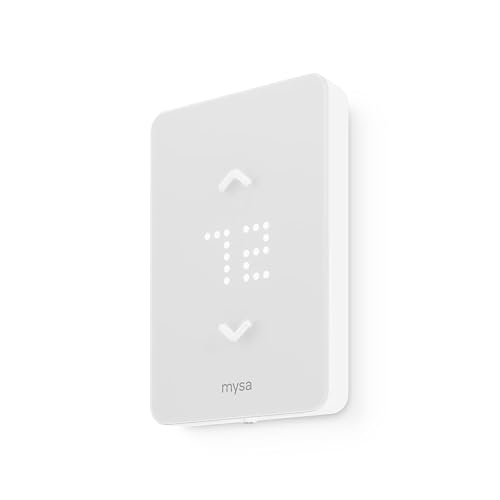
Mysa Smart Thermostat LITE for Electric Baseboard Heaters

ecobee Comfort and Security Bundle

Honeywell Lyric T6 Pro Wi-Fi Programmable Thermostat
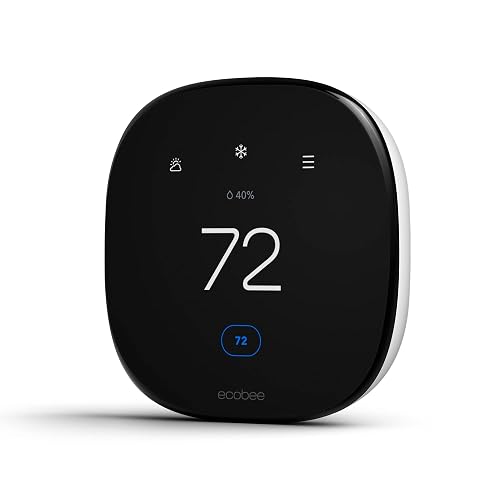
ecobee Smart Thermostat Enhanced

Google Nest Learning Thermostat 4th Gen + Sensor, Obsidian

Google Nest Learning Thermostat 4th Gen + Sensor, Silver
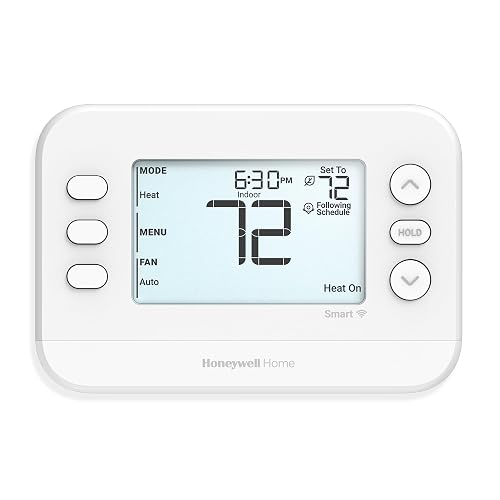
Honeywell Home X2S Smart Wi-Fi Thermostat
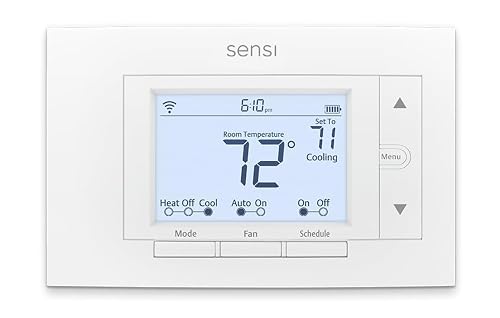
Sensi Smart Thermostat ST55
A Breakdown Of The Leading Choices
Most smart thermostats assume a low-voltage forced-air system, which leaves electric baseboard owners stuck with clunky analog dials. The Mysa Smart Thermostat LITE flips that script by handling 120V to 240V high-voltage wiring, a range that covers most North American baseboard installs.
You wire it directly to the existing baseboard circuit, then connect over WiFi without a hub. The app supports per-day scheduling, geofencing, and HomeKit alongside Alexa and Google. For older apartments and cottages relying on electric heat, this fills a niche almost no other HomeKit thermostat addresses.
Real Benefits
- Supports high-voltage baseboard circuits up to 240V, a rare fit in this category
- Native HomeKit plus Alexa and Google voice control from one device
- Per-day scheduling and away-mode trimming can lower electric heat bills noticeably
- Compact touch interface fits in tight electrical box spaces
- No hub required, easing installation for first-time smart-home owners
Honest Caveats
- Only works with line-voltage electric heat, so forced-air homes should skip it
- Hardwired install may call for an electrician in older panels
Best Suited To
Owners of homes heated by electric baseboards or fan-forced wall units who want HomeKit scheduling without rewiring the system.
Consider Something Else When
Anyone with a central forced-air HVAC setup will find the Honeywell Home X2S Smart Wi-Fi Thermostat a more compatible everyday fit.
The ecobee Comfort and Security Bundle pairs the Smart Thermostat Premium with a SmartSensor 2-pack and turns the wall unit into a hub for both climate and intrusion monitoring. The thermostat has a built-in speaker and a quad-core processor, so it can pull double duty as a base station.
You gain motion detection across rooms, alerts when doors or windows open unexpectedly, and refined temperature zoning. Compared to the ecobee Smart Thermostat Enhanced covered below, this bundle adds that sensor coverage and a more advanced display.
Where It Excels
- SmartSensor 2-pack helps balance temperatures in rooms the main unit cannot reach
- Built-in siren and motion awareness extend useful life beyond a thermostat
- Premium speaker doubles as a voice and audio interface in a hallway or entry
- Touchscreen with richer controls than the standard Enhanced model
Trade-Offs
- Bundled cost sits well above a standalone thermostat
- Full security features may require a subscription tier after the trial window
- Larger footprint than a basic wall control
Feature Snapshot
Who It Suits Best
Homeowners who want a single wall device to manage climate plus a layer of entry and motion alerts.
Skip It When
Shoppers focused strictly on heating and cooling should consider the ecobee Smart Thermostat Enhanced, which delivers core features at a lower tier.
Where many HomeKit thermostats cap out at single-stage heating and cooling, the Honeywell Lyric T6 Pro reaches further. It supports up to two heat stages and one cool stage on heat pump setups, or two heat and two cool on conventional systems. That flexibility makes it useful in homes with more elaborate HVAC hardware.
The design leans workmanlike rather than decorative, with a backlit touchscreen and physical buttons. You get app control, HomeKit, and a 7-day schedule. For owners running a multi-stage system who care more about compatibility than flash, it tends to be a steady choice.
Key Advantages
- Handles two-stage heat and cool, which fits many larger homes
- Heat pump compatibility broadens install options
- HomeKit plus Honeywell’s own app give you two control paths
Points To Note
- Interface is functional rather than stylish, with no animated dial
- Requires a C-wire (common wire) in most installs, a small extra step for older homes
Right Fit For
Homeowners with multi-stage forced-air or heat pump systems who want a reliable Wi-Fi thermostat without paying a premium for the look.
A Better Fit Elsewhere
Anyone wanting a more polished interface and learning features should look at the Google Nest Learning Thermostat 4th gen, which trades staging depth for smarter automation.
The ecobee Smart Thermostat Enhanced sits one step below the Premium model reviewed above and lands in a sweet spot for most households. You get HomeKit, Alexa, and Google, plus the option to add SmartSensors for room-by-room averaging. The interface is bright, with a generous touch area that makes quick adjustments easy.
Its strength is doing the everyday things well rather than chasing extra features. Schedules, geofencing, and learning habits all run in the background, freeing you from constant tweaking.
Notable Gains
- Strikes a balance between capability and price across the ecobee range
- Multi-platform voice control keeps flexibility for cross-ecosystem households
- Compatible with room sensors for tighter comfort in trickier layouts
- Touch display offers a clear on-device experience
Possible Compromises
- Lacks the Premium model’s integrated speaker and security hub features
- Advanced functions may sit behind a subscription tier over time
Made For
Everyday households that want strong HomeKit support, dependable scheduling, and the option to expand with room sensors later.
Swap It Out When
Shoppers who want a built-in siren and voice assistant features should step up to the ecobee Comfort and Security Bundle instead.
The fourth-generation Nest Learning Thermostat refines an already-strong formula with a slimmer profile, a brighter display, and a second-generation Nest Temperature Sensor in the box. The Obsidian finish is the darker of the two colorways, which suits modern or moody interiors nicely.
It learns your temperature preferences over time, then quietly builds a schedule so you stop fiddling with the app. For HomeKit users, the integration is straightforward through the Apple Home app, though deep automations sit in the Google Home ecosystem.
Practical Advantages
- Adaptive learning trims manual scheduling within a few weeks of use
- Bundled temperature sensor helps rooms that the main unit cannot see
- Refined dial and glass face elevate any wall they sit on
- Works with HomeKit, Alexa, and Google for flexible control
Details To Watch
- Full learning features work best inside the Google Home app, so the Apple side feels secondary
- Some advanced energy reports may need a Google account and cloud connection
Feature Snapshot
Who Should Grab It
Design-focused owners who want a learning thermostat and a bold wall piece, in a darker finish that pairs with rich color palettes.
Another Choice May Suit
If a lighter finish fits your decor better, the silver version of the same Nest Learning Thermostat 4th gen offers identical hardware in a softer tone.
The silver variant of the Nest Learning Thermostat 4th gen is the same hardware as the Obsidian model, only in a lighter metallic finish. For traditional kitchens, white-walled hallways, and Scandinavian-leaning spaces, the silver tone tends to disappear into the background.
Functionally, you get the same learning engine, bundled 2nd-gen temperature sensor, and HomeKit support. Where the Obsidian version makes a statement, this one steps back and lets the room lead.
Noteworthy Benefits
- Silver finish blends with light or neutral color schemes
- Same learning engine and sensor as the Obsidian model
- Works with HomeKit, Alexa, and Google for cross-ecosystem households
- Refined display offers strong readability from a distance
Worth Noting
- Learning features depend on a stable Google account and cloud connection
- Lighter finish may show fingerprints more readily than darker ones
Perfect Match For
Owners of bright, traditional, or minimalist interiors who want a learning thermostat without a dark accent on the wall.
Look Elsewhere When
Anyone wanting a more compact, dial-free design should consider the Honeywell Home X2S, which trades learning for a simpler interface.
The Honeywell Home X2S is built for the homeowner who wants HomeKit without a learning curve. The interface uses a clear color display and a small set of side controls, so you can change the temperature without launching an app. The white finish suits most walls.
Under the hood, it supports conventional and heat pump systems up to two heat and two cool. Flexible scheduling, filter reminders, and humidity monitoring round out a sensible everyday package.
Points In Its Favor
- Plain-language controls ease first-time smart thermostat setup
- Compatible with common conventional and heat pump stages
- HomeKit plus Honeywell’s own app offer two control paths
- Filter and humidity reminders help with regular maintenance
Less Ideal Details
- Smaller display than premium models, which may feel dated to some
- C-wire required for full Wi-Fi functionality in many homes
Built With In Mind
First-time smart thermostat shoppers who want dependable HomeKit scheduling and a wall interface that explains itself.
Reach For A Different Pick When
Shoppers wanting adaptive learning should pivot to the Google Nest Learning Thermostat 4th gen, which builds schedules automatically.
The Sensi ST55 is the entry-level HomeKit pick for people who care more about functionality than flash. Made by Emerson, a name rooted in HVAC manufacturing, it covers the basics: app control, scheduling, and energy reports. The look is utilitarian, almost identical to a traditional rectangular thermostat, with a small backlit screen.
For DIYers, the install is friendly. The app walks you through wiring step by step, and the unit commonly fits over an existing footprint without repainting.
A Strong Showing
- Accessible price point among HomeKit-compatible thermostats
- App-guided wiring helps DIYers install without a service call
- Backed by a long-established HVAC manufacturer
- Flexible 7-day scheduling suits varied weekly routines
- Energy usage reports help track how settings affect bills
Soft Spots
- Display and styling are conservative, with no touchscreen flair
- Lacks room sensors, so coverage depends on placement
- Some smart features may be limited without a registered Sensi account
Feature Snapshot
Whose Shelf It Belongs On
Renters, first-time smart-home shoppers, and DIYers who want a no-fuss thermostat with reliable HomeKit support.
Where Another Pick Suits Better
Homeowners wanting a more advanced learning engine and bundled room sensor should choose the Google Nest Learning Thermostat 4th gen instead.
Picking The Right Fit For Your Home
Match The Thermostat To Your HVAC System
The first filter is the equipment itself. Central forced-air, heat pump, and electric baseboard heat each use different wiring, and not every HomeKit thermostat supports all three. A C-wire (a low-voltage common wire that delivers constant power) is often required for Wi-Fi thermostats, so checking your current wiring saves time during install. Multi-stage systems with two heating or cooling stages will rule out a few basic models, while high-voltage baseboard homes need a unit like the Mysa LITE designed for that load.
Decide Which HomeKit Features Actually Matter
HomeKit brings shared control through the Apple Home app, Siri voice commands, and automation tied to location, time, or other accessories. Basic models handle on/off temperature changes, while pricier units add room sensors, geofencing (automatic adjustments based on your phone’s location), learning schedules, and even security hub features. The question is which of those you genuinely use, not which look impressive on paper.
Consider Your Wall, Your Wiring, And Your Routine
A thermostat sits on a visible wall, so finish and size matter. Touchscreen-heavy models add presence, while understated designs blend in. Think about who else uses the home: kids, guests, or roommates benefit from a simple physical interface. And remember that learning thermostats get smarter with consistent use, so a regular routine helps them shine.
Key Considerations Across These Picks
Common Shopping Slip Ups
Many shoppers grab a thermostat that looks great but does not match their HVAC wiring. A quick photo of the current wiring plate, plus a count of how many heat and cool stages the system uses, prevents most mismatches. Another pitfall is ignoring the C-wire requirement, which leaves the new unit constantly losing power.
Where The Extra Money Goes
Higher-tier models typically bundle room sensors, premium displays, integrated speakers, and learning engines. Those extras pay off in homes with uneven temperatures, larger floor plans, or busy households where automatic scheduling saves real effort. For a single-zone apartment with a predictable routine, a simpler unit covers the essentials without stretching the budget.
Frequently Asked Questions
Do all these thermostats work with the Apple Home app?
Every pick on this list supports HomeKit, which means each one appears in the Apple Home app and responds to Siri voice commands once paired.
Will any of these work without a C-wire?
Most Wi-Fi thermostats, including the picks above, need a C-wire for steady power. The Mysa LITE handles high-voltage wiring differently, so its requirements vary from the others.
Can I install these thermostats myself?
The Sensi ST55 and Honeywell Home X2S include app-guided installs aimed at DIYers. The Mysa LITE and other high-voltage models often benefit from a licensed electrician, especially in older panels.
What happens if my Wi-Fi goes down?
Each unit still operates manually from the wall, so heating and cooling continue without cloud access. Schedules stored on the device keep running, while remote app control returns once Wi-Fi is restored.
How important are room sensors?
Room sensors help when a single thermostat cannot see the whole home, such as a finished basement or a sun-soaked upstairs bedroom. If the existing thermostat location matches your daily comfort well, sensors are optional.


