

Picking a thermostat should feel less like rocket science and more like a small win for your home. The right one keeps rooms steady on a January night, trims wasted run time, and stays out of your way day to day. With a flood of smart, programmable, and specialty options on the market right now, the hard part is matching the thermostat to your system and your routine, not just the slickest screen. This guide walks you through nine solid choices, from a flagship smart unit that learns your patterns to no-fuss manual dials that just get the job done.
A Snapshot Of The Selections
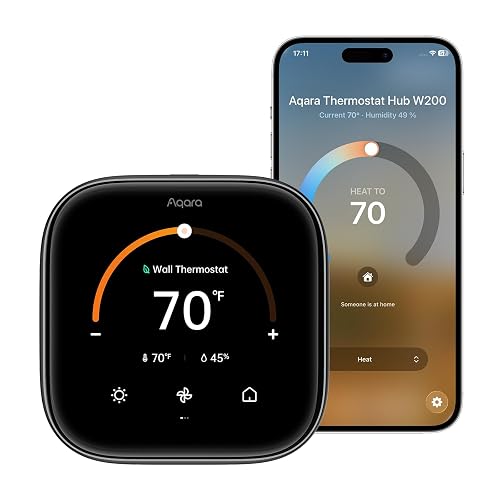
Aqara Smart Thermostat W200 with Apple Adaptive Temperature
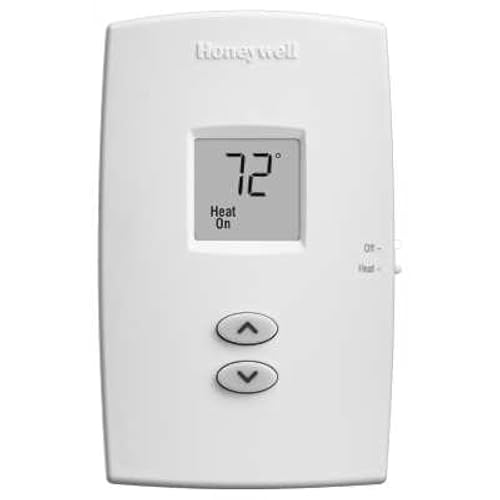
Honeywell TH1100DV1000 PRO 1000 Heat Only Thermostat
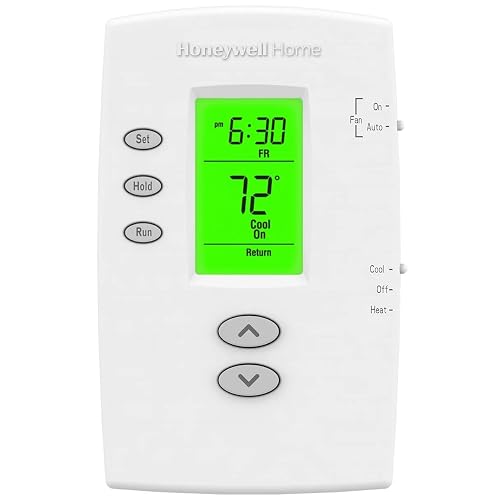
Honeywell TH2110DV1008 PRO 2000 Programmable Thermostat
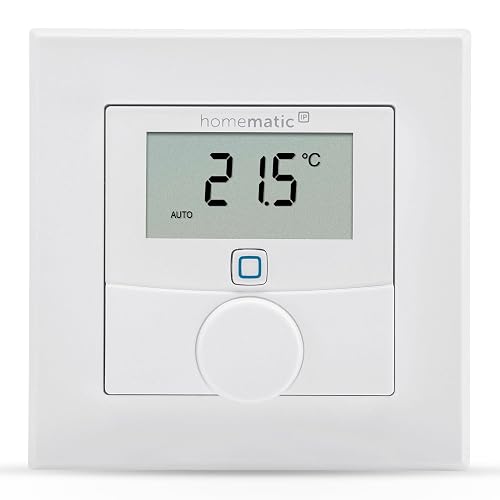
Homematic IP Wall Thermostat with Humidity Sensor
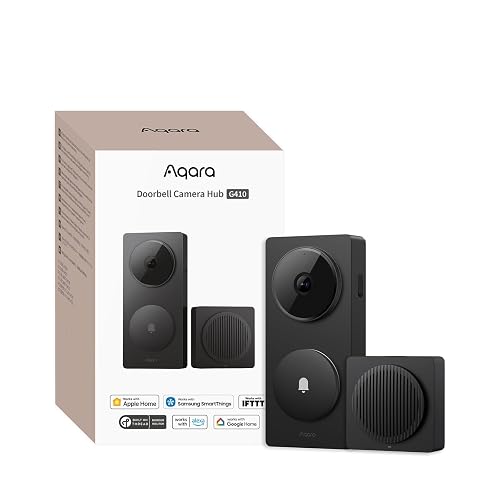
Aqara Smart Doorbell Camera G410 with Chime

OJ Microline UTN4 Radiant Floor Heat Thermostat with GFCI
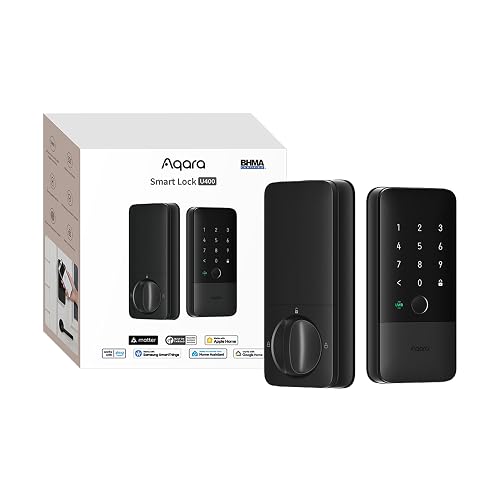
Aqara UWB Smart Lock U400 with Home Key

Google Nest Learning Thermostat 4th Gen (Obsidian)

Google Nest Learning Thermostat 4th Gen (Silver)
Meet The Standout Selections
For households already running an Apple-centric smart home, the Aqara W200 leans into a clever bit of automation. Through the Apple Home app, Adaptive Temperature reads activity states like “home,” “sleep,” “away,” and “extended away” using an iPhone, then nudges the temperature for you. The result feels less like programming and more like the house quietly catching up with your day.
That hands-off quality is the real story here. Instead of fiddling with a weekly schedule, you set the comfort band once and let iPhone presence handling do the rest. For a family with shifting routines, the time savings on the thermostat alone can be noticeable.
The Case For It
- Adaptive Temperature removes the weekly schedule step entirely, saving you setup time on day one.
- Plays well with Apple HomeKit, so Siri voice and Home app tiles come along for the ride.
- Activity-based logic tends to reduce wasted heating when nobody is actually home.
- Slim wall footprint keeps it discreet in hallways and narrow walls.
Things To Consider
- Adaptive Temperature needs an Apple home hub like a HomePod or Apple TV, which adds to the entry cost.
- You may find the smart features less useful if your household iPhones stay parked on a charger all day.
- Wiring checks during install: a missing C-wire can complicate older homes, depending on the existing system.
Made For
Apple households with a HomePod or Apple TV who want comfort automation without schedule babysitting.
Skip It When
The Google Nest Learning Thermostat 4th Gen fits better if you live inside Google Home and want learning-style scheduling.
Sometimes the smartest move is the simplest one. The Honeywell TH1100DV1000 is a vertical non-programmable thermostat aimed at single-stage heat-only systems, and that single focus is the point. There is no app, no schedule, no firmware to chase. You set a temperature, and the system holds it.
For a vacation cabin, a garage workshop, or a rental where tenants need a no-learning-curve wall control, this is a comfortable fit. The premier white finish blends with most trim, and the compact dimensions make the swap a quick weekend project.
Standout Benefits
- Vertical layout reads clearly at a glance, helpful for older eyes or low mounting heights.
- Heat-only compatibility keeps wiring straightforward for furnaces and baseboard systems.
- Mechanical-style reliability means fewer electronics to fail over a long lifespan.
Points To Note
- No scheduling means you will adjust the dial manually as seasons change.
- Not suited to multi-stage heating or cooling systems, so check compatibility before swapping.
Best Suited To
Owners of simple heat-only systems who want a dial-and-forget wall control without smart features.
Look Elsewhere When
The Honeywell TH2110DV1008 PRO 2000 is a better match for anyone wanting weekday and weekend programming.
The PRO 2000 steps things up from its non-programmable sibling without going full smart-home. You get weekday and weekend scheduling across 5-2 programming, so a tighter work-week pattern and a relaxed weekend curve can live on the same thermostat. The backlit display makes late-night adjustments painless.
For most households, the practical win is the temporary and permanent override functions. Someone home sick on a Tuesday, you bump the heat. Big family gathering on Saturday, you hold a warmer setpoint. The thermostat bends to the day instead of forcing the day to fit a rigid program.
Bright Spots
- 5-2 programming covers the workweek and weekend with separate comfort profiles.
- Backlit display helps with quick readings in dim hallways or overnight.
- Heat/cool and heat pump compatibility widens installation options.
- Early start logic preconditions the home so the setpoint is reached on time.
Worth Noting
- Lacks remote app control, so all changes happen at the wall.
- Program setup takes patience the first time, depending on how detailed you want your schedule.
Feature Snapshot
Who Should Grab It
Homeowners with a predictable weekly routine who want scheduling without app overhead.
A Better Fit Elsewhere
The Aqara Smart Thermostat W200 suits you better if Apple Home integration and presence-based automation matter more than a static schedule.
The Homematic IP Wall Thermostat is built for a specific kind of home: one already running a Homematic IP ecosystem. What sets it apart from a standard wall thermostat is the built-in humidity sensor, which feeds both temperature and moisture readings into the same app. Bathrooms, basements, and nursery rooms tend to be where the humidity data earns its keep.
Underfloor heating and radiator control are both on the menu, and voice assistant support through Alexa and Google Assistant rounds out the everyday use cases. It feels like a thoughtful add-on for an existing Homematic IP setup rather than a standalone product for a fresh install.
Why It Works Well
- Integrated humidity reading gives one wall unit the job of two sensors.
- Compatible with both radiator and underfloor heating zones.
- Alexa and Google Assistant support covers the most common voice setups.
- App control via the Homematic IP Access Point keeps adjustments in your pocket.
Trade Offs
- Requires the Homematic IP Access Point or a compatible CCU3, an upfront addition for newcomers to the ecosystem.
- Owners commonly report that initial device pairing takes patience, especially on a larger system.
Whose Shelf It Belongs On
Existing Homematic IP users who want humidity-aware control for a single room or zone.
Swap It Out When
The Aqara Smart Thermostat W200 is the stronger fit for Apple Home households wanting broader automation hooks.
This is not a thermostat in the strict sense, but the Aqara Smart Doorbell Camera G410 earns a spot on a smart-home shortlist because of what it does for the bigger ecosystem. HomeKit Secure Video support means encrypted recording and iCloud storage show up natively in the Apple Home app, which keeps your front door in the same control surface as your heating.
The built-in Zigbee and Matter hub is the quiet flex. It can serve as a bridge for other Aqara devices, so adding a thermostat, a lock, or sensors later does not require yet another box on the shelf. For a fresh smart-home build, that consolidation can be a real plus.
The Good Stuff
- HomeKit Secure Video delivers encrypted recording straight through the Apple Home app.
- Matter, Alexa, Google Assistant, SmartThings, and Home Assistant compatibility broadens future expansion.
- Integrated Zigbee and Matter hub can anchor other Aqara devices.
- Included chime covers homes where the existing doorbell chime is weak or missing.
A Few Limitations
- Full HomeKit Secure Video features depend on an iCloud subscription tier that not everyone carries.
- Wired doorbell installation is the typical setup, so older homes may need transformer checks.
Quick Facts
Right Fit For
Households building out an Aqara-based smart home who want the front door and heating on the same platform.
Reach For A Different Pick When
The Aqara Smart Thermostat W200 is the better choice if a thermostat comes first and the doorbell is a future project.
Radiant floor heating lives in its own world, and the OJ Microline UTN4 was designed for it. The built-in Class A GFCI (Ground Fault Circuit Interrupter) handles a safety requirement that applies specifically to electric underfloor systems, which is one less external component to buy and wire. Support for 120V and 240V setups covers the two most common residential circuits.
Dual sensing is the practical touch. The thermostat reads both ambient air and the floor sensor, which matters for tile, stone, and laminate where floor temperature, not air temperature, drives comfort. The included floor sensor means you can move forward with install on day one.
Features That Help
- Built-in Class A GFCI satisfies safety code for electric radiant systems.
- Dual sensing balances air and floor temperature for steadier comfort.
- Works with tile, carpet, stone, laminate, and engineered wood installations.
- Floor sensor included, so the box arrives ready for install.
Honest Caveats
- Non-programmable, so daily adjustments are manual.
- Specialized enough that it does not double as a whole-home HVAC thermostat.
Core Details
Who Will Love This
Homeowners finishing a bathroom, kitchen, or basement with electric radiant floor heating.
Not Your Match When
The Honeywell TH2110DV1008 PRO 2000 suits you better for whole-home forced-air scheduling.
Another ecosystem entry rather than a heating thermostat proper, the Aqara U400 brings Ultra-Wideband (UWB) hands-free unlocking to the front door. The lock detects your approach, direction, and intent, and unlocks as you arrive, which feels less like sci-fi and more like a small daily relief on a rainy day with full hands.
Apple Home Key support means a tap from an iPhone or Apple Watch handles entry for guests or kids without the lock learning their fingerprint. The fingerprint deadbolt is the backup plan for everyone else, and the black finish suits modern doors cleanly.
Where It Excels
- UWB detection delivers a smoother hands-free entry experience than Bluetooth-only locks.
- Apple Home Key covers iPhone and Apple Watch users out of the box.
- Fingerprint deadbolt gives a fast, keyless fallback for the whole household.
- Black finish looks at home on most contemporary door hardware.
Soft Spots
- Best behavior depends on Aqara hub compatibility for full UWB performance.
- Door alignment and existing deadbolt cutout can affect install time on older doors.
Feature Card
Perfect Match For
Apple households upgrading the front door alongside a wider Aqara-based comfort setup.
Consider Something Else When
The Aqara Smart Thermostat W200 is the better pick if heating control is the immediate priority.
The Nest Learning Thermostat has been the household name in self-teaching climate control for years, and the fourth-generation model pushes that idea further. Over a week or two of normal use, the thermostat builds a schedule around the temperatures you actually choose, including manual nudges on a cold morning or a warm evening. The included Nest Temperature Sensor (2nd gen) extends that awareness to a second room, which matters in homes with a real temperature gap between, say, a nursery and a hallway.
The Obsidian finish is the darker of the two color options and pairs well with deep-toned walls, modern interiors, and minimalist decor. It is a thermostat that does not mind being looked at.
The Upside
- Self-learning logic removes the upfront schedule step that puts off many shoppers.
- Second-room sensor helps balance comfort in homes with uneven temperatures.
- Obsidian finish suits darker walls and contemporary interiors.
- Google Home integration makes voice and routine control feel natural.
Less Ideal Details
- Full learning behavior usually takes one to two weeks of consistent use, depending on routine variety.
- Some advanced features sit behind a Nest subscription tier, so factor that into ownership expectations.
Who It Suits Best
Google Home households with predictable routines and a preference for hands-off climate learning.
Where Another Pick Suits Better
The Aqara Smart Thermostat W200 is the stronger pick for Apple Home users who value iPhone-based presence automation.
Functionally identical to the Obsidian version, the Silver Nest Learning Thermostat 4th Gen offers a lighter, brushed-style finish that suits traditional trim, white walls, and warmer interior palettes. For homes where the thermostat sits on a light-colored wall, this finish can read as a softer accent than its darker sibling.
You still get the same learning engine, the included second-generation temperature sensor, and the Google Home hooks. The decision between the two Nest colors tends to come down to the wall, not the feature set.
Useful Touches
- Silver finish blends with traditional trim and lighter wall colors.
- Learning logic reduces manual schedule edits after the first couple of weeks.
- Second-room sensor helps manage comfort in homes with hot or cold spots.
- Voice control through Google Assistant fits households already using Nest speakers.
A Few Considerations
- Learning accuracy improves with consistent manual adjustments during the first stretch of use.
- Some features depend on a Nest subscription, which is worth weighing against long-term cost.
Built With In Mind
Google Home users with lighter wall colors and a preference for a softer metallic finish.
Another Choice May Suit
The Honeywell TH2110DV1008 PRO 2000 is the better fit for anyone who wants straightforward scheduling without an app or subscription.
What Matters Most Before Choosing Heating Thermostats
Match The Thermostat To Your System Type
The first decision lives in your equipment closet, not the app store. Heat-only furnaces, heat pumps, multi-stage systems, and electric radiant floors each speak different wiring languages, and a mismatch can mean an expensive rewire or a thermostat that simply refuses to play nice. Confirm whether your system needs a C-wire (common wire) for continuous power, since most smart thermostats do.
Decide How Much Scheduling You Actually Want
Some homes thrive on a strict weekday and weekend routine, while others run best on presence-based automation. Programmable models like the Honeywell PRO 2000 reward a fixed schedule, while learning and adaptive thermostats like the Nest 4th Gen and Aqara W200 suit households with shifting patterns. Honest self-assessment here saves years of fiddling later.
Think About Ecosystem Fit Before Features
A thermostat rarely lives alone, and the platform decision tends to matter more than any single feature. Apple Home, Google Home, Alexa, and Homematic IP each pull in different directions, and buying a thermostat that does not talk to the rest of your setup is a common source of regret. Pick the ecosystem you actually use daily, then choose the model that fits it.
Weigh Smart Features Against Long-Term Cost
Subscription tiers for advanced insights, voice control reliability, and ongoing app support all add up over years of ownership. A premium learning thermostat brings real comfort benefits, but a simple wall dial costs nothing beyond install. Balance the upfront price tag against the steady drip of subscriptions and the time savings you realistically gain.
Key Considerations Across These Picks
Pitfalls Shoppers Hit
The single most common slip is buying a thermostat before checking the wiring, especially the presence of a C-wire. Many older homes lack one, and a smart thermostat that needs constant power simply will not boot without an adapter or a new run of wire. Confirm compatibility with your HVAC system type, not just the brand of furnace.
What The Higher Tier Buys
Stepping up to a learning or adaptive thermostat buys you time and consistency. Instead of editing a schedule every season, the thermostat watches and adjusts, which tends to pay off in homes with predictable but shifting routines. The premium also covers wider ecosystem support, so the thermostat plays nicely with the rest of your smart home rather than sitting as a lonely wall unit.
Frequently Asked Questions
Do Smart Heating Thermostats Really Save On Energy Bills?
They can, especially when presence-based or learning features actively lower the setpoint during empty hours. The savings depend on your previous habits, your climate, and how often you actually used a schedule before.
Will A New Thermostat Work With My Old Wiring?
Most modern thermostats support common residential wiring, but a missing C-wire is the usual stumbling block. Check the existing wire count and the install guide before you buy, and budget for a C-wire adapter if your home lacks one.
What Is A C-Wire And Why Does It Matter?
A C-wire, or common wire, delivers continuous 24V power to the thermostat so smart features can run without draining the HVAC system. Without it, many smart thermostats need a power adapter or a new wire run.
Can One Thermostat Handle A Multi-Room Home?
A single thermostat can manage the whole home, but adding a remote temperature sensor, like the one bundled with the Nest 4th Gen, helps balance comfort in rooms that run hot or cold. For zoned systems, separate thermostats per zone are the more reliable path.
How Hard Is It To Install A Thermostat Yourself?
Most swaps take under an hour with basic tools, a photo of the existing wiring, and the included instructions. Turn off the breaker first, label every wire, and if anything looks unfamiliar, a quick call to an HVAC pro can prevent a costly mistake.
Final Verdict
A thermostat touches every part of daily comfort, which is why a thoughtful match beats a flashy upgrade. Start with your system type and ecosystem, then pick the model that meets you where you live. The right pick will fade into the background while quietly keeping every room exactly how you like it.


