

Choosing a thermostat sounds simple until you stand in the hardware aisle staring at a wall of near-identical rectangles. The difference between a $20 dial and a $250 learning model is mostly about how much thinking you want to do about your home’s temperature, and how much you want the box to handle for you. Most households benefit more from a clean, reliable wall unit than from a flashy screen, which is why the picks below lean toward proven, no-nonsense controls.
If your HVAC system is older, runs on line voltage, or pairs with a heat pump, the right thermostat is the one that matches your wiring, not the one with the most buttons. Use the guide below to match the right shape to the right job, and skip the rest.
A Side-By-Side Look
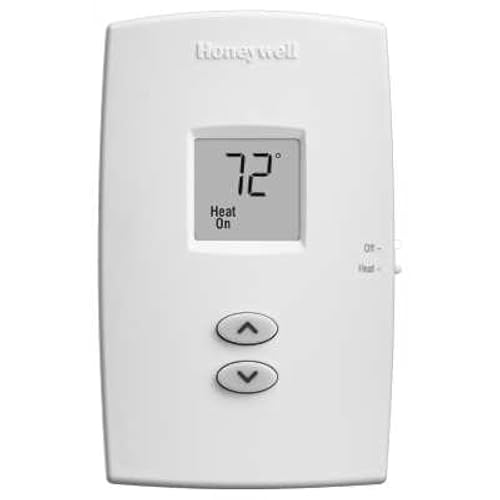
Honeywell TH1100DV1000 PRO 1000 Vertical Non-Programmable Thermostat
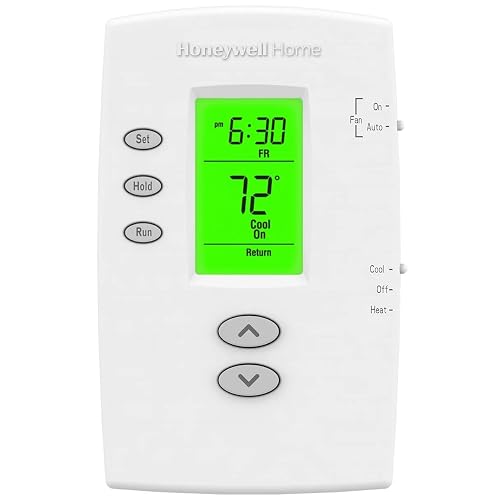
Honeywell TH2110DV1008 PRO 2000 Vertical Programmable Thermostat
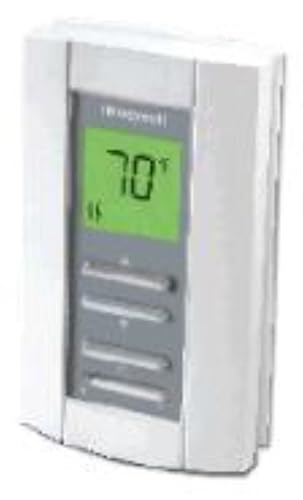
Honeywell TL7235A1003 Line Volt Pro 240V Digital Thermostat
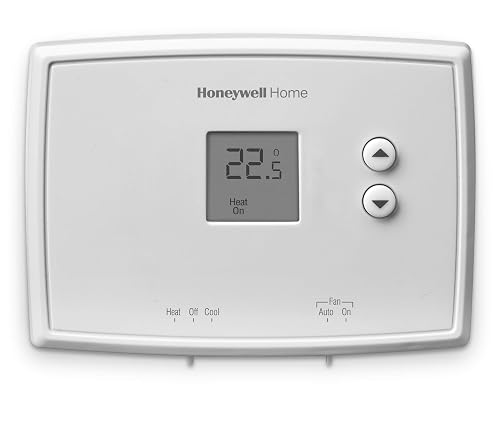
Honeywell Home RTH111B Digital Non-Programmable Thermostat

Honeywell Home X2P Programmable Thermostat, Single-Stage
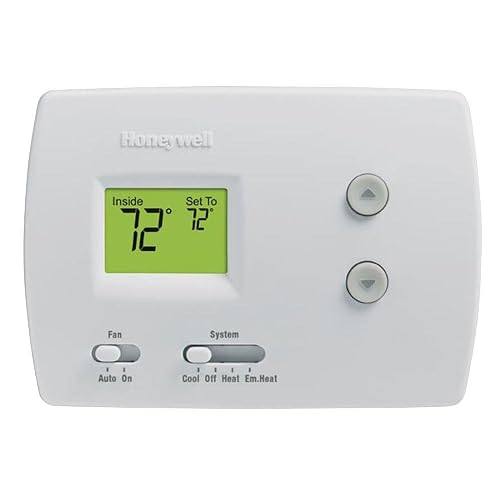
Honeywell RTH3100C1002/E1 Digital Heat Pump Thermostat

Honeywell TH3210D1004 Non-Programmable Digital Thermostat

Google Nest Learning Thermostat 4th Gen + Sensor (Obsidian)

Google Nest Learning Thermostat 4th Gen + Sensor (Silver)
A Closer Look At Each Pick
Heat-only homes with a single furnace stage don’t need Wi-Fi, a learning algorithm, or a color screen. The Honeywell TH1100DV1000 PRO 1000 leans into that reality with a vertical layout, a premier white face, and a set of simple slide switches for setup. It’s a thermostat you wire up once, set to a comfortable temperature, and largely forget about for the next decade.
For a small condo with a single-stage gas furnace, or a basement addition with baseboard heat running through a relay, the lack of programming is the feature, not the flaw. Compare that to the Honeywell Home RTH111B further down, which adds a digital readout for households that want the room temperature visible at a glance.
Notable Upsides
- Slide-switch setup avoids menu diving during installation
- Vertical footprint fits narrow wall studs and tight baseboard runs
- Premier white finish blends into most trim and paint colors
- Mechanical-style reliability means almost nothing on the board can fail
Things To Consider
- Heat-only design rules out central air or heat pump homes
- No backlight, so reading the dial in a dark hallway takes a moment
Quick Facts
Who It Suits Best
Homeowners with a single-stage furnace who want a no-maintenance wall control and zero learning curve.
Skip It When
Central air or a heat pump runs your home, in which case the Honeywell TH3210D1004 covers 2H/1C setups with far more precision.
Step up from a basic dial and the TH2110DV1008 PRO 2000 is where most households land. It runs a 5-2 weekday/weekend schedule, displays the room temperature in real time, and lights up when you press a button so you can adjust it in the dark. The Early Start feature wakes the system a bit earlier so the house hits your target by the time the alarm goes off, which is the kind of quiet convenience that actually saves energy.
Where the earlier TH1100DV1000 ignores scheduling entirely, the PRO 2000 builds a small but useful brain. It still looks like a thermostat, not a phone app, which is part of the appeal for anyone tired of cloud-dependent controls.
What Earns Its Place
- 5-2 weekday and weekend blocks match most work routines
- Backlit screen is readable in dim hallways at night
- Early Start pre-heats or pre-cools so rooms hit the setpoint on time
- One-touch override returns to the schedule without reprogramming
- Vertical layout mirrors the TH1100DV1000 for cleaner wall replacement
Points To Keep In Mind
- Heat/Cool or heat pump without auxiliary heat only, no multi-stage
- Schedule editing is button-driven, so plan a few extra minutes during setup
Made For
Working households that want a real schedule, an easy read, and a thermostat that doesn’t ask for a phone to function.
Consider Something Else When
You run a heat pump with auxiliary heat, where the Honeywell RTH3100C1002/E1 is wired for that exact job.
This is the odd one out, and the one you actually need if your home heats with 240-volt electric baseboards or similar line-voltage gear. A low-voltage thermostat wired to a relay will not switch a 240V heater safely, and the TL7235A1003 solves that with on-demand backlighting, electronic temperature sensing, and a heating indicator that confirms the system is pulling current. The “silent” operation is the small detail people appreciate most: no relay click every few minutes while you work from home.
It looks plain, almost industrial, and that’s the point. The Honeywell TL7235A1003 is built for an electrical box, not a magazine shoot, and it handles the job without fanfare.
A Strong Showing
- Rated for 240V line-voltage electric heat systems
- On-demand backlight activates only when needed
- Soft-click electronics eliminate the loud relay snap of mechanical units
- At-a-glance heating indicator confirms the system is actively running
Things To Weigh
- Single-purpose design: not a fit for central forced-air systems
- No scheduling, so manually turning the setpoint down for sleep falls to you
Best Suited To
Rooms and apartments that heat with 240V electric baseboards, convectors, or fan-forced wall heaters.
Look Elsewhere When
You have a standard low-voltage furnace and central air, where the Honeywell TH3210D1004 handles 2H/1C with stronger accuracy.
The Honeywell Home RTH111B is the small upgrade that matters most to renters and second homes. Soft-touch buttons replace the slide switches of the TH1100DV1000, the screen shows a precise digital temperature, and the install still takes under twenty minutes. It’s the cleanest “set it and leave it” wall unit in this lineup, and it pairs well with the simple Honeywell Home X2P as a no-fuss wall control.
The screen stays uncluttered on purpose, showing only what you need to make a decision. In practice, that means the room temperature, the setpoint, and not much else.
The Helpful Details
- Soft-touch buttons feel sturdier than membrane keypads
- Digital display shows the current room temperature in large numerals
- Quick setup with on-screen prompts for system type
- Great fit for rentals where a smarter thermostat isn’t practical
Worth Noting
- No scheduling, so daily routines still need manual nudges
- Display isn’t backlit, which can be tricky in a windowless hallway
Who Will Love This
Landlords, renters, and owners of small homes who want a precise digital readout without paying for a learning thermostat.
Not Your Match When
You want a real weekday/weekend schedule, in which case the Honeywell TH2110DV1008 PRO 2000 is the smarter step up.
Some households live by a Monday-Friday grind, others rotate shifts, and a few just want the thermostat to stop arguing with the dog walker. The Honeywell Home X2P is built for that messiness. It supports 5-1-1, 5-2, 7-day, and even a non-programmable mode, so you can dial in a schedule that actually fits the week. Air filter reminders, decor-friendly white housing, and single-stage 1 heat/1 cool support round it out.
It feels more modern than the TH2110DV1008 above, with a cleaner interface and more setup flexibility, while staying firmly in the wall-mounted, non-connected camp.
Practical Pluses
- Multiple schedule modes cover shift work and irregular weeks
- Air filter reminder nudges you before airflow drops off
- White faceplate coordinates with most trim and paint choices
- Non-programmable option gives nervous newcomers a soft landing
Soft Spots
- Single-stage only, so multi-stage HVAC owners should look at the TH3210D1004 instead
Feature Snapshot
Perfect Match For
Homeowners with single-stage systems who want flexible scheduling without giving up a traditional wall thermostat.
Reach For A Different Pick When
You want learning behavior and remote app control, in which case the Google Nest Learning Thermostat 4th Gen is the next logical step.
A heat pump needs a thermostat that knows the difference between compressor heat and strip heat, and the Honeywell RTH3100C1002/E1 is built for that job. The backlit screen and soft-touch buttons make it easy to use in a dim utility room, and the mercury-free design feels appropriate for a 2026 install. Compared to the TH2110DV1008, it leans hard into heat pump logic rather than a general heat/cool schedule.
It does not work with electric baseboard heat, and it is not a fit for gas-backup or multi-stage systems, so match the model to the equipment on the wall before clicking through checkout.
Benefits That Matter
- Built for heat pumps with auxiliary heat, not just standard furnaces
- Backlit display is readable in basement mechanical rooms
- Soft-touch buttons hold up to years of daily presses
- Mercury-free construction feels right for a modern retrofit
Where It May Fall Short
- Not compatible with 120-240V electric baseboard heat
- Does not support multi-stage heating or cooling equipment
Built With In Mind
Heat pump homes in mild climates that need a focused wall control without smart-home overhead.
A Better Fit Elsewhere
You have a standard gas furnace and central air, in which case the Honeywell TH3210D1004 delivers tighter accuracy.
The TH3210D1004 is the quiet workhorse of the Honeywell Pro 3000 line. It shows both the current and set temperatures at the same time, holds comfort within about ±1°F, and supports 2 heat / 1 cool systems. The backlit screen handles low-light hallways and the precision feels closer to a higher-tier unit than the price suggests.
For homeowners who want a dependable wall control without the cost or complexity of a connected thermostat, this lands in a sweet spot the RTH111B can’t quite reach.
The Case For It
- Simultaneous display of room and setpoint temperatures
- ±1°F comfort control keeps rooms from drifting overnight
- Backlit screen stays readable in dim hallways
- Supports 2H/1C systems common in many homes
Possible Compromises
- No scheduling, so day-to-day tweaks stay manual
- Plain interface may feel dated next to the X2P or Nest
The Right Fit
Owners of standard 2H/1C systems who value precision over scheduling and want a set-and-forget wall unit.
Swap It Out When
You want Wi-Fi and a learning schedule, in which case the Google Nest Learning Thermostat 4th Gen is the natural leap.
After seven wall-mounted units that ask you to do the thinking, the Google Nest Learning Thermostat 4th Gen flips the script. The included 2nd-gen Nest Temperature Sensor pairs with the head unit to read temperatures in another room, and over time the system learns when you wake up, leave, and return. The Obsidian finish looks intentional in darker living spaces, which is part of the appeal compared to a beige rectangle.
It is more involved to install than the Honeywell TH3210D1004, and it expects a C-wire or a power adapter in many homes. For households already living in a connected ecosystem, the upgrade feels natural.
Useful Touches
- Learning behavior builds a schedule from your real patterns
- External sensor balances hot and cold rooms in a two-zone house
- Obsidian finish adds a premium look in modern interiors
- Remote control from a phone helps during travel or late commutes
Factors To Consider
- Most installs need a C-wire or a power adapter for stable operation
- Learning period takes a week or two before the schedule feels dialed in
Whose Shelf It Belongs On
Tech-forward households ready to give the thermostat real input on when and how the HVAC system runs.
Where A Sibling Pick Shines
You prefer a tactile wall control and minimal apps, in which case the Honeywell Home X2P is the friendlier option.
Same learning brain, different finish. The Silver version of the Google Nest Learning Thermostat 4th Gen pairs with the included 2nd-gen sensor to manage hot and cold rooms, and the lighter tone disappears into bright kitchens, sunrooms, and contemporary spaces better than the Obsidian version. It is, in most ways, the same product with a different face.
For households leaning toward white walls, brushed hardware, or Scandinavian styling, Silver tends to read as a smaller object on the wall, which is a real consideration if the thermostat sits opposite a TV.
Good Reasons To Consider
- Same learning intelligence as the Obsidian version
- Silver finish blends into bright or modern rooms
- External sensor helps even out temperature swings across rooms
- Phone control and voice integration fit connected homes naturally
Hidden Buying Traps
- C-wire or power adapter still required for most installs
- Premium features depend on a stable home Wi-Fi connection
The Right Fit
Smart-home households with bright, light-colored interiors who want a thermostat that doesn’t dominate the wall.
Where Another Pick Suits Better
You want a simpler wall-mounted schedule with no app dependency, in which case the Honeywell Home X2P is the cleaner choice.
What To Match Before You Pick a Thermostat
System Voltage and Wiring
The first fork in the road is voltage. Most central HVAC systems run on low-voltage wires (usually 24V), which all the Honeywell Pro series picks support. Homes with electric baseboard heat typically run 120V or 240V directly, which is why a dedicated line-voltage unit like the Honeywell TL7235A1003 exists. Installing a low-voltage thermostat on a line-voltage heater is unsafe and won’t work, so check the breaker label or the existing thermostat’s wire count before buying.
Stages and Heat Pump Logic
Stages refer to how many heating or cooling speeds your system supports. A single-stage system cycles on and off at one speed, while multi-stage systems ramp gently. The TH3210D1004 covers 2H/1C, the X2P handles 1H/1C, and the RTH3100C1002/E1 is built for heat pumps with auxiliary heat. Match the stage count on the back of your existing thermostat to avoid buying something the system can’t use.
Scheduling vs. Learning
Schedules you set yourself are predictable and editable. A learning thermostat like the Google Nest 4th Gen observes your patterns and adjusts on its own. If you live the same week every week, a programmable wall unit is plenty. If your routine drifts or you want a system that handles the occasional away day, the learning approach saves more time than money.
Wall Finish and Room Layout
The faceplate color and shape affect how the thermostat looks once it’s installed. A vertical rectangle like the TH1100DV1000 suits narrow studs between windows, while a square Nest blends into a clean modern wall. For homes with significant room-to-room temperature swings, the Nest Temperature Sensor helps balance the readings without rewiring.
Shopping Smarter Across These Picks
Pitfalls Shoppers Hit
The most common mistake is choosing a thermostat by feature list rather than by system compatibility. A 7-day programmable unit is wasted on a heat pump that needs auxiliary heat logic, and a learning thermostat is overkill in a studio apartment. Check the wire count, the voltage, and the system type on the equipment label before falling for a colorful screen. Another trap is skipping the C-wire check for Wi-Fi models, which can lead to an install that loses power intermittently.
When Paying More Pays Off
The jump from a basic wall unit to a learning thermostat or a heat-pump-specific model pays off when the system runs for years and the savings are small but constant. A 1°F precision improvement, a smarter overnight setback, or a balanced remote sensor can shave real dollars off utility bills over a decade. If you travel, rotate shifts, or manage a multi-zone home, the higher tier earns its keep quickly. If you live in a small, predictable space with a single furnace, a clean Honeywell Pro unit is plenty.


