

If you live in a Duke Energy service area, a smart thermostat can do more than look slick on the wall. The right pick learns your routine, eases hot and cold spots room by room, and helps your HVAC settle into a steadier rhythm during Carolina summers and mountain winters. For many households, that means lower monthly bills without the daily fiddling. This guide walks through nine solid options, from full-color touchscreens to simple add-on sensors, so you can match a thermostat to your home, your wiring, and the way you actually live.
The Essentials At A Glance
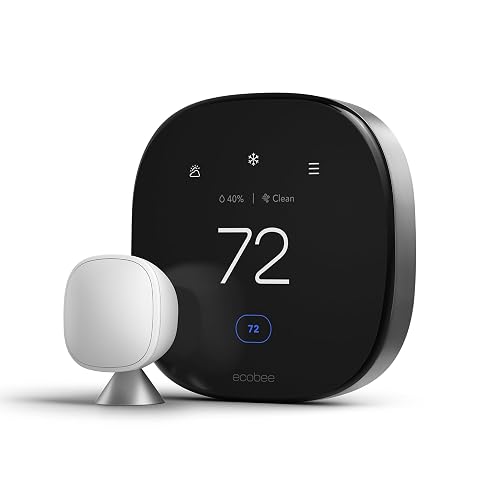
ecobee Smart Thermostat Premium with Smart Sensor
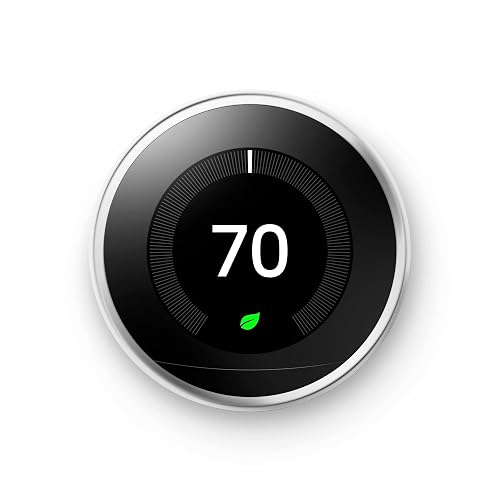
Google Nest Learning Thermostat (Polished Steel)

ecobee SmartSensor 2-Pack
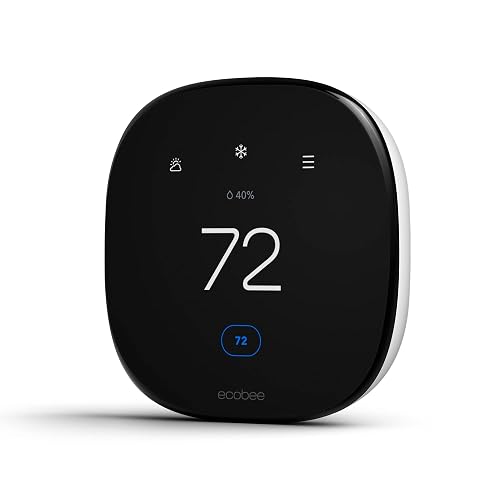
ecobee Smart Thermostat Enhanced

Alarm.com Smart Thermostat

Google Nest Learning Thermostat 4th Gen (Obsidian)

Google Nest Learning Thermostat 4th Gen (Silver)
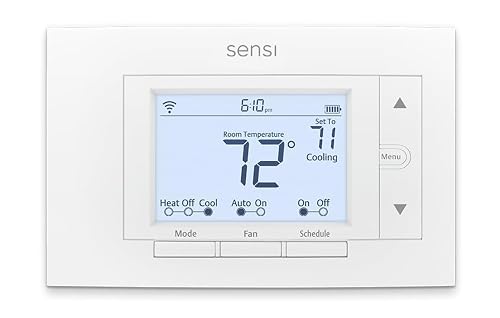
Sensi Smart Thermostat ST55
The Picks, Examined More Closely
The ecobee Smart Thermostat Premium is the model to look at if you want your thermostat to do more than nudge the temperature up and down. It carries a built-in air quality monitor, plays nicely with Siri and Alexa right out of the box, and ships with a SmartSensor so the system can read comfort in the room you actually use.
For a Duke Energy customer in a multi-room home, the practical win is balance. The included sensor helps smooth out the upstairs-versus-downstairs tug of war that many split-level houses wrestle with, and the on-device voice control means you can tweak the temperature without lifting your phone.
What Helps Most
- Built-in air quality monitor adds a wellness layer most thermostats skip.
- Included SmartSensor targets the rooms you spend time in, not just the hallway.
- Native Siri and Alexa support removes the need for a separate smart speaker on the counter.
- Doorbell Live View and smoke alarm detection extend its usefulness beyond climate.
- Geofencing learns your comings and goings so it stops heating an empty house.
Things To Consider
- Premium price puts it out of reach for shoppers on a tight budget.
- Full feature set depends on a stable Wi-Fi connection and a modern HVAC system.
Who It Suits Best
Homeowners with multi-room layouts, smart-home enthusiasts, and anyone who wants air quality data alongside temperature control will find the most value here.
Consider Something Else When
The Sensi Smart Thermostat ST55 makes more sense for renters and tight budgets who mainly want basic Wi-Fi scheduling.
The Nest Learning Thermostat in polished steel is the thermostat that helped define the category, and it still feels right at home on a hallway wall. The dial-based interface is intuitive enough that household members who never touched the app can still change the temperature by feel.
Inside, it quietly maps your routine over the first few weeks, then begins building a schedule that follows your real day. For Duke Energy households, the Home/Away Assist feature is the sleeper hit, dropping the system into an Eco Temperature automatically when the house empties out.
Everyday Advantages
- Self-programming schedule removes the chore of manual adjustments.
- Energy History view shows when and why power gets used.
- Nest Leaf gives a quick visual cue when a chosen temperature saves energy.
- Remote control from phone, laptop, or tablet keeps settings within reach.
Worth Noting
- Best behavior requires Home/Away Assist to detect everyone reliably, which works better for some households than others.
- Some advanced features rely on a continuing subscription for full functionality.
- Polished steel finish shows fingerprints and needs an occasional wipe.
Key Specs
Made For
Set-and-forget households and Google ecosystem households who want a thermostat that quietly tunes itself will appreciate the Nest approach.
Look Elsewhere When
The ecobee Smart Thermostat Premium is a better match for shoppers who want built-in air quality monitoring and a bundled room sensor.
The ecobee SmartSensor 2-Pack is not a thermostat on its own, but for anyone already running an ecobee system, these little square sensors are the missing piece. Place them in the rooms that never seem to match the hallway, and the main thermostat starts adjusting based on real occupancy, not just the wall where the original unit lives.
The value of a two-pack is straightforward. Bedrooms, bonus rooms, and finished basements all get their own read on temperature and presence, so the system can dial back energy use in empty spaces while keeping the spaces you actually use comfortable.
Good Reasons To Consider
- Infrared occupancy detection up to about 60 feet, so the system knows when a room is in use.
- Wireless communication with the main ecobee thermostat, no extra hub needed.
- Two-pack coverage addresses the most common hot and cold spots in a typical home.
Trade Offs
- Only works with ecobee thermostats, so it is a non-starter for Nest or Sensi homes.
- Battery-operated sensors need periodic swaps depending on usage.
Right Fit For
ecobee owners with multi-room layouts, finished basements, or home offices that never quite match the rest of the house will see the biggest payoff.
Swap It Out When
The Google Nest Temperature Sensor is the better fit for Nest Learning Thermostat households who want similar room-by-room coverage.
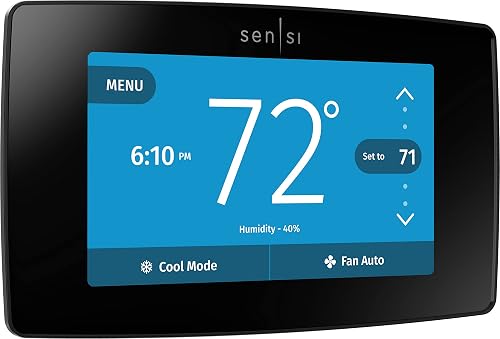
The Sensi Touch ST75 leans into a familiar touchscreen experience with a color display, a clean layout, and an app that does not try to do too much. It comes from Emerson, a name that has been in the HVAC world for over a century, so the wiring side of installation tends to be a smoother ride.
For Duke Energy customers, the practical angle is data privacy and simple scheduling. You get Wi-Fi control, Alexa compatibility, and Energy Star efficiency without surrendering a lot of personal data to the cloud, which is a real differentiator for households that read privacy policies before signing up.
The Practical Payoff
- Color touchscreen is easy to read across the room and gentle on the eyes at night.
- Strong focus on data privacy for shoppers who care about what their smart devices share.
- DIY-friendly installation with clear in-app guidance for common wiring setups.
- Energy Star certification means it meets strict efficiency benchmarks.
Points To Keep In Mind
- A C-wire is required, so older homes without a common wire may need an adapter.
- Touchscreen can show smudges on the glossy black finish and may need an occasional wipe.
- Fewer headline features than ecobee or Nest, which is a feature for some and a limitation for others.
Feature Snapshot
Best Suited To
DIY homeowners with a C-wire, privacy-focused households, and anyone who prefers a touchscreen over a dial will find the Sensi Touch a natural fit.
A Better Fit Elsewhere
The ecobee Smart Thermostat Enhanced is a stronger match for households that want deeper learning and energy reports without paying for the Premium tier.
The ecobee Smart Thermostat Enhanced is the calmer sibling of the Premium model, stripping back the air quality monitor and built-in voice control to keep the price friendlier. The core of what makes ecobee a household name is still here, including adaptive scheduling, occupancy-based adjustments, and eco+ features that automatically trim energy use when you are away or asleep.
For Duke Energy customers who want a learning-style thermostat without the highest price tag, the Enhanced sits in a comfortable middle ground. It also plays well with Apple Watch, so quick temperature tweaks from the wrist are a small daily luxury.
What It Does Well
- eco+ features automate energy savings without manual schedule editing.
- Occupancy-based adjustments help reduce heating and cooling in empty rooms.
- Works with Apple Watch, smartphones, and major smart home platforms.
- Lower price than the Premium while keeping most of the core feature set.
Honest Caveats
- No built-in air quality monitor, so you lose that wellness layer of the Premium model.
- No native voice assistant on the device itself.
Who Will Love This
First-time smart thermostat owners and existing ecobee shoppers who want core features at a lower cost will appreciate this model.
Not Your Match When
The ecobee Smart Thermostat Premium is a better choice for households who want air quality readings and on-device voice control built in.
The Alarm.com Smart Thermostat is a quieter option in this list, and that is exactly the point. It is built for households that already run an Alarm.com security and automation platform, where the thermostat becomes one more spoke in a connected wheel rather than a standalone gadget.
For Duke Energy customers with a monitored system, the practical appeal is integration. Custom schedules, geo-services automation, and critical temperature alerts all flow through the same app that handles door locks, cameras, and alarm panels, so the thermostat becomes part of a single routine.
Where It Delivers
- Remote access and control through the Alarm.com app.
- Custom schedules tailored to how the household actually uses the home.
- Critical temperature alerts warn of unusual heating or cooling drops.
- Geo-services automation adjusts comfort based on who is home.
Room For Improvement
- Most useful inside an Alarm.com ecosystem, so standalone shoppers get less value.
- Less brand recognition means fewer third-party accessory options than ecobee or Nest.
Perfect Match For
Alarm.com monitored households and security-first shoppers who want climate control managed through the same platform as their cameras and locks.
Reach For A Different Pick When
The Sensi Smart Thermostat ST55 is a smarter buy for anyone without a monitored security platform who just wants simple Wi-Fi control.
The 4th generation Nest Learning Thermostat in Obsidian is the deepest refresh of the line in years, with a brighter display, a slimmer profile, and the latest learning engine under the hood. It arrives bundled with a 2nd generation Nest Temperature Sensor, so a key room starts getting smarter attention on day one.
For long-time Nest households, this is the upgrade path that finally feels worth the swap. The system tracks your routine more flexibly than earlier versions, and the new temperature sensor closes a gap that used to require buying accessories separately.
Features That Help
- Newest learning engine adapts as your schedule changes through the seasons.
- Bundled 2nd gen Nest Temperature Sensor for room-level comfort.
- Brighter display that is easier to read across a room.
- HVAC health monitoring with maintenance reminders.
Small Caveats
- Premium price sits above the 3rd generation Nest and most ecobee models.
- Obsidian finish shows fingerprints on the glossy surface.
Spec Overview
Built With In Mind
Long-time Nest households and smart-home power users who want the freshest learning core will get the most out of this upgrade.
Where A Sibling Pick Shines
The Google Nest Learning Thermostat 4th Gen in Silver is the better fit for shoppers who prefer a lighter finish on the wall.
The Silver edition of the 4th generation Nest Learning Thermostat carries the same upgraded learning engine as the Obsidian version, but the finish reads brighter and a touch more neutral on the wall. The 2nd gen Nest Temperature Sensor is in the box, so multi-room comfort works out of the package.
For Duke Energy households in open-concept living spaces with lighter paint or wood tones, the silver finish tends to blend in rather than dominate. It is a small choice with an outsized effect on how the room feels.
Advantages To Know
- Identical learning core to the Obsidian model, so no compromise on the smart side.
- Bundled sensor for room-level temperature reading on day one.
- Silver finish blends with light walls, white trim, and modern kitchens.
- Brighter display that is easier to glance at across a larger room.
Some Limits To Know
- Same premium price as the Obsidian version.
- No change in core features between the two finishes, so the choice is purely aesthetic.
Whose Shelf It Belongs On
Shoppers who care about the finish on the wall and households with lighter interior palettes will appreciate the silver option.
Skip It When
The Google Nest Learning Thermostat 3rd generation in Polished Steel is the better fit for shoppers who want a proven learning thermostat at a friendlier price.
The Sensi ST55 is the no-nonsense sibling in the Sensi family, built for households that want Wi-Fi control and scheduling without paying for a touchscreen or learning engine. It keeps the same Emerson DNA, with a strong focus on data privacy and a straightforward mobile app that does the basics well.
For Duke Energy customers in smaller homes, rental properties, or guest houses, the ST55 is a sensible step up from an old programmable thermostat. You get app control, Alexa voice commands, and Energy Star efficiency, all without the higher price of a learning model.
What Earns Its Place
- Lower price point makes smart climate control accessible.
- DIY-friendly installation with clear wiring guidance in the app.
- Energy Star certification for households watching their usage.
- Strong data privacy approach from Emerson.
Factors To Consider
- No learning engine, so scheduling is manual rather than automatic.
- Smaller, simpler display than the Sensi Touch or ecobee models.
Feature Card
Who Should Grab It
Renters, small-home owners, and first-time smart thermostat shoppers who want simple scheduling and app control on a budget will find the ST55 a steady pick.
Where Another Pick Suits Better
The ecobee Smart Thermostat Enhanced is a stronger match for households that want adaptive scheduling and broader smart home integration.
Picking The Right Match For Your Home
A smart thermostat only earns its keep if it fits the way you live and the system already on your wall. Before settling on a model, take a few minutes to think through the practical side of ownership, since the right answer often depends on details that have nothing to do with screen size.
Match The Thermostat To Your HVAC System
Older homes with conventional heating and cooling may need a C-wire, the common wire that delivers continuous power to a smart thermostat. Models like the Sensi ST75 make that requirement clear, and you may need an adapter or a professional install if your wiring does not already include one. Heat pump and multi-stage systems open up more features, including adaptive staging on ecobee and Nest models, so confirm compatibility before you commit.
Think About The Rooms That Never Feel Right
A single thermostat in the hallway can only tell the truth about the hallway. If your home has a finished basement, a bonus room over the garage, or a bedroom that runs hot at night, a thermostat with room sensors will make a noticeable difference. The ecobee SmartSensor 2-Pack and the bundled Nest Temperature Sensor in the 4th generation models both address that problem without a full second system.
Decide How Hands-On You Want To Be
Learning thermostats like the Nest line build a schedule on their own after a couple of weeks of attention, which suits households that do not want to fiddle. Programmable models like the Sensi ST55 give you the same Wi-Fi convenience but expect you to set the schedule yourself. The right choice is really a question of how often you want to interact with the thermostat after the initial setup.
Consider Your Existing Smart Home Setup
Homes already running on Alexa, Google Assistant, or Apple HomeKit will get the most from a thermostat that speaks those languages fluently. The ecobee and Nest lines both fit that bill, while the Alarm.com model makes the most sense inside a monitored security ecosystem. Picking a thermostat that matches what you already use keeps the daily experience simple.
What To Watch Before You Commit
Common Shopping Slip Ups
The most common mistake is buying a thermostat that needs a C-wire without checking the existing wiring first, which can turn a DIY afternoon into a longer project. Another slip is overpaying for learning features in a home where the schedule barely changes week to week, or underbuying a model without room sensors for a house that clearly has hot and cold spots. In most cases, a quick photo of the current wiring and a honest walk-through of the home saves a return trip later.
What The Higher Tier Buys
Stepping up to a Premium or 4th generation model brings three things you will not find on a basic programmable unit: a smarter learning core that adapts to a changing routine, room sensors that read comfort where you actually spend time, and extras like air quality monitoring or HVAC health alerts. For most Duke Energy households, the upgrade is worth it when the home has multiple problem rooms or a more complex HVAC system, since the savings from better zoning and earlier maintenance reminders can pay back the higher upfront cost over time.
Frequently Asked Questions
Do smart thermostats work with Duke Energy time-of-use rates?
Many smart thermostats can be set to schedules that line up with off-peak hours, which helps you take advantage of lower time-of-use rates. Check your local Duke Energy rate plan and look for a thermostat with flexible scheduling or geofencing.
Will I need a C-wire for any of these thermostats?
Several models, including the Sensi ST75, list a C-wire as required. ecobee and Nest models often include power adapter options in the box, but checking your existing wiring before buying is the safest move.
Can one thermostat handle a multi-story home?
A single thermostat can manage the system, but multi-story homes usually benefit from adding room sensors to address hot and cold spots. The ecobee SmartSensor 2-Pack and the bundled Nest Temperature Sensor are both designed for that purpose.
Are these thermostats hard to install?
Most are designed for DIY installation with app-guided wiring, and common HVAC setups take under an hour. Homes with older wiring, heat-only systems, or proprietary configurations may benefit from a professional install.
Do these thermostats work without a subscription?
Core scheduling and app control typically work without a subscription. Some advanced features, especially on certain Nest tiers, may require a continuing plan for full functionality, so it is worth checking the specific model’s terms.
Final Verdict
The right smart thermostat for a Duke Energy home is the one that fits your wiring, your rooms, and your tolerance for fiddling. If you want the deepest feature set, the ecobee Smart Thermostat Premium earns its place at the top. Households that prefer a self-learning dial will find the Nest line a familiar match, and shoppers on a tighter budget will get honest value from the Sensi ST55. Take a few minutes to look at your existing wiring, walk through the rooms that never feel right, and pick the model that solves the actual problems in your home.


