

A quick temperature tweak from the office, a smarter schedule that follows your family’s routine, a greenhouse that regulates itself while you’re away: phone-controlled climate gear has quietly moved from nice-to-have to everyday tool. The lineup below runs from full-home wall thermostats to plug-in controllers for fans, reptile tanks, and workshops. Most are aimed at homeowners who want an app that just works, but a few are built for very specific jobs like brewing, incubation, or hobby greenhouses. Some need a C-wire (a common wire that supplies continuous power to the thermostat) and a hub, others simply plug into a wall outlet. Knowing that difference up front saves a lot of frustration.
The Leading Options At A Glance
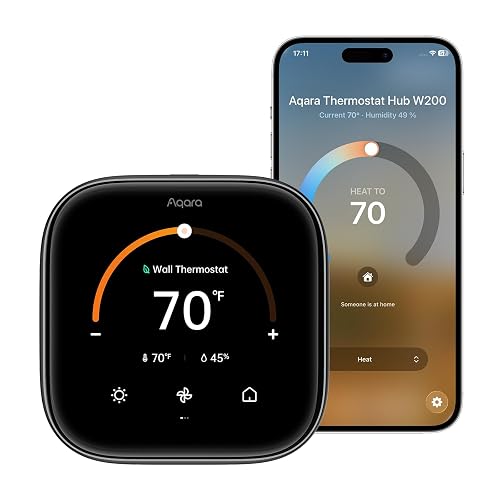
Aqara Smart Thermostat W200 with Apple Adaptive Temperature
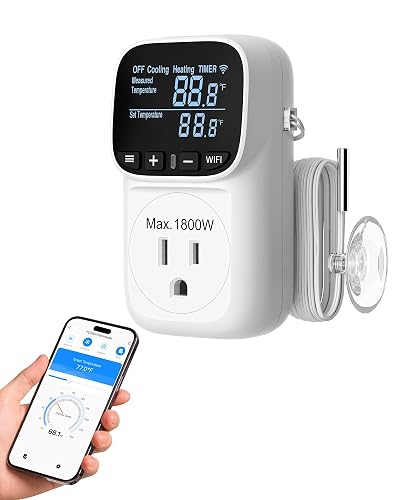
DEWENWILS Smart Temperature Controller for Fan
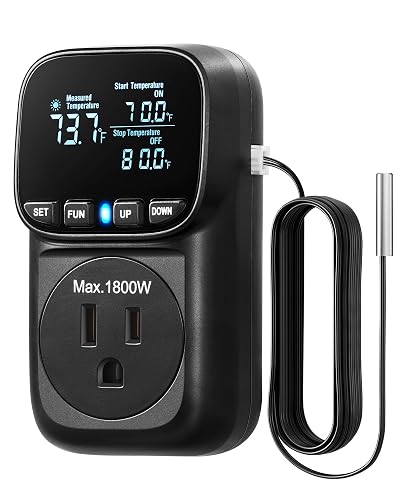
DEWENWILS Temperature Controller Outlet 15A Thermostat Plug
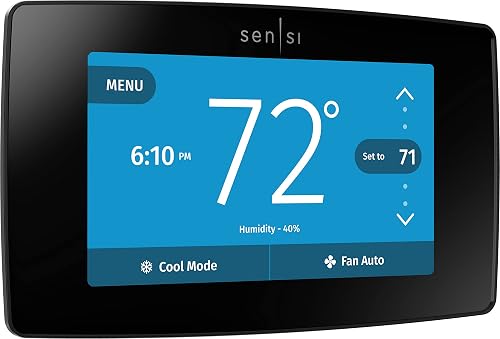
Sensi Touch Smart Thermostat ST75 by Emerson
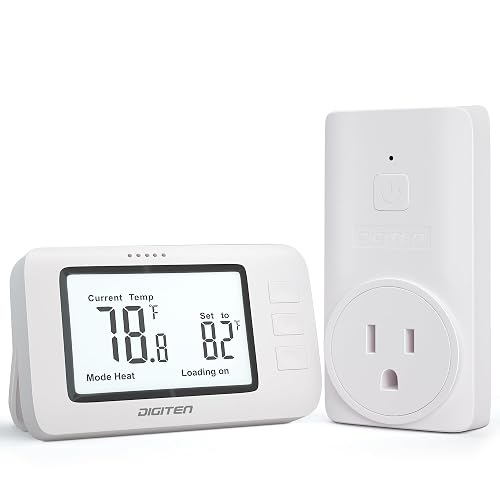
DIGITEN Wireless Thermostat WTC100 Pro
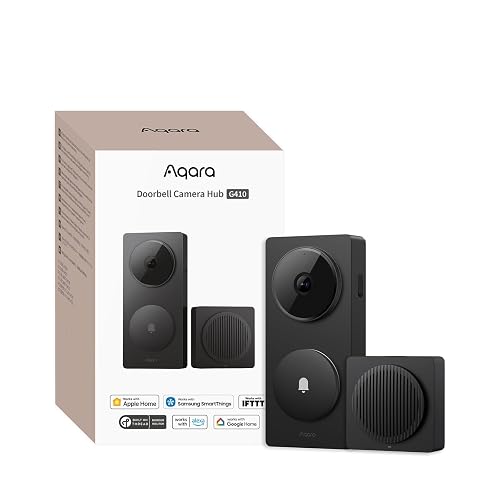
Aqara Smart Doorbell Camera G410 with Chime
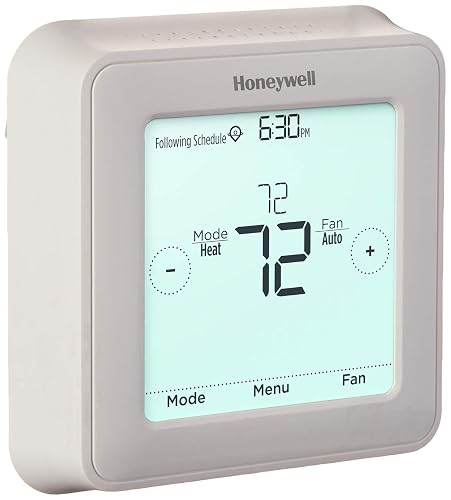
Honeywell Home 7 Day Programmable Touchscreen Thermostat
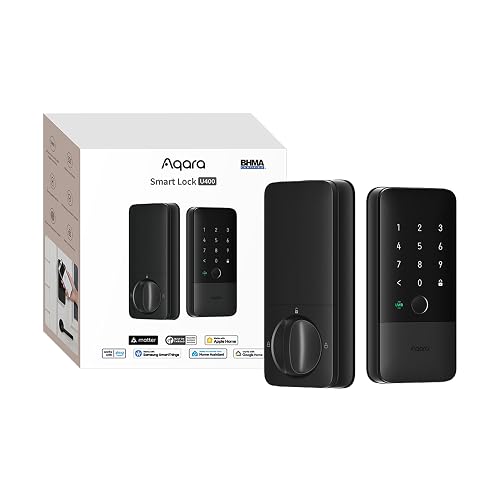
Aqara UWB Smart Lock U400 with Apple Home Key
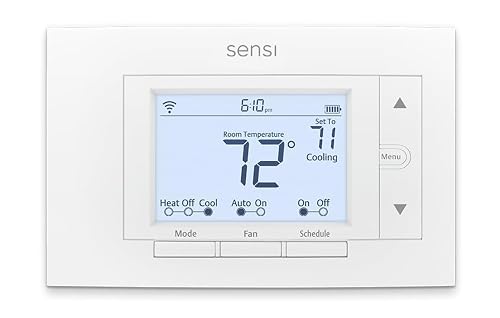
Sensi Smart Thermostat ST55 by Emerson
Why These Options Stand Out
The W200 leans hard into Apple intelligence, and that single focus is what makes it feel different from the Sensi models further down this list. Instead of asking you to build a six-event weekly schedule, it watches the iPhone in your pocket and shifts between home, away, sleep, and extended-away states automatically. For households already running a HomePod or Apple TV as a hub, that means one less app to fiddle with after the initial setup.
You trade some hands-on control for that automation, though. Owners used to granular schedules may find Adaptive Temperature surprisingly quiet, since it quietly makes decisions for you in the background. The catch is the ecosystem wall: without Apple hardware in the house, much of the magic stays locked away.
Positive Takeaways
- Adaptive Temperature learns from your iPhone’s location, so the home warms or cools as you actually arrive
- Slips neatly into Apple Home alongside other Aqara gear, including the G410 doorbell and the U400 lock reviewed later
- App-based scheduling is a solid backup if you want to override the adaptive behavior on weekends
- Avoids the manual programming maze that turns many first-time smart thermostat owners away
Points To Keep In Mind
- You’ll need a home hub like Apple TV or HomePod for the adaptive features to function at all
- Wiring compatibility is the usual gotcha, so check your existing thermostat cable before committing
Who It Suits Best
Apple-centric households with a hub already on the shelf, who would rather hand off routine climate decisions to the phone in their pocket.
Look Elsewhere When
The Sensi Touch ST75 suits households that want a visible touchscreen and broader ecosystem support, including Alexa-friendly setups.
Where the Aqara W200 is built around your living room, the DEWENWILS WiFi outlet is built around the rooms nobody thinks about: reptile enclosures, greenhouses, fermentation chambers, and basements with a single portable heater. Six operating modes cover cooling-only, heating-only, timer-only, and combined routines, which sounds like a lot but is genuinely useful when one outlet ends up driving very different gear over its life.
The 1800W ceiling handles most space heaters and fans without breaking a sweat, and the wide -40℉ to 240℉ probe range covers everything from a chilly wine room to a sweltering workshop. Compared with the wall-mounted thermostats earlier, this is a tool first, a household fixture second.
A Strong Showing
- Mode variety means the same outlet can drive a heat lamp in winter and an exhaust fan in summer
- Power-outage memory function quietly restores your settings after a brownout, no reprogramming needed
- App scheduling covers daily routines, so a greenhouse can cool before noon and warm before dusk on its own
- The wide probe range covers hobby builds that other plug-in controllers simply can’t reach
Trade Offs
- You’ll need a separate grounded outlet within reach of the temperature probe, so placement planning matters
- Setup leans toward industrial-style terminology, which may feel dense if you just want a basic fan timer
Key Specs
Right Fit For
Hobby growers and reptile keepers running one outlet that needs to switch between heating and cooling across the year.
Swap It Out When
The Sensi Smart Thermostat ST55 suits anyone whose main goal is whole-home HVAC control from a wall-mounted unit.
This DEWENWILS outlet is the workmanlike cousin to the WiFi model above. The feature list is shorter, but the build is aimed at one specific job: running a serious high-wattage heater without tripping breakers or cooking the plug. Owners commonly route this to garage heaters, propagation mats, and incubators where reliability outweighs app polish.
The VA display is a quiet but welcome upgrade, since older plug thermostats tend to wash out under bright workshop lights. If your main worry is leaving a heater running unattended, the overload protection adds peace of mind that the fan-only DEWENWILS can’t quite match.
Bright Spots
- 15A / 1800W rating comfortably handles most household space heaters and propagation mats
- VA display stays readable in low light and bright sun, helpful in greenhouses and garages
- Overload protection helps guard connected equipment during long unattended runs
- Self-illuminating font makes the temperature read clearly from across the room
Less Ideal Details
- No WiFi app control, so plan to walk over to the outlet for any setting change
- Probe placement becomes critical on heating-only setups, since a misaligned sensor can short-cycle gear
Made For
Workshop owners and hobbyists who want set-and-forget thermal control of a single high-wattage device, without needing an app.
Reach For A Different Pick When
The DEWENWILS WiFi Temperature Controller is a better fit when you actually want phone control and combined heating or cooling modes.
The Sensi Touch is the friendly face of whole-home smart thermostats. The color touchscreen is unusually crisp for the category, and the app guides you through wiring with clear illustrations instead of jargon-heavy instruction sheets. Compared to the Aqara W200’s adaptive approach, Sensi stays closer to traditional scheduling, which many people actually prefer once they sit down to program it.
Data privacy is a quiet but real selling point: Sensi has published policies about not selling usage data, which is the kind of detail that matters for households wary of cloud-connected gear. A C-wire is required, so older homes without one in the wall will need an extra step.
What Works In Its Favor
- Touchscreen color display is readable at a glance from across a hallway
- Emerson’s HVAC background shows in setup flow, with wiring guidance that demystifies the install
- Privacy-focused app policies avoid the more aggressive data collection common in the category
- Compatibility with multiple voice ecosystems keeps it flexible for mixed households
Possible Compromises
- A C-wire is required, so some older homes may need a power adapter before installation
- Availability can be patchy, so it’s worth confirming the listing is in stock before planning an install weekend
Feature Snapshot
Best Suited To
Homeowners with modern HVAC wiring who want a balance of app control, visible touchscreen, and strong privacy practices.
A Better Fit Elsewhere
The Honeywell Home 7 Day Programmable Thermostat suits anyone happy with on-device scheduling and who doesn’t need app control.
The WTC100 Pro sits in a strange middle ground that ends up being its strength. There’s no app, no account, and no ecosystem to wrangle: the wireless remote just talks to a plug-in receiver. For someone who likes the idea of a smart thermostat but doesn’t want another login, that simplicity is genuinely refreshing.
The trade-off shows up in capability. You give up app scheduling, voice control, and the kind of detailed reporting you’d get from a Sensi or Aqara. In return, the device tends to work the moment you unbox it, which for some households is exactly the right exchange.
The Good Stuff
- Plug-and-play setup with no app, account, or Wi-Fi password to enter
- Wireless remote lets you check or change temperature from across the room
- Simple three-button operation keeps the learning curve short for non-tech-savvy users
- Switchable Celsius and Fahrenheit display avoids mental math
Where It Is Less Suited
- No app or voice control, so you give up the headline feature of the rest of this list
- Remote batteries will need replacement occasionally, so factor in a small maintenance habit
Whose Shelf It Belongs On
Anyone who wants thermostat-style comfort control without a smartphone, smart home, or monthly account attached to it.
Consider Something Else When
The Sensi Smart Thermostat ST55 is a better pick when you specifically want full app control and broad voice compatibility.
Technically a doorbell, the G410 earns a spot here because of what it brings to the table beyond the front porch. The built-in Aqara Zigbee and Matter hub (a small radio that bridges smart-home devices to your network) means it can act as the connective tissue for thermostats, sensors, and locks in an Aqara household, reducing the need for extra bridge hardware.
HomeKit Secure Video support appeals strongly to Apple households, since encrypted recording and iCloud storage happen without sending footage to a third party. Compared with the standalone thermostats above, this is more of a hub-with-a-camera than a doorbell in isolation.
Where It Excels
- Built-in hub capability reduces the bridge clutter common in mixed-device smart homes
- HomeKit Secure Video keeps recordings encrypted through Apple’s iCloud pipeline
- Broad ecosystem compatibility helps it coexist with Alexa, Google, and SmartThings setups
- Chime included, so the doorbell works right out of the box without extra hardware
Honest Caveats
- Adding it to your home requires existing doorbell wiring, which limits it to wired installations
- You’ll likely want to pair it with other Aqara gear to fully unlock the hub’s value
Quick Facts
Who Should Grab It
Homeowners building around Aqara sensors and locks who want a doorbell that doubles as a smart-home hub.
Skip It When
The Sensi Touch ST75 makes more sense for households that only want a thermostat and don’t need extra security hardware.
The Honeywell Home 7 Day is what most people picture when they hear “programmable thermostat.” There is no app, no hub, and no account to set up. You program it on the wall once, and it runs the same schedule every week. For households that find phone-app thermostats a bit much, that’s a feature, not a limitation.
The package includes everything for a clean install: mounting hardware, anchors, and a quick-start guide that walks you through each wire. Compared with the WiFi-enabled Sensi models earlier, the trade is straightforward: you gain simplicity and lose remote access.
Strengths Worth Knowing
- 7-day programming covers weekday and weekend routines without needing a phone
- Touchscreen interface is responsive enough for quick on-wall adjustments
- Honeywell’s HVAC heritage shows in clear, jargon-free setup instructions
- All required mounting hardware is in the box, so no extra trips to the hardware store
Potential Drawbacks
- No app or voice control, so any change requires standing in front of the wall unit
- Programming lives entirely on-device, which means no remote tweaks during a trip
Who Will Love This
Long-time homeowners who prefer a reliable wall thermostat with weekly scheduling and zero dependency on a smartphone or Wi-Fi network.
Not Your Match When
The Sensi Smart Thermostat ST55 is a better choice for anyone who specifically wants app control and voice assistant integration.
The U400 is a smart lock, not a thermostat, but it slots into the same Aqara ecosystem the W200 belongs to, and for many households the front door is the real entry point into whole-home climate automation. UWB (Ultra-Wideband) is the headline: a radio technology that senses direction and distance, so the lock recognizes when you’re approaching with intent and unlocks hands-free.
Apple Home Key support turns an iPhone or Apple Watch into a tap-to-unlock credential, which pairs naturally with the thermostat’s adaptive temperature features. A fingerprint reader sits on the lock for those times the phone stays in a pocket.
Everyday Wins
- UWB-based presence detection makes the lock react as you approach, rather than waiting for a tap
- Apple Home Key and fingerprint offer flexible credential options for different family members
- Plugs into the same Aqara ecosystem as the W200 thermostat and the G410 doorbell
- Hands-free operation is genuinely useful when arms are full of groceries or kids
Points To Note
- UWB presence detection requires a recent iPhone, so older devices fall back to standard tap unlock
- Battery life depends on unlock frequency, so heavy-traffic homes should expect more frequent recharges
At A Glance
Perfect Match For
Apple-centric households that already use Home Key for the car and want the same tap-to-enter experience at the front door.
Where Another Pick Suits Better
The Honeywell Home 7 Day Programmable Thermostat is the right call if the priority is dependable climate scheduling without smart-lock complexity.
The Sensi ST55 is the slightly quieter sibling to the Touch ST75 reviewed earlier. The screen is simpler and the price tends to be friendlier, but the app, the privacy stance, and the DIY-friendly install stay in place. For first-time smart thermostat owners, that combination removes most of the friction that sends people back to the old dial on the wall.
It plays well with multiple voice ecosystems, which matters in households where some rooms answer to Alexa and others lean on Google. Owners commonly report the install takes about 30 minutes with a clear wiring app, which is honest about the time commitment up front.
Good Reasons To Consider
- App-guided wiring removes the guesswork that intimidates first-time installers
- Privacy-focused approach to usage data keeps the thermostat off the ad-tech radar
- Multi-ecosystem support makes it easy to slot into existing smart-home setups
- Compact screen layout fits where bulkier color displays would look out of place
Soft Spots
- No color touchscreen like the ST75, so on-wall feedback is more text-driven
- Some HVAC systems may still need a C-wire adapter, worth checking before ordering
Built With In Mind
First-time smart thermostat owners who want app control, broad voice compatibility, and a friendly install without a learning curve.
Not Your Match When
The Aqara Smart Thermostat W200 suits households invested in Apple Home who want adaptive, location-based temperature shifts.
What To Weigh Before Picking a Phone-Connected Thermostat
A few decisions made up front keep regret low later on. The biggest one is wiring: most wall-mounted smart thermostats expect a C-wire for continuous power, and a surprising number of older homes lack one. Checking the existing thermostat cable before ordering can save an awkward mid-install pause. For plug-in controllers like the DEWENWILS models, the constraint shifts to outlet placement and probe reach, since the sensor needs to read the air you actually want to control.
The next decision is ecosystem. Apple households will get the most out of the Aqara W200 thermostat and the G410 doorbell, while mixed Alexa and Google homes usually find Sensi easier to integrate. Voice control is convenient, but app quality matters more over the long run, since that is where schedules, geofencing, and energy reports actually live. For specialized rooms like greenhouses or reptile enclosures, a plug-in controller is usually a better tool than a wall thermostat, which is designed for whole-home HVAC.
Finally, think about how hands-off you actually want the experience to be. The DIGITEN WTC100 Pro trades app control for simplicity, while the Sensi Touch ST75 and Aqara W200 both lean into automation once configured. For a household that likes to tinker weekly, that automation is the whole point. For one that just wants steady comfort, a programmable Honeywell on the wall is often plenty.
Key Considerations Across These Picks
Wrong Turns To Avoid
A common slip-up is buying a wall thermostat without checking the wiring first. Many smart thermostats need a C-wire, and discovering that mid-install turns a 30-minute job into a hardware-store run. Another is choosing a plug-in controller for whole-home HVAC, since these outlets are designed to drive a single space heater or fan, not a central system. Finally, overlooking ecosystem fit leads to app clutter: two thermostats that look identical on paper can feel wildly different once one refuses to talk to the voice assistant you actually use.
Where The Extra Money Goes
The jump from a basic programmable thermostat to a phone-controlled model buys three things: remote access, scheduling intelligence, and integration with the rest of the home. App-based scheduling is more flexible than the on-device weekly grid of older units, and features like Adaptive Temperature on the Aqara W200 go further by removing most of the schedule work entirely. Compatibility with broader ecosystems, including Matter and HomeKit, is where the higher-tier models earn their keep, especially in households already running a hub. When the rest of the home is also getting smarter, that ecosystem fit becomes the difference between a thermostat you occasionally use and one you barely think about.
Frequently Asked Questions
Do all of these thermostats need a Wi-Fi connection?
The wall-mounted smart thermostats in this list rely on Wi-Fi for app control, while the DIGITEN WTC100 Pro and the DEWENWILS plug-in models include both app-connected and standalone options. A basic Honeywell programmable runs entirely on-device once installed.
What is a C-wire and why does it matter?
A C-wire, short for “common wire,” delivers continuous 24-volt power to the thermostat from the HVAC system. Many smart thermostats need it to keep their Wi-Fi radios alive, and homes built before the early 2000s may not have one already in the wall.
Can I use a plug-in thermostat controller with central HVAC?
Plug-in controllers like the DEWENWILS outlets are designed to switch a single heater, fan, or similar device. Driving an entire central system requires a wall-mounted thermostat wired into the HVAC control board.
How does Adaptive Temperature differ from a regular schedule?
A regular schedule follows a fixed weekly plan, while Adaptive Temperature reacts to real-time presence cues from your phone. The Aqara W200 uses states like “home” and “away” rather than fixed times, so the home adjusts when you actually leave and return.
Are these thermostats compatible with voice assistants?
Most of the wall-mounted picks, including both Sensi models, work with multiple voice ecosystems. The Aqara W200 leans Apple-first, while the Honeywell programmable doesn’t include voice control at all.


