

A touchscreen thermostat turns a wall switch into a small command center, letting you dial in comfort by tapping, swiping, or pulling up an app from the couch. For households juggling radiant floors, multi-stage HVAC, or a simple weekend schedule, the right pick saves you from fiddling with buttons in the dark. The list below mixes floor-heating specialists with whole-home smart controls, so you can match the thermostat to the system you actually own.
A Quick View Of The Lineup

SunTouch SunStat ConnectPlus Smart Wi-Fi Thermostat 4.3″
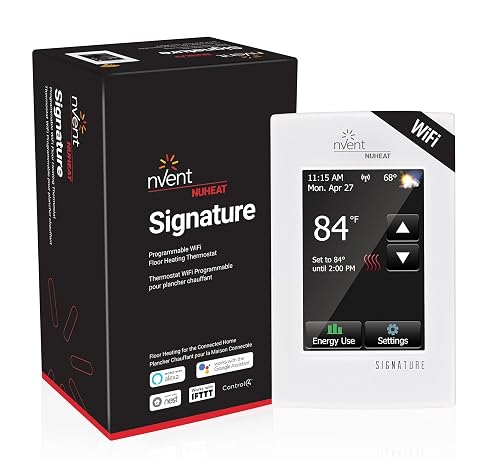
Nuheat nVent Signature AC0055 WiFi Floor Thermostat
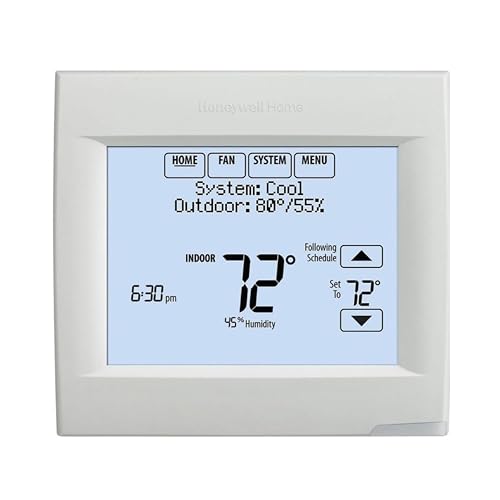
Honeywell TH8321WF1001/U Wi-Fi 8000 Thermostat
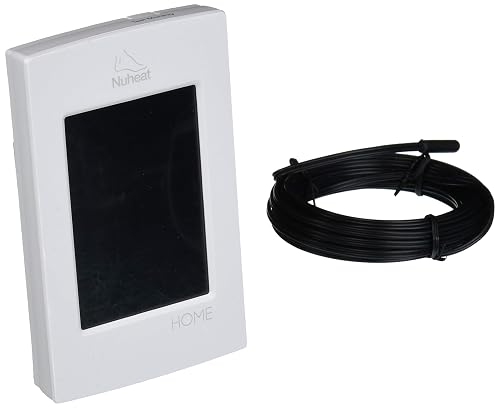
nVent Home Dual-Voltage Touchscreen Thermostat
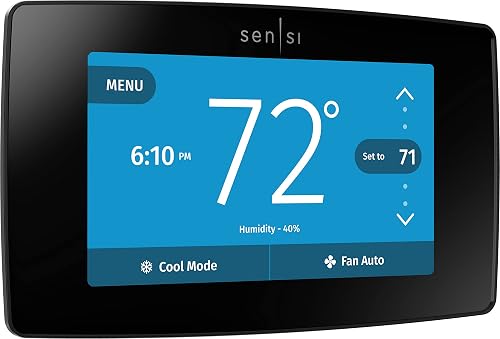
Sensi Touch ST75 Smart Thermostat (Black)
OJ Microline UDG4-4999 Floor Heating Thermostat

Google Nest Learning Thermostat 4th Gen (Obsidian)

Google Nest Learning Thermostat 4th Gen (Silver)
Honeywell TH9320WF5003 Wi-Fi Programmable Thermostat
Inside Each Recommended Option
The ConnectPlus leans into the kind of remote control floor-heating households want. The 4.3-inch color screen sits flush in a wall plate, and once it joins your home network, you can nudge the bathroom tiles warm before stepping out of bed. SunTouch built it for electric radiant systems, so you skip the awkward “does my forced air even work here” question that comes up with general HVAC models.
Compared to the Nuheat Signature covered next, this one trades some design polish for a more straightforward menu layout. Owners running a single mat or a small zone tend to find it approachable, especially if the mat came bundled with the thermostat from the start.
The Upside
- Wi-Fi control means you can start the floor warming from the office, useful in chilly entryways and basements
- 4.3-inch display is large enough to read across a room without squinting
- Compatible with common voice assistants, so you can call out a temperature change while your hands are flour-covered
- Weather compensation adjusts run time based on outdoor conditions, saving electricity on mild days
Things To Consider
- Setup wants a stable 2.4 GHz network; older routers sometimes need a quick reset before pairing
- The screen wakes with a tap, but the menu structure takes a few days to feel intuitive
- Floor-sensor wire sold separately for some configurations, so budget a small add-on if you do not already have one in the wall
At A Glance
Who It Suits Best
Homeowners with electric radiant floors who want app and voice control without a steep learning curve.
Consider Something Else When
The Honeywell TH8321WF1001/U Wi-Fi 8000 Thermostat is a better match when you run multi-stage forced air rather than a floor mat.
The Signature trades the practical look of the SunTouch for a slim glass face that disappears into modern interiors. You tap the surface, the display wakes, and the schedule sits a swipe away. The app experience feels closer to a consumer smart-home product than a contractor-grade control.
For renovation projects where the wall plate is visible from the kitchen island, the cleaner silhouette pays off. It carries the same floor-heating focus as the ConnectPlus, so you still get accurate floor sensing and a built-in scheduler.
Standout Benefits
- Edge-to-edge glass front looks at home in a finished living space or a high-end master bath
- App control covers iOS, Android, and a web portal, which helps when household members use different devices
- Integrates with common smart-home hubs, so the floor heat joins the rest of your routines
Points To Note
- Price sits above basic floor thermostats, so it makes the most sense during a remodel rather than a quick swap
- Glass surface shows fingerprints and water spots in steamy bathrooms, so a microfiber cloth comes in handy
- Full feature set unlocks once you create an account and connect it to Wi-Fi, which adds a setup step beyond older dial thermostats
Made For
Design-focused renovators who want a thermostat that looks intentional next to tile and stone.
Not Your Match When
The nVent Home Dual-Voltage Touchscreen Thermostat is a smarter pick for a single-room retrofit on a tighter budget.
The Wi-Fi 8000 sits on the opposite end of the touchscreen category from floor-heating models. It handles up to three heating stages and two cooling stages, so it slots into homes with heat pumps, multi-stage furnaces, or a combination system that would overwhelm simpler controls. The screen is bright and the menu leans functional, not decorative.
Think of it as a control panel for a serious HVAC closet rather than a designer accent. Compared to the Sensi Touch covered later, the Honeywell gives you more wiring flexibility, but it asks for a C-wire (a common wire that delivers continuous power) and a careful read of the wiring diagram before you commit.
Practical Advantages
- Up to 3 heat / 2 cool staging covers heat pumps with auxiliary strips and dual-fuel setups
- Remote control through Honeywell’s app helps when you forget to adjust before leaving on a trip
- Works in light commercial spaces too, so a small office or a studio apartment building can share inventory
Honest Caveats
- Requires a C-wire for stable power, which means older homes may need a wiring adapter or a pro install
- The interface is information-dense, so first-time users should keep the manual nearby during the first week
- Setup menus assume familiarity with staging and system type, so DIY newbies may want a technician
Best Suited To
Owners of multi-stage systems who want reliable Wi-Fi control without giving up technical flexibility.
Skip It When
The Sensi Touch ST75 Smart Thermostat (Black) suits a typical single-stage central HVAC setup far better and skips the heavier wiring demands.
The Home thermostat from nVent is a no-nonsense pick for a single electric floor zone. Its 3.5-inch color screen sits in a clean white frame, and the menu keeps things simple with a 7-day schedule and a physical on/off switch on the side. A GFCI (ground fault circuit interrupter, a safety device that cuts power if it detects a current leak) sits right in the unit, which matters in a bathroom or kitchen where moisture is part of daily life.
It does not chase the smart-home crowd the way the Nuheat Signature does. That is the point, and for many owners the calm interface is a feature in itself.
Notable Upsides
- Dual voltage (120V and 240V) means one SKU covers most North American floor-heating installs
- Built-in Class A GFCI protection adds a layer of safety in wet rooms without needing a separate breaker
- Energy usage monitor shows how much power the floor draws, helpful when you want to track a bill spike
Trade Offs
- No app or voice control, so adjustments happen at the wall, which can feel old-school to smart-home users
- The 3.5-inch display is smaller than the SunTouch and Nuheat options, so menu text feels tighter
- Lacks outdoor temperature or weather compensation features that the ConnectPlus includes
Right Fit For
Single-room electric floor projects where reliability and built-in safety matter more than smart features.
Look Elsewhere When
The OJ Microline UDG4-4999 Floor Heating Thermostat is a stronger fit if you want detailed energy logs and dual sensing in the same package.
The Sensi Touch comes from Emerson’s long HVAC history, and you can feel it in the wiring guidance and the in-app setup walkthrough. The black color screen reads like a small tablet, the app walks you through each terminal, and most homeowners handle the install in under an hour with a screwdriver. Privacy shows up in the marketing because Sensi stores data on the device rather than shipping every reading to the cloud.
Compared to the Honeywell TH9320WF5003 covered later, the Sensi leans simpler and friendlier. You give up the seven-day depth of a heavier commercial model, but most households do not need that.
Advantages To Know
- Color touchscreen pairs with a strong mobile app for remote scheduling, useful for shift workers and travelers
- Works with common voice assistants, so it slots into routines like “good morning” alongside lights and coffee
- DIY-friendly install with clear terminal labels, which saves a service call for confident homeowners
Some Limits To Know
- Requires a C-wire, and adapters are not always included, so check the box before you start
- Less suited to multi-stage heat pump setups than the Honeywell Wi-Fi 8000
- Glossy black face shows smudges in bright hallways, so a quick wipe is part of ownership
Who Will Love This
Homeowners with a standard central HVAC system who want app control, a clean look, and a self-install project.
A Better Fit Elsewhere
The Google Nest Learning Thermostat 4th Gen (Obsidian) is the better match for people who want a thermostat that learns a schedule rather than you programming it.
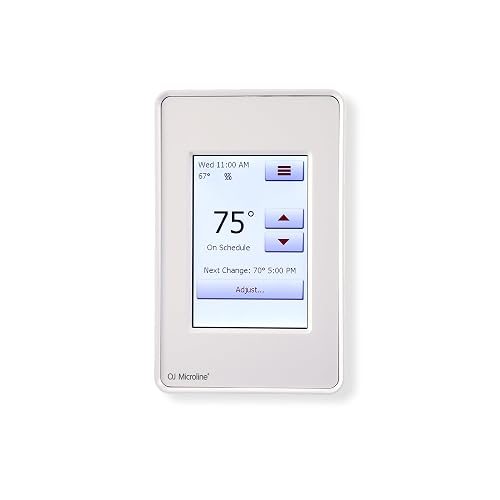
OJ Microline built the UDG4-4999 for the data-curious floor-heating owner. Dual sensing (the thermostat reads both air and floor temperature) keeps the mat from overcooking the room, and a power-logging feature spits out energy reports you can pull on a laptop or phone. The Class A GFCI sits inside the unit, so a wet-room install stays code-friendly without extra hardware.
It feels closer to a small piece of test equipment than a home accessory. If that sounds appealing rather than intimidating, the depth here is rare in this category.
What Works In Its Favor
- Dual sensing reads both floor probe and ambient air, which prevents the warm-floor-stuffy-room problem
- Energy monitoring with power logging gives a clear picture of running costs per zone
- Supports 120V and 240V systems, so one model covers most North American installs
Where It Is Less Suited
- Energy reports live behind a software portal, so the casual user may not explore them often
- More menu layers than a basic thermostat, so plan a longer first-week setup
- No native voice assistant integration, which puts it behind the SunTouch and Nuheat for hands-free control
Quick Facts
Perfect Match For
Floor-heating owners who like seeing kilowatt-hour data and want finer control over their zones.
Another Choice May Suit
The SunTouch SunStat ConnectPlus Smart Wi-Fi Thermostat 4.3″ makes more sense for a shopper who cares more about app and voice control than logs.
The 4th generation Nest leans into Google’s smart-home stack while keeping the round dial that made the line famous. The included Nest Temperature Sensor (2nd gen) lets you measure a specific room, like a nursery or a finished basement, instead of trusting the hallway reading. Over a few weeks it picks up on your patterns and starts shifting temperatures before you ask.
It handles central HVAC rather than electric radiant floors, so it is not a swap-in for the floor-heating models earlier in this list. For typical forced-air households, the learning curve stays gentle because the thermostat does most of the scheduling for you.
What Pays Off
- Adaptive learning builds a schedule from your manual adjustments, so you program less over time
- Included remote sensor targets a specific room, useful for homes with uneven temperatures
- Obsidian finish gives the dial a darker, more architectural look than older Nest colors
Less Ideal Details
- Best features lean on the Google Home ecosystem, so it works less smoothly for households on other platforms
- Floor heating systems need a different model entirely, so this is HVAC-only
- Premium price tag, which may feel steep if you just need a programmable schedule
Who Should Grab It
Central HVAC households that want a thermostat to learn their routine and enjoy the Google Home app.
Swap It Out When
The Honeywell TH8321WF1001/U Wi-Fi 8000 Thermostat is the better tool for multi-stage heating and cooling with deeper wiring control.
The Silver version of the 4th gen Nest shares every smart feature with the Obsidian model above, but the brighter metal finish suits lighter walls, Scandinavian-style rooms, and kitchens with stainless hardware. It still ships with the second-generation temperature sensor, so the room-balancing benefit travels with it.
For shoppers who care about how the dial looks against a backsplash or a feature wall, color often becomes the deciding factor. Functionally, you are choosing the same experience as the Obsidian pick.
Why It Works Well
- Polished silver dial brightens up white or neutral walls better than darker thermostat finishes
- Same learning engine as the rest of the 4th gen line, so feature parity is real
- Bundled sensor simplifies buying, since you do not need a separate accessory to balance rooms
Practical Considerations
- Reflective surface catches fingerprints under direct sunlight, so a cloth nearby is helpful
- Same ecosystem dependence as the Obsidian model, so non-Google households lose some polish
Built With In Mind
Style-led smart homes where the thermostat has to match a brighter palette and integrate with Google Home.
Where A Sibling Pick Shines
The Sensi Touch ST75 Smart Thermostat (Black) is a better match if you want a color touchscreen with simpler wiring and broader platform support.
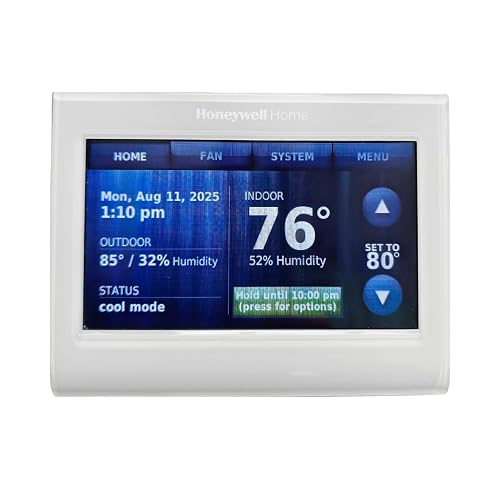
The TH9320WF5003 closes the list with a familiar Honeywell feel: a 7-day schedule, custom on-screen readouts, and Wi-Fi control through the Total Connect Comfort app. Voice control is available through compatible speakers, which makes it friendly for routines like “bedtime.” The screen is customizable, so you can show only the temperatures and times you care about.
It does not run electric radiant floors, so it is the wrong tool for the SunTouch or Nuheat crowd. For typical central air, it sits in the sweet spot between heavy commercial controls and a basic programmable unit.
What Stands Out
- 7-day programming lets each day have its own schedule, which helps shift workers and weekend routines
- Customizable display keeps the home screen uncluttered with only the data you want
- Energy-saving mode nudges setpoints toward efficiency when you are away
Factors To Consider
- Professional installation is recommended for some setups, which adds to the total project cost
- App experience feels a step behind the newer Sensi and Google apps in terms of polish
- Limited support for electric floor heating, so it pairs with forced-air systems
Whose Shelf It Belongs On
Households with a standard central HVAC system and a structured weekly routine that benefits from a detailed schedule.
Reach For A Different Pick When
The Google Nest Learning Thermostat 4th Gen (Obsidian) is a better match if you prefer the thermostat to learn your routine instead of programming each day by hand.
Picking the Right Fit for Your Heating System
Match the thermostat to the load
Before falling in love with a screen, confirm what the thermostat actually controls. Electric radiant floors need a model like the SunTouch ConnectPlus, the Nuheat Signature, the nVent Home, or the OJ Microline UDG4-4999, all of which read a floor probe and manage a mat or cable. Standard central HVAC, including a heat pump, works with whole-home controls like the Sensi Touch, the Honeywell Wi-Fi 8000, the Honeywell TH9320WF5003, and the Google Nest 4th gen. Picking the wrong category means the schedule and the sensors never line up with the system you have on the wall.
Mind the wiring, especially the C-wire
A C-wire, or common wire, carries continuous 24-volt power to a smart thermostat so the Wi-Fi radio stays awake. Many older homes only run four conductors to the wall plate, which leaves the smart functions starved. The Sensi Touch, Honeywell Wi-Fi 8000, and Nest 4th gen all benefit from a C-wire, and adapters exist but cost extra time. Floor-heating models usually draw from a dedicated supply and do not need the same C-wire treatment, which makes them easier to swap in during a remodel.
Decide how much you want to program
Some households love hand-tuning a 7-day schedule, and the Honeywell TH9320WF5003 rewards that effort. Others would rather the thermostat watch and adapt, which is where the Nest 4th gen shines. A middle path lives in the Sensi Touch: a familiar weekly schedule with app shortcuts when life gets messy. Comfort here is about how much mental energy you want to spend on a wall device.
Look at sensors, not just the screen
A bright touchscreen is nice, but the sensor setup determines how evenly the home feels. Floor models with dual sensing (air and floor) keep tile from getting too warm on a sunny day, while whole-home thermostats with a remote sensor, like the Nest 4th gen, balance a hot upstairs against a cool basement. The right sensor configuration can matter more than screen size once the novelty wears off.
Smart Spending Across the Lineup
Common pitfalls when shopping this category
The easiest mistake is choosing a sleek smart thermostat for an electric floor system, then watching the floor sensor error out on day one. Check whether the model lists a floor probe, a GFCI, and the correct voltage before you click buy. The other common trap is skipping the C-wire check, which leaves you with a thermostat that keeps rebooting and a return label in your hand.
Where the higher tier earns its money
Premium picks like the Google Nest 4th gen, the Honeywell Wi-Fi 8000, and the OJ Microline UDG4-4999 add sensors, multi-stage handling, or detailed energy logs that basic models skip. Those extras matter for multi-zone homes, heat pumps, and anyone tracking kilowatt-hours. For a single room with predictable use, a mid-tier pick handles the job without the extra spend.
Frequently Asked Questions
Do all touchscreen thermostats need a C-wire?
Not every model, but most Wi-Fi thermostats, including the Sensi Touch, Honeywell Wi-Fi 8000, and Google Nest 4th gen, perform best with a C-wire for steady power. Electric floor-heating models usually pull from a dedicated power lead, so they bypass the C-wire question entirely.
Can one thermostat control both floor heating and forced air?
Most picks on this list focus on a single system type, so a combined setup usually needs a separate floor thermostat plus the main HVAC control. A model like the Honeywell Wi-Fi 8000 can manage multi-stage forced air, while the SunTouch ConnectPlus runs electric floors, and the two can coexist in the same home.
Are touchscreen thermostats hard to install?
Floor-heating thermostats often replace a single-gang box with clear high-voltage wiring, which many confident DIYers handle. Smart HVAC models vary, with the Sensi Touch leaning DIY-friendly and the Honeywell Wi-Fi 8000 often calling for a pro, especially in homes without a C-wire.
Will a touchscreen thermostat save energy?
A programmable schedule, an adaptive learning routine, or detailed energy logs can all reduce waste by trimming run time when the home is empty. The savings depend on how often you adjust setpoints today, since a smarter schedule helps most when you forget to turn the system down.
What is a GFCI, and why does it matter for floor heat?
A GFCI, or ground fault circuit interrupter, cuts power quickly if it detects a current leak, which is important in bathrooms and kitchens where water is nearby. Models like the nVent Home and the OJ Microline UDG4-4999 include a built-in Class A GFCI so the floor heat stays code-friendly without an extra breaker.
Closing Remarks
The right touchscreen thermostat comes down to matching the system on your wall, the wiring behind it, and the amount of attention you want to give a schedule. Floor-heating homes get the most from a dedicated floor model, while central HVAC households usually do well with a smart universal pick. Take a quick look at your breaker panel, your existing wiring, and your daily routine, and the choice in this list should narrow itself fast.


