

Picking the right wall thermostat shapes how comfortable your home feels every single day. The right pick trims wasted energy, learns your routine, and keeps rooms steady through harsh winters and humid summers. This roundup walks through nine solid options, from app-driven smart thermostats to straightforward programmable wall units, so you can match the right fit to your home, system, and budget.
The Choices Worth Comparing
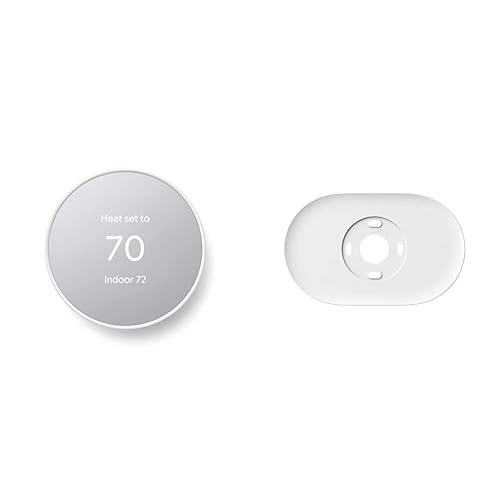
Google Nest Thermostat with Trim Kit (Snow)
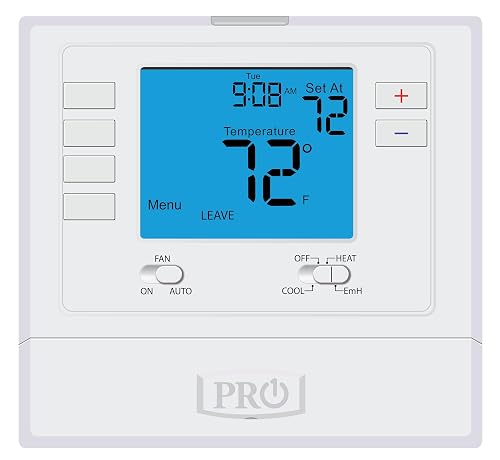
PRO1 T725 Programmable Heat Pump Thermostat
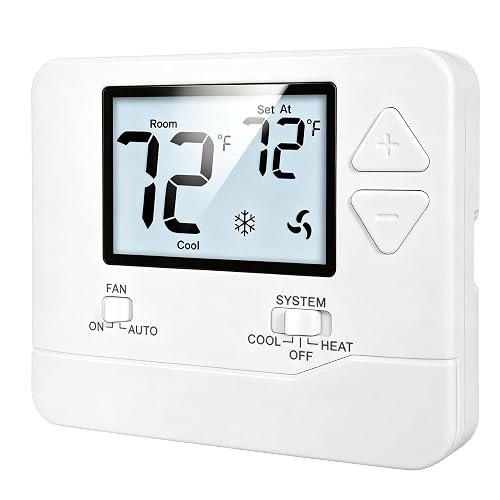
Heagstat 1 Heat/1 Cool Non-Programmable Thermostat
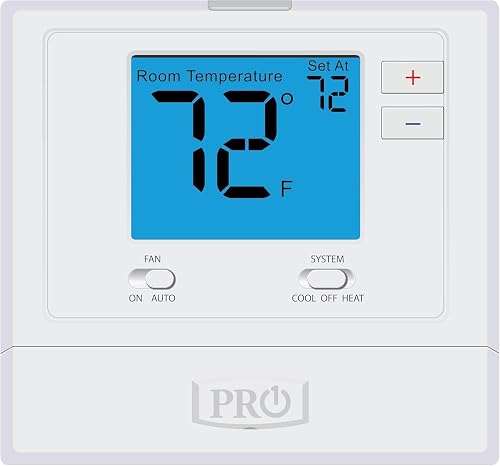
PRO1 T701 Single Stage Non-Programmable Thermostat

PRO1 T715 Multi-Stage Programmable Gas Thermostat
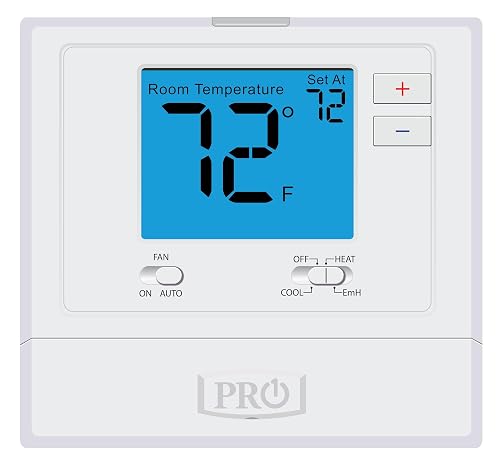
PRO1 T721 Non-Programmable Heat Pump Thermostat

Google Nest Learning Thermostat 4th Gen (Obsidian) + Sensor

Google Nest Learning Thermostat 4th Gen (Silver) + Sensor

PRO1 T805 Programmable Conventional Thermostat
What Each Pick Brings To The Table
The Google Nest Thermostat feels like the natural first step into app-driven climate control. It carries an ENERGY STAR certification, which signals that the unit meets independent efficiency benchmarks, and it ships with a trim plate plus a steel plate for installs over electrical boxes. The included mounting hardware is a small but thoughtful touch, since older homes often have paint rings or wider openings that a standard base won’t cover cleanly.
Set-up runs through the Google Home app on Android or iPhone, and a built-in presence-sensing routine nudges temperatures toward eco-friendly levels when nobody’s home. You can program custom schedules, adjust from the couch, or hand off control to other family members with their own logins. Owners upgrading from a basic manual dial tend to notice the difference within a single billing cycle.
Everyday Advantages
- ENERGY STAR certification supports lower utility draw without manual babysitting
- Included trim plate hides older paint lines around the wall opening
- Steel mounting plate lets the unit sit over a standard electrical box
- Schedule control through the Google Home app avoids fiddling with tiny buttons on the wall
- Auto-away behavior trims heating and cooling when the house is empty
Things To Consider
- Full feature set leans on a stable home Wi-Fi connection and the Google Home app
- Trim plate is decorative rather than structural, so wall patching may still be needed for larger gaps
Who It Suits Best
Connected homeowners stepping into app-based climate control for the first time, especially in homes with cosmetic wall blemishes from previous thermostats.
Where Another Pick Suits Better
Multi-room households that want per-room temperature readings should look at the Google Nest Learning Thermostat (4th gen) Obsidian, which ships with a remote temperature sensor.
The PRO1 T725 is the kind of wall unit an installer reaches for when a heat pump system needs more than a basic dial. It supports 2 heat/1 cool heat pump configurations alongside 1 heat/1 cool conventional setups, and it offers 7-day or 5/1/1 scheduling so weekdays and weekends can each get their own routine. A 4-square-inch blue backlit screen surfaces mode and set-point data at a glance.
Compared with the Google Nest Thermostat above, the T725 trades app control for tactile buttons and a familiar interface that does not depend on Wi-Fi. For households with patchy internet or anyone who prefers hardware buttons, that trade is meaningful. The T700 platform also gives the unit a roomy, readable display without forcing you to squint across the hallway.
A Few Highlights
- Two heating stages support a wider range of heat pump setups
- 7-day scheduling handles mixed family routines without manual resets
- Backlit display remains readable in low light and at night
- Conventional fallback lets one unit serve multiple system types
Worth Noting
- No wireless connectivity, so remote adjustments require being at the wall
- Programming takes longer than app-driven competitors if the schedule changes often
- C-wire or proper common-wire setup is often required for reliable power
Made For
Heat pump households with two-stage equipment who prefer hard-button control over app-driven scheduling.
Consider Something Else When
Anyone wanting phone-based remote access should pick the Google Nest Thermostat with Trim Kit (Snow) for its app-first approach.
The Heagstat Non-Programmable Thermostat is built for the simplest possible single-stage system. It works with 24VAC conventional forced-air setups, covering gas, oil, and electric furnaces paired with a separate air-conditioning condenser. The white backlight is bright enough to read across a dim hallway, and the front face stays uncluttered on purpose.
Wire count matters here. The base accommodates two to five wires cleanly, so it suits older homes that lack a common wire or extra conductors. That makes it a sensible swap for a builder-grade dial in a rental unit or a guest room. Compared with the PRO1 T725 above, the Heagstat is intentionally stripped down, with no scheduling and no learning features, which is exactly what some properties need.
The Value In It
- Low entry cost suits rentals, secondary rooms, and quick replacements
- Two-to-five wire compatibility covers most legacy single-stage installs
- Backlit display keeps the set-point readable in dim hallways
- No app or account setup, which keeps tenant-facing use simple
Trade Offs
- No scheduling, so set-point changes happen manually at the wall
- Not compatible with heat pump systems or multi-stage equipment
- Six-to-eight wire systems are not supported, which rules out some newer setups
Key Specs
Best Suited To
Landlords and homeowners with simple single-stage furnaces who want an inexpensive, no-fuss wall swap.
Not Your Match When
Households running multi-stage gas or heat pump equipment should look at the PRO1 T715 Multi-Stage Programmable Gas Thermostat instead.
The PRO1 T701 takes the same T700 platform as the T725 and pares it down to single-stage conventional use. You get a 4-square-inch blue backlit display, a glow-in-the-dark light button, and manual set-point control without scheduling complexity. For a parent or older relative who just wants to nudge the temperature up or down, the simpler interface removes almost every learning curve.
Where the Heagstat above leans on the most basic possible build, the T701 adds a glow-in-the-dark light button and a more readable screen. That’s a small quality-of-life bump, and it tends to matter in real hallways where the nearest lamp might be fifteen feet away. If you don’t need schedules, the T701 is a polite middle ground between the cheapest dial and a full programmable wall unit.
Everyday Wins
- Glow-in-the-dark button helps locate the unit in a power outage
- Backlit display remains readable in dim rooms and basements
- Manual set-point control avoids accidentally erased schedules
- Same T700 platform family as the T725 for a familiar feel
Points To Note
- No app connectivity, so any change has to happen at the wall
- Single-stage only, so multi-stage homes will need a different model
Feature Snapshot
Who Should Grab It
Anyone with a single-stage conventional system who wants a slightly nicer wall unit than the cheapest dial on the market.
Look Elsewhere When
Households that want seven-day scheduling should pick the PRO1 T805 Programmable Conventional Thermostat, which adds flexible scheduling in the same family.
The PRO1 T715 is aimed squarely at two-stage gas furnace systems, which is a common setup in regions with bitter winters. It supports 2 heat/2 cool configurations and offers 7-day, 5/1/1, or fully non-programmable modes, so installers and end users can pick the right depth of scheduling. You also get battery or hard-wire power options, which helps when the existing wall cavity has limited access to a common wire.
Where the PRO1 T725 above handles heat pumps, the T715 leans into multi-stage gas. That distinction matters, because mis-wiring a thermostat to the wrong system type is a common DIY trip-up. The 4-square-inch backlit display and glow-in-the-dark button echo the T701 and T725, which keeps the family feel consistent across rooms or properties.
What Pays Off
- Two-stage heating and cooling matches mid-to-high-end furnace systems
- Three schedule modes let installers set up exactly the depth you need
- Battery or hard-wire power sidesteps tricky common-wire installs
- Backlit display and glow button remain easy to find after dark
Honest Caveats
- Programming depth may feel like overkill in homes with one fixed routine
- No Wi-Fi, so remote access still means standing at the wall
Right Fit For
Households running two-stage gas furnaces that want flexible scheduling without committing to a connected thermostat.
A Better Fit Elsewhere
Heat pump owners should pick the PRO1 T725 Programmable Heat Pump Thermostat, which is built for that equipment family.
The PRO1 T721 is the heat pump version of the T701, with one notable upgrade. It supports 2 heat/1 cool heat pump systems or 1 heat/1 cool conventional systems, so an installer can carry a single SKU across mixed properties. The 4-square-inch blue backlit display and glow-in-the-dark light button are familiar touches, and the unit runs on AA batteries or hard-wire power depending on the install.
Versus the PRO1 T725 above, the T721 drops the programmable scheduling and lands at a more approachable point in the lineup. For a vacation home or a basement heat pump setup, that stripped-down approach is often exactly what you want, since schedules tend to drift and the manual dial remains the simplest way to keep the space comfortable.
Useful Highlights
- Heat pump or conventional compatibility covers mixed system homes
- AA battery or hard-wire power avoids rewiring during install
- Glow-in-the-dark light button is handy in basements and utility rooms
- Backlit display keeps the set-point readable at night
Room For Improvement
- No scheduling, so manual adjustments are the only way to change set-points
- Two-stage heat support is limited to a single cool stage, which may not match every equipment setup
Feature Card
Perfect Match For
Heat pump owners who prefer tactile button control and don’t need app connectivity or weekly scheduling.
Swap It Out When
Anyone wanting app-based scheduling should look at the Google Nest Thermostat with Trim Kit (Snow), which puts weekly routines on a phone.
The Google Nest Learning Thermostat (4th gen) is the brainier sibling of the entry-level Nest covered earlier. It studies the temperatures you prefer across the day, adapts as routines shift, and now ships with a Nest Temperature Sensor (2nd gen) so a second room can feed readings back to the main unit. The Obsidian finish is a deep, polished black that anchors a darker wall palette better than a white face would.
Compared with the original Nest Thermostat above, the 4th gen adds that learning layer and supports a wider system compatibility range, depending on your home’s wiring. You can read the current set-point from across the room thanks to the larger edge-lit display, and the included remote sensor is a real-world win for homes where the thermostat sits in a hallway but the family lives in the living room.
Real Benefits
- Learning behavior reduces manual schedule tweaks over time
- Remote temperature sensor helps balance bedrooms that run hot or cold
- Edge-lit display reads clearly from across a large room
- Obsidian finish blends into modern dark-wall interiors
Soft Spots
- Higher up-front cost than entry-level Nest or any PRO1 unit here
- Common-wire or power accessory is often required for proper install
Whose Shelf It Belongs On
Tech-forward households in multi-room homes that benefit from per-room temperature balancing and want the thermostat to learn over time.
Reach For A Different Pick When
Shoppers who prefer a lighter finish should pick the Google Nest Learning Thermostat (4th gen) Silver + Sensor, which shares the same internals.
The Silver version of the 4th-gen Nest Learning Thermostat brings the same learning engine and bundled sensor to homes that lean toward lighter wall finishes. Functionally, it mirrors the Obsidian unit down to the screen, the Wi-Fi stack, and the included Temperature Sensor (2nd gen), so the choice between them is genuinely about look rather than features.
Versus the entry-level Google Nest Thermostat with Trim Kit at the top of this list, the 4th gen adds that adaptive learning and a larger display that reads better from a distance. For open-plan living rooms, the difference tends to be obvious, since the dial is the visual center of the wall, not just a control tucked into a corner.
Practical Pluses
- Silver finish pairs well with white or pastel walls
- Remote sensor helps prioritize the room that matters most
- Learning routine trims manual schedule edits over weeks of use
- Edge-lit display remains readable at night without flooding the room
Possible Compromises
- Same premium pricing as the Obsidian sibling, so the finish is the only real difference
- Smart features depend on a stable Wi-Fi network and the Google Home app
Quick Facts
Built With In Mind
Style-conscious smart home households that want learning behavior and a lighter finish to match brighter walls.
Where A Sibling Pick Shines
Households with darker walls should pick the Google Nest Learning Thermostat (4th gen) Obsidian + Sensor, which disappears into that color scheme better.
The PRO1 T805 is the largest-display option in the T800 platform, which makes it a strong fit for living areas where the thermostat is read from across the room. It supports 1 heat/1 cool conventional systems, offers 7-day, 5/1/1, or non-programmable modes, and runs on battery or hard-wire power. The 7-square-inch blue backlit screen is a noticeable jump up from the 4-square-inch displays on the T700 family.
Where the PRO1 T701 keeps things minimal, the T805 is the version to pick if you want scheduling without giving up the readability. That extra screen real estate also helps if a family member has low vision or simply prefers large numerals. Compared with the Google Nest units, the T805 has no app layer, which some households genuinely prefer.
Advantages To Know
- 7-square-inch display is the largest in the PRO1 roundup here
- 7-day or 5/1/1 scheduling matches varied family routines
- Battery or hard-wire power eases common-wire headaches
- Backlit screen stays readable from across a wide room
Potential Drawbacks
- No Wi-Fi, so remote adjustments still happen at the wall
- Larger footprint may not match a smaller decorator wall plate
Product Snapshot
Right Fit For
Conventional-system households that want a generously sized display and flexible scheduling without app dependency.
Another Choice May Suit
Households ready to step into app-based climate control should look at the Google Nest Thermostat with Trim Kit (Snow) for a fully connected setup.
Choosing a Thermostat That Fits Your System and Habits
Picking a thermostat starts with the equipment on the other side of the wall. A single-stage conventional furnace has very different needs than a two-stage gas system or a heat pump, and mismatching those often leads to short cycling or missed heating stages. Check your existing thermostat’s wire count and labeling before shopping. The number of conductors in the wall, the presence of a common wire, and whether the unit lists C, W, Y, or G terminals tell you which of these nine models will physically fit your setup.
Connectivity comes next. App-driven models like the Google Nest line unlock remote control, learning routines, and integrations with the rest of a smart home, but they lean on a stable Wi-Fi network and a phone you actually use. Hard-button units like the PRO1 T725 and T805 trade app access for tactile reliability, which some households genuinely prefer. For older homes, watch the wire count closely. Models such as the Heagstat and PRO1 T721 support battery or limited-wire installs that sidestep common-wire headaches.
Think about who actually changes the temperature. A larger 7-square-inch display on the PRO1 T805 helps anyone reading from across the room. A glow-in-the-dark button on the T701, T715, and T721 is a small but real win in basements and hallways. For multi-room homes, a remote sensor bundled with the Google Nest Learning Thermostat (4th gen) lets one room’s reading steer the whole system, which often matters more than any other feature on the spec sheet.
Finally, weigh the routine. A weekly schedule that never changes is fine on a programmable wall unit, but shifting patterns tend to favor the learning behavior of the 4th gen Nest. ENERGY STAR certification on the entry-level Google Nest signals independent efficiency verification if utility savings are part of your goal. Match the right depth of features to the right equipment, and any of these nine options should keep your home comfortable year-round.
Key Considerations Across These Picks
Pitfalls Shoppers Hit
The most common misstep is buying a thermostat before checking the wire count. A five-wire system cannot safely power a unit that expects a common wire, and a heat pump labeled thermostat will not behave correctly on a conventional furnace. Always pull the faceplate off the existing unit and note the terminal letters before clicking through listings.
Another trap is assuming every “smart” thermostat needs constant fiddling. The Google Nest Learning Thermostat (4th gen) is designed to fade into the background after the first couple of weeks, and the entry-level Google Nest Thermostat uses a similar gentle automation. If you want to stay hands-off, pick a model that matches your appetite for app time rather than the flashiest screen on the page.
What The Higher Tier Buys
Spending more usually buys a learning engine, a bundled temperature sensor, and a larger display. The 4th gen Nest picks up the remote sensor and adaptive scheduling, which most PRO1 units in this list skip. The PRO1 T805 lands in the middle by trading app control for the largest non-smart screen in the group, which is the upgrade worth paying for if the thermostat is the visual center of the room.
Frequently Asked Questions
Do I need a common wire for any of these thermostats?
Several PRO1 models accept battery power, including the T721, T715, and T805, so a missing common wire is workable. The Google Nest units typically expect a common wire or a power accessory to run reliably.
Will any of these work with a heat pump system?
The PRO1 T725 and T721 both list heat pump support. Heat pump households should match the unit to the stage count, while conventional furnace owners should avoid the heat pump SKUs to prevent mis-wiring.
Can a thermostat really lower my utility bill?
The entry-level Google Nest Thermostat carries ENERGY STAR certification, which signals independent efficiency verification, and the 4th gen Nest adds learning behavior that often trims wasted heating and cooling over time. Actual savings depend on your system, your schedule, and how often the set-point is left at an extreme temperature.
Do I need Wi-Fi to use a programmable wall unit?
No. The PRO1 T725, T715, and T805 all run schedules directly on the wall without a network connection. Wi-Fi is only required for app-driven models like the Google Nest line.
How hard is it to install one of these myself?
Most homeowners comfortable with a screwdriver and a voltage checker can swap a like-for-like wall unit, especially models that accept battery power. Heat pump and multi-stage systems may benefit from a professional installer to confirm terminal mapping before powering the unit back on.
Final Verdict
A thermostat is one of the few upgrades that pays you back in daily comfort, and the right pick depends on your system type, your tolerance for apps, and how visible the wall unit will be. Match the equipment first, then layer in the features that actually fit your routine. From there, any of these nine options should keep your home comfortable season after season.


