

Picking a thermostat used to mean choosing between a simple dial and a basic programmable box. Now the category has split in two: no-frills workhorses for one-room or single-stage heating systems, and connected controllers that learn your routine, talk to voice assistants, and track energy use. Most homes need a clear match between the thermostat and the HVAC wiring behind the wall, so the smart pick starts with what your system can actually support.
Whether you’re swapping a broken unit, finishing a renovation, or finally stepping into app-based control, the right choice comes down to compatibility, the schedule you want to live with, and how much wall-time you want to spend programming. The ten options below cover the full range, from heat-only basics to color-screen smart thermostats with room sensors.
The Lineup, Simplified
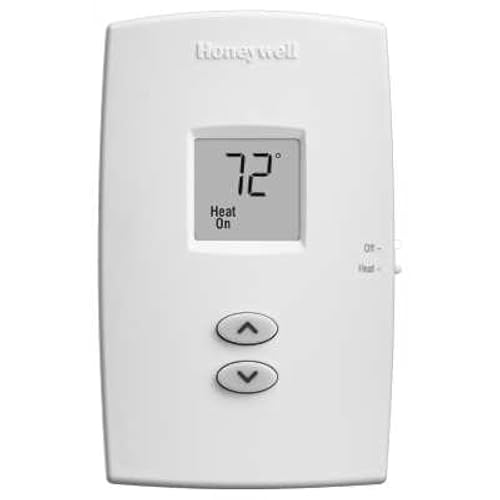
Honeywell TH1100DV1000 PRO 1000 Vertical Non-Programmable Thermostat
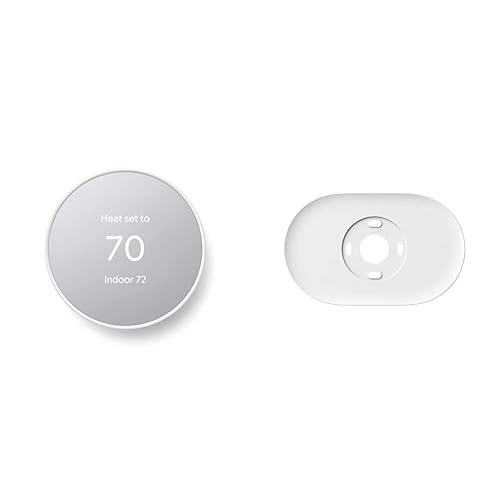
Google Nest Thermostat with Trim Kit (Snow)
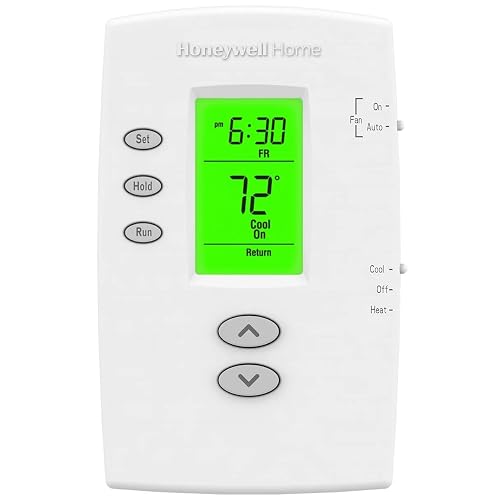
Honeywell PRO 2000 Vertical Programmable Thermostat
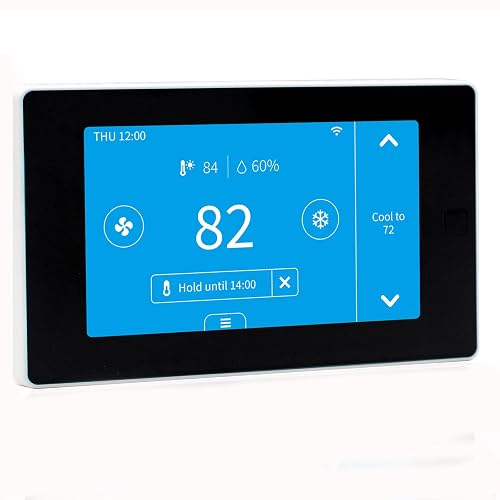
EdgeAnt WiFi Smart Thermostat with C-Wire Adapter
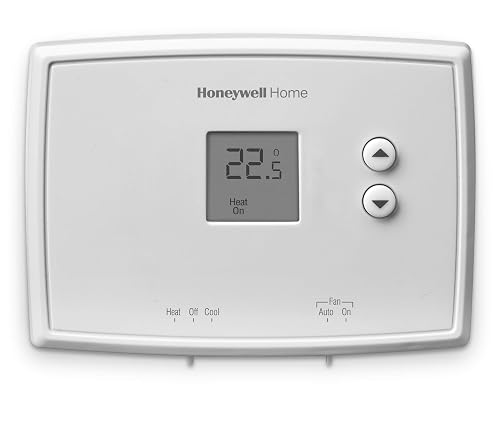
Honeywell Home RTH111B Digital Non-Programmable Thermostat
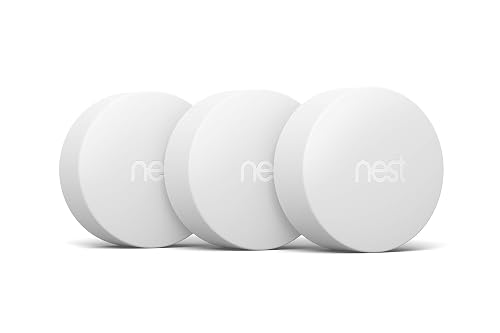
Google Nest Temperature Sensor 3-Pack
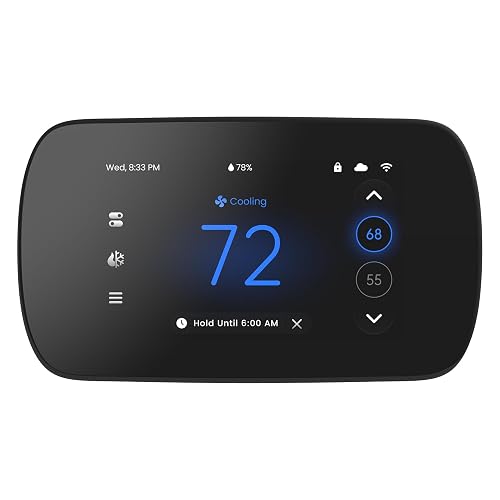
EdgeAnt 4.3-Inch WiFi Touchscreen Thermostat

Honeywell TH3210D1004 Non-Programmable Digital Thermostat
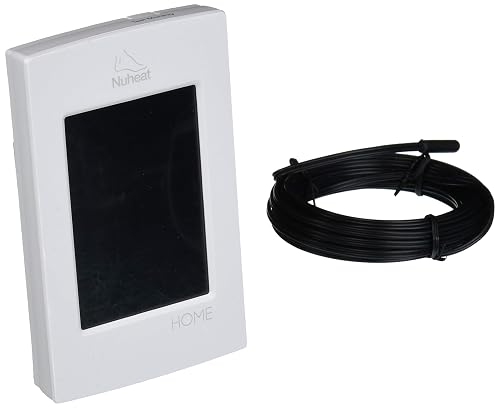
nVent Home Dual-Voltage Floor Heating Thermostat
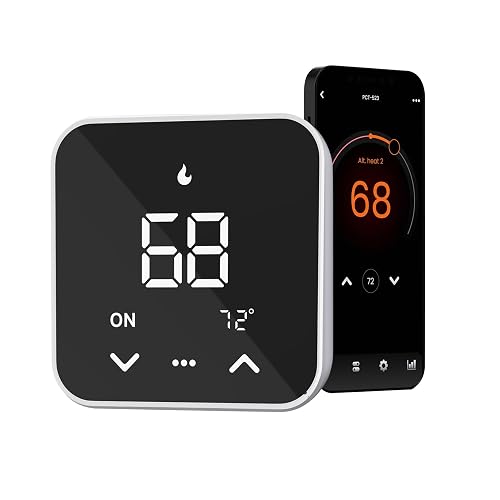
EdgeAnt WiFi Thermostat, 7-Day x 8-Period (Black)
More On The Choices That Made The List
Heating-only homes and baseboard-style single-stage systems rarely need a learning thermostat. The Honeywell TH1100DV1000 PRO 1000 is built for exactly that situation: one stage of heat, no cooling, no programming to learn, no app to set up. The vertical layout slides into a standard 2×4 wall opening and the premier white faceplate blends with most trim, so it disappears in utility rooms and hallways.
You get a manual up-and-down slider for setpoint control and a clear display showing the current room temperature. For most households with a single furnace or boiler circuit, that’s the whole job. It also means the wall stays quiet: no chirps, no schedules, no late-night firmware updates. The trade-off is intentional; compared to the app-driven picks later in this list, you give up scheduling, geofencing, and remote control. For a workshop, guest suite, or older home, that’s an honest simplification.
Positive Points
- One-stage heat operation matches older furnaces and boilers without compatibility headaches
- Manual slider keeps day-to-day control fast for anyone who walks past the wall
- Compact vertical footprint fits where wider horizontal units feel oversized
Things To Consider
- Heat-only design means it cannot run an air-conditioner circuit, even a basic one
- No scheduling, so weekend and weekday comfort settings have to be adjusted by hand
Whose Wall It Belongs On
Homeowners with single-stage forced-air or boiler heat who want a clean, no-app replacement for a failing analog thermostat.
Reach For A Different Pick When
The Honeywell TH3210D1004 makes more sense for homes that also need a cooling circuit running through the wall.
Where the Honeywell above keeps things mechanical, the Google Nest Thermostat leans fully into the connected category. The Snow finish is a softer take on the typical dark smart-thermostat look, and the included trim plate covers paint lines left by a previous wall unit. A separate steel mounting plate is also in the box for installations over an electrical box.
Setup happens in the Google Home app on Android or iPhone, where you build a weekly schedule and adjust setpoints from anywhere. The system also senses when the house is empty and turns the temperature down automatically, which is the feature most households notice on their first energy bill. Compatibility should still be checked before purchase, but most 24V systems work without extra hardware. Compared with the simpler Honeywell PRO 1000 from earlier, the Nest is the kind of jump that changes how often you walk up to the wall at all.
What Makes Sense
- Energy-aware scheduling reduces heating and cooling when nobody is home
- Voice control through Google Assistant and Alexa removes the need to touch the wall
- Trim plate hides the previous install’s paint scars, useful in older homes
Honest Caveats
- Requires Wi-Fi and a smartphone for the full feature set to feel worthwhile
- Learning routines take a couple of weeks before the auto-schedule feels natural
Feature Card
Who It Suits Best
Connected-home households already using Google Assistant who want app control and energy tracking without a steep learning curve.
Look Elsewhere When
The EdgeAnt WiFi Thermostat with C-Wire Adapter is a better fit for households whose existing wiring lacks a common wire and need an adapter in the box.
The PRO 2000 lives in the middle ground: smarter than the slide-switch PRO 1000, but without the app tether of a true smart thermostat. Weekday and weekend schedules can be programmed separately, which matches the way most working households actually live. The backlit display shows ambient room temperature at all times and gives one-touch access to the setpoint.
An early-start function reads the next programmed setpoint and brings the system up to temperature ahead of schedule, so a 6 a.m. wake-up does not crawl through a cold bathroom. Temporary and permanent overrides let you bump the temperature for a single evening or commit to a change. The PRO 2000 works with heat-only, heat-cool, and heat-pump-without-auxiliary-heat systems. If you want scheduling but not Wi-Fi, this Honeywell sits exactly between the basic PRO 1000 and the connected Nest above.
Standout Benefits
- Separate weekday and weekend programming matches real-life routines
- Early-start logic warms the house before the alarm, no morning chill
- Permanent and temporary overrides cover both one-off and lasting changes
Worth Noting
- No Wi-Fi means schedules cannot be edited from a phone on the road
- Not designed for heat-pump systems that rely on auxiliary heat strips
Made For
Households with predictable work-and-home schedules who want automatic comfort changes without managing an app or cloud account.
Consider Something Else When
The Google Nest Thermostat is a stronger fit for anyone who wants app control and learning behavior on top of basic scheduling.
Many older homes have HVAC wiring without a dedicated common wire, and most Wi-Fi thermostats will not power up without one. The EdgeAnt C-Wire Adapter is built into the box, so you do not have to hunt for a separate accessory or pay an electrician to pull a fifth wire through the wall. The thermostat itself pairs with Alexa and Google Assistant, so voice and app control come standard.
Setup runs through the Tuya or Smart Life apps, both of which support weekly schedules and remote temperature changes. Broad system coverage includes conventional 2H/2C setups and most 4H/2C heat pumps, though the manufacturer still recommends running a compatibility check before purchase. Versus the Nest above, this is a less polished app experience, but the included adapter removes a real install barrier for many homes.
Practical Pluses
- C-wire adapter in the box avoids extra parts and electrician visits
- Voice control through both Alexa and Google Assistant works out of the box
- Wide HVAC compatibility covers most conventional and heat-pump systems
Points To Note
- Tuya and Smart Life apps feel less refined than first-party smart-home apps
- Compatibility still varies by older or non-standard wiring labels
Who Will Love This
Owners of older homes with limited thermostat wiring who want a Wi-Fi upgrade without rewiring the wall first.
Where Another Pick Suits Better
The Google Nest Thermostat is the smoother experience for households already committed to the Google Home app.
The RTH111B is for households that want a digital readout but do not want to set up a schedule. Soft-touch buttons replace the old clicky membrane, and the display only shows the information needed to set the room temperature. No app, no Wi-Fi, no programming, just a clean up-and-down control.
It suits rentals, secondary suites, and family members who find a programmable wall unit intimidating. Compared with the heat-only PRO 1000 reviewed earlier, this Honeywell handles both heating and cooling, and the digital screen removes the guesswork of reading a sliding scale. Owners commonly report that the simple layout is the biggest draw, and that cleaning the smooth face is a quick wipe-down. Where the PRO 2000 and Nest above add scheduling, this one stays deliberately minimal.
Everyday Advantages
- Soft-touch buttons make temperature changes feel less mechanical
- Minimalist display keeps the wall uncluttered, especially in smaller rooms
- Handles both heating and cooling without any programming setup
Trade Offs
- No scheduling means manual adjustments for day-and-night routines
- Lacks the energy-tracking data that smart thermostats surface
Right Fit For
Guest rooms, rental units, and homeowners who want a clean digital upgrade without committing to a weekly schedule.
Swap It Out When
The Honeywell PRO 2000 is a better match for households that want weekday and weekend programming without paying for a Wi-Fi thermostat.
Most thermostats make decisions based on the room where they sit, which is rarely the room that actually matters at 2 a.m. The Google Nest Temperature Sensor 3-Pack reads the temperature in up to three additional rooms and feeds that information back to a compatible Nest thermostat over Bluetooth, up to roughly 50 feet away.
Place one in a nursery, one in a home office, and one in a basement den, and the thermostat prioritizes whichever room you have set as the active target. It’s a useful add-on for multi-story homes where the upstairs always runs warmer than the hallway thermostat suggests. The package does not include the thermostat itself, so this is a true complement to the Nest reviewed earlier rather than a standalone pick. Versus the single-room assumptions of the RTH111B and PRO 2000, the sensors add real balance for uneven layouts.
Notable Upsides
- Three sensors cover most multi-room homes in a single purchase
- Bluetooth communication avoids adding more devices to the Wi-Fi network
- Small footprint lets the sensors sit on a shelf or mount to a wall
Worth Bearing In Mind
- Requires a compatible Nest thermostat to be useful at all
- Bluetooth range can drop through dense walls or across long hallways
Best Suited To
Existing Nest thermostat owners with uneven heating or cooling who want room-by-room priority control without running new wiring.
Not Your Match When
The EdgeAnt touchscreen thermostat is a stronger standalone pick for homes without a Nest already mounted to the wall.
Where most smart thermostats rely on a small mirrored dial or a tiny status display, this EdgeAnt unit puts a 4.3-inch color touchscreen on the wall. The bigger screen makes weekly schedules and mode changes easier to read at a glance, and the 7-day by 8-period programming model supports very granular routines for households with shifting shifts.
Alexa and Google Assistant integration come through the Tuya or Smart Life apps, and the C-wire requirement means older homes need to check wiring before buying. Heat-only, line-voltage, and electric baseboard systems are off the compatibility list, so this is firmly a 24V HVAC pick. Compared to the quieter face of the RTH111B, this one feels like a small control panel on the wall, which some households love and others find busy.
Real Benefits
- Larger color screen makes schedules and current setpoint easy to read across the room
- 7-day by 8-period programming fits complex work and school routines
- Voice integration with both major assistants covers most smart-home setups
Practical Considerations
- Not compatible with heat-only 2-wire systems or electric baseboard heating
- Touchscreen stays backlit at all times, which may feel bright in bedrooms at night
Feature Card
Perfect Match For
Visual-control households with a 24V HVAC system who want detailed weekly scheduling and a large, glanceable display on the wall.
Skip It When
The EdgeAnt C-Wire Adapter model earlier in this list is the better choice for older homes lacking a common wire at the thermostat location.
The TH3210D1004 sits in Honeywell’s Pro 3000 line and handles 2H/1C systems, meaning two stages of heating and one stage of cooling. The backlit digital display shows both the current room temperature and the setpoint at the same time, so you never have to press a button to see what the system is aiming for.
Comfort control is rated within roughly half a degree, which is tighter than most basic wall units. There is no scheduling or app layer; this is a purpose-built digital replacement for an old analog dial. The Pro 3000 has been a long-standing part of Honeywell’s commercial-leaning lineup, and owners commonly cite the solid feel of the buttons and the predictable behavior over years of use. Versus the touchscreens earlier, the simple keypad and no-nonsense display make this the easy grab for a garage, sunroom, or workshop.
What Pays Off
- Dual-display readout shows current and target temperatures simultaneously
- Tight temperature tolerance keeps rooms closer to the setpoint
- Supports two heating stages, useful for heat-pump plus strip systems
Soft Spots
- No scheduling or remote control, so the wall unit is the only control point
- Plastic faceplate shows scuffs faster than painted metal finishes
Who Should Grab It
Households with a two-stage heating system who want precise, no-app temperature control and a long-lived wall unit.
Another Choice May Suit
The Honeywell RTH111B is a simpler, less expensive alternative for homes that only need single-stage heating and cooling.
Most thermostats on this list are designed for forced-air or boiler systems. The nVent Home thermostat is built specifically for electric radiant floor heating, with dual-voltage support at both 120V and 240V. The 3.5-inch color touchscreen runs an intuitive schedule and surfaces energy-usage data so you can see how much the floor system is actually costing you.
Built-in Class A GFCI protection guards against current leakage, a meaningful safety layer for any heating element embedded under tile. A physical on/off switch on the side lets you cut power during summer months without touching the schedule. The energy monitor is the real differentiator: it tracks usage in a way that the basic wall units above simply cannot. Where the Honeywell TH3210D1004 suits a standard HVAC system, this nVent model is purpose-built for the bathroom or mudroom floor.
Good Reasons To Consider
- Dual-voltage compatibility covers the two most common floor-heating circuits
- Built-in GFCI protection meets safety expectations for heated floors
- Energy monitor surfaces real usage data, not just a schedule
Points To Keep In Mind
- Designed only for electric floor heating, not central HVAC systems
- Higher install complexity if the existing floor sensor is not already in place
The Right Fit
Homeowners with electric radiant floor heating in a bathroom, kitchen, or basement who want programmable scheduling and energy tracking.
Wrong Turns To Avoid
The Google Nest Thermostat is the better fit for whole-home forced-air systems with a standard 24V control board.
The black-finish EdgeAnt wraps the same scheduling depth as its 4.3-inch sibling into a more discreet color option. The 7-day by 8-period grid means you can build a different temperature plan for every weekday, every weekend block, and even split days into multiple comfort windows, useful for hybrid work schedules or rotating shift work.
Alexa and Google Assistant compatibility runs through the Tuya or Smart Life apps, and remote control from a phone is included. Like the other EdgeAnt models, the C-wire requirement narrows compatibility, so homes with only two wires at the wall need an adapter. The black face sits more subtly on dark paint or stone accent walls than the lighter finishes. Compared to the Nest reviewed earlier, this trades app polish for a deeper weekly schedule, which matters more to planners than to set-and-forget households.
Advantages To Know
- Eight schedule periods per day support complex routines
- Black finish blends with darker walls and modern interiors
- Voice control through both Alexa and Google Assistant works out of the box
Some Limits To Know
- Eight periods per day is overkill for households with one stable routine
- Tuya and Smart Life apps add an extra account to manage alongside other smart-home tools
Built With In Mind
Multi-zone households with rotating schedules who want fine-grained programming and a darker wall finish to match modern interiors.
A Better Fit Elsewhere
The Honeywell PRO 2000 is the right choice for households that want basic weekday and weekend programming without Wi-Fi or app overhead.
Matching The Thermostat To Your HVAC Setup
Start with the wires already in the wall. Most 24V systems with at least five conductors will accept any smart thermostat on this list; older two-wire or line-voltage setups (common with electric baseboard heat) need a non-programmable or heat-only replacement, and that is the whole reason the Honeywell PRO 1000 and RTH111B exist alongside the Wi-Fi options.
The C-wire, short for “common wire,” delivers continuous 24V power to the thermostat so Wi-Fi radios and touchscreens can stay awake. If your current wall has only Rh, Rc, W, Y, and G, you can still add a smart thermostat by using a C-wire adapter, which is exactly why the EdgeAnt adapter model ships one in the box. Skipping this step is the single most common reason a smart thermostat will not power up after install.
Match the thermostat to the system, not the other way around. A 2H/1C system needs at least two heating stage terminals, which the Honeywell TH3210D1004 supports. A heat-pump-without-auxiliary-heat system is fine on the PRO 2000, but auxiliary strip heat changes the math. Electric floor heating is its own category entirely, and the nVent Home model is purpose-built for that.
Decide how much control you actually want. If you walk past the thermostat once a day and never think about it again, a non-programmable digital unit like the RTH111B or TH3210D1004 will be more comfortable than a smart model, because there is no app to forget about. If you travel, work rotating shifts, or split time between homes, the scheduling depth of the PRO 2000 or the app control of the Nest and EdgeAnt models starts to earn its keep.
Key Considerations Across These Picks
Traps First Timers Fall Into
Buying a smart thermostat before checking the wiring is the most common misstep. The box arrives, the install begins, and the screen never lights up because the wall lacks a common wire. Running the manufacturer’s compatibility checker (EdgeAnt publishes one, Nest and Honeywell both walk you through it in their apps) takes a few minutes and saves the return trip.
Another common trap is choosing a thermostat that supports more heating or cooling stages than the HVAC system actually uses. A 2H/1C thermostat on a single-stage furnace will not damage anything, but the extra stage setting just sits there unused. Match the stage count to the equipment.
When Paying More Pays Off
The jump from a $30 non-programmable unit to a $150 smart thermostat buys scheduling, remote control, and energy reporting. The jump to a $200-plus touchscreen model adds a larger display, deeper scheduling, and broader system compatibility. For households with consistent routines, the lower tier is plenty. For households with rotating shifts, frequent travel, or multi-room priorities, the higher tier pays for itself through the first year of energy use.
Frequently Asked Questions
Do I need a C-wire to install a wireless thermostat?
Most Wi-Fi thermostats need a C-wire for continuous 24V power. Homes without one can use a thermostat that includes a C-wire adapter, such as the EdgeAnt C-Wire Adapter model, or have an electrician pull a new wire through the wall.
Will a smart thermostat work with a heat-pump system?
Many will, but heat-pump compatibility varies. Models that list heat-pump-without-auxiliary-heat support cover the most common residential setups. Heat pumps with auxiliary strip heat need a thermostat that explicitly handles that stage, so check the spec sheet before buying.
Can I install a thermostat myself?
Most homeowners can handle a direct swap on a 24V low-voltage system, but line-voltage electric baseboard heating runs at 120V or 240V and should be wired by a licensed electrician. The same goes for adding a new C-wire through finished walls.
Are thermostat sensors worth adding?
In homes with uneven heating or cooling, room sensors can be very useful. The Google Nest Temperature Sensor 3-Pack lets a single thermostat prioritize different rooms at different times of day, which can solve stubborn hot or cold spots in multi-story homes.
How long does a programmable thermostat last?
Most wall-mounted thermostats last somewhere between 10 and 20 years, depending on the brand and how often the HVAC system cycles. The buttons and touchscreens tend to age faster than the internal relays.
Final Verdict
The right thermostat comes down to a clear-eyed look at your existing wiring and your daily routine. Heat-only systems with simple walls point to the Honeywell PRO 1000 or the RTH111B. Standard 24V HVAC in a connected home points to the Nest or the EdgeAnt touchscreen. Electric radiant floors belong in a category of their own, which is where the nVent Home model earns its place. Whichever route matches your system, the comfort upgrade shows up in the first week and the energy difference shows up on the first bill.


