

Picking a thermostat used to mean choosing between two clunky boxes at the hardware store. Today, the right model can learn your routine, trim your utility spend, and let you nudge the temperature from a parking lot. The list below mixes straightforward wall units and Wi-Fi-enabled smart options, so you can match the level of control to your home and your comfort with technology.
The Shortlist At A Glance
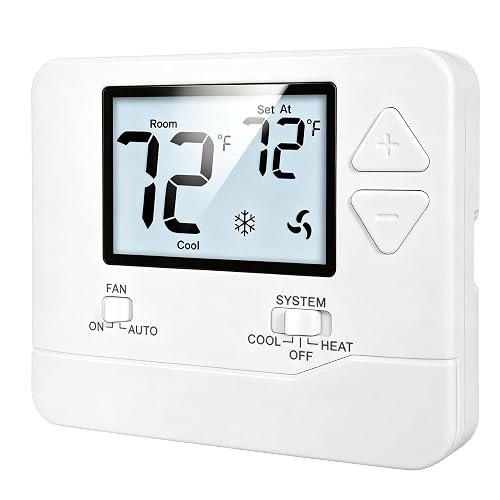
Heagstat NonProgrammable Thermostat for Home (White Backlight)
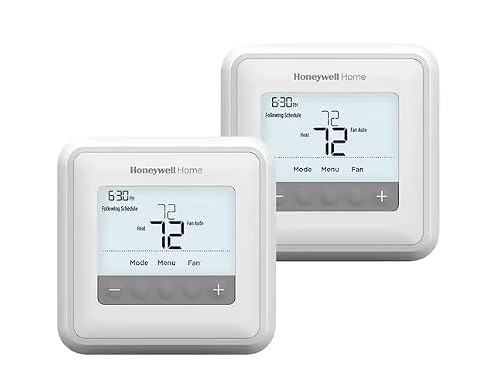
Honeywell Home T4 PRO 2-Day Programmable Thermostat
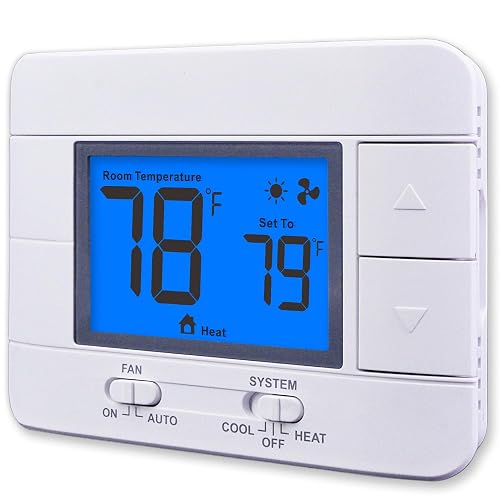
Aowel Non Programmable Thermostat for Home (Humidity Display)
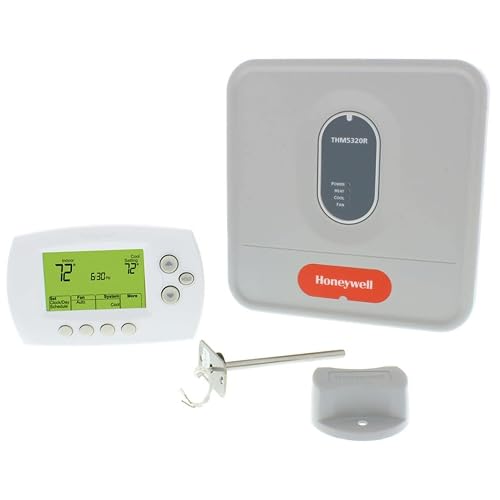
Honeywell 115369 24V Wireless FocusPRO Thermostat Kit
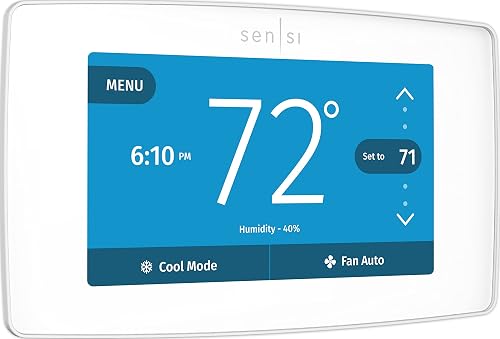
Sensi Touch Smart Thermostat by Emerson (ST75W, White)

SkyTech Millivolt Wireless On/Off Thermostat Remote (1001TH-A)

Google Nest Learning Thermostat 4th Gen + Sensor (Obsidian)

Google Nest Learning Thermostat 4th Gen + Sensor (Silver)
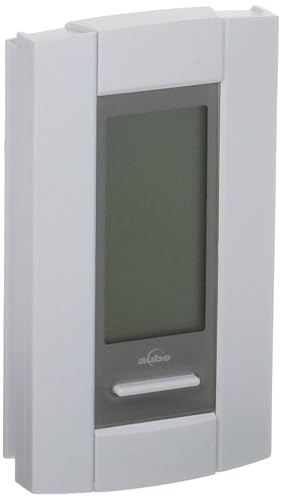
Honeywell TH115-A-12 120V 7-Day Digital Heat Thermostat
A Breakdown Of The Leading Choices
Heagstat’s wall unit trades app features for honesty. It is built for homeowners with a straightforward 24-volt forced-air setup, the kind of single-stage furnace and outdoor condenser pairing found in most older U.S. homes. A C-wire is not required, which is a relief in older properties where the wall cavity hides only two or three thin conductors.
The interface is a backlit display with large temperature readouts. You tap the up or down arrow and the room shifts a few degrees. In a guest room or rental unit where occupants come and go, that kind of dependable simplicity is genuinely useful. Compared with the Honeywell T4 PRO later in the list, this one makes no attempt to learn anything about you, which is the whole point.
Real Benefits
- White backlight keeps the readout visible in dim hallways and at night
- Works with conventional 1-heat, 1-cool systems using a low-voltage common wire setup
- Manual operation means a tenant cannot accidentally drain your data or fiddle with the schedule
- Compact footprint fits over a standard wall plate without patching drywall
Worth Noting
- Not suitable for heat-pump systems, multi-stage equipment, or 6-to-8 wire setups, so homes with complex HVAC gear should pass
- No scheduling means you will nudge the temperature by hand when seasons change
At A Glance
Made For
Owners of basic single-stage systems who want a no-fuss wall control and zero learning curve.
Skip It When
You run a heat pump or multi-stage furnace, in which case the Sensi Touch Smart Thermostat by Emerson handles broader equipment with Wi-Fi scheduling built in.
The T4 PRO leans on plain push-button programming and an on-screen install guide. It walks you through wiring step by step, which is reassuring for anyone who has stared at a bundle of colored wires and wondered which one is which. The display is uncomplicated, the buttons have a satisfying click, and the unit remembers your schedule even if the power drops overnight.
Where it stands out is adaptive intelligent recovery, Honeywell’s name for the feature that learns how long your system needs to reach the target temperature. The thermostat starts warming the house a little earlier on cold mornings so the room feels right on schedule. In homes with a slower-rising furnace, that comfort is meaningful. Unlike the Heagstat before it, this one is built for someone who wants a schedule but is happy to leave their phone in their pocket.
A Strong Showing
- Adaptive recovery learns heating and cooling cycle times for more accurate arrival temperatures
- Internal memory keeps your schedule through power outages
- Auto daylight-saving adjustment means no semi-annual fiddling
- Universal mounting plate helps when swapping an older Honeywell model
Points To Keep In Mind
- No Wi-Fi or app control, so remote changes require a wall visit
- Programming interface is functional but not as modern as a touchscreen like the Sensi Touch
Quick Facts
Who Will Love This
Households with predictable routines who want a programmable schedule without managing an app or learning a new interface.
Another Choice May Suit
Remote-first households will get more out of the Sensi Touch Smart Thermostat by Emerson, which adds Wi-Fi and voice assistant support.
Aowel’s wall thermostat sits in the same low-voltage single-stage family as the Heagstat, but adds one practical feature: a built-in humidity reading. The blue backlit LCD shows the room’s moisture level next to the temperature, which helps you spot sticky summer afternoons or dry winter mornings at a glance. For anyone running a humidifier or dehumidifier independently, that data is genuinely useful.
Setup follows the same path as other 24V units, with terminals clearly labeled. The housing is plain white plastic, the buttons are tactile, and the screen is easy to read across a bedroom. It targets a similar audience to the Heagstat, yet the extra humidity data gives it a real edge in homes where indoor air quality feels off in shoulder seasons.
Reasons It Performs
- Integrated humidity sensor shows moisture percentage alongside temperature
- Blue backlit screen remains readable in dim rooms and at night
- Compatible with conventional gas, oil, or electric single-stage HVAC systems
- Manual controls keep operation simple for less tech-focused households
Trade Offs
- Humidity is a readout, not automatic control, so pairing with a separate humidifier is still required
- Not designed for multi-stage or heat-pump equipment
Best Suited To
Sleeping areas and living rooms where tracking indoor humidity matters more than scheduling complex temperature swings.
A Better Fit Elsewhere
Anyone wanting automated humidity control should consider pairing a smart dehumidifier with the Sensi Touch Smart Thermostat by Emerson for a fully connected system.
This kit solves a very specific problem. Honeywell ships a wireless thermostat alongside an Equipment Interface Module (EIM) that wires into your HVAC gear, allowing the wall unit to communicate with the system over RedLINK wireless technology. That setup shines in renovations or additions where running a new cable through finished walls would be a nightmare, since the EIM lives near the equipment and the thermostat just needs power.
Honeywell also bundles a return air sensor with the system. If the wireless thermostat loses power, the sensor steps in and keeps the heating setpoint at 62°F and cooling at 82°F as a safety default. The FocusPRO display itself is familiar Honeywell territory, with push-button controls and a no-nonsense readout. It is a heavier install than a basic wall unit, and it costs more, but the wireless reach is the real payoff.
Practical Advantages
- RedLINK wireless connection between thermostat and HVAC gear removes the need for new wire runs
- Return air sensor maintains safe indoor temperatures if the thermostat loses power
- Equipment Interface Module centralizes HVAC wiring for cleaner installs
- Ideal for retrofits, additions, and garages converted into living space
Less Ideal Details
- More components mean a longer install than a simple wall swap
- No app connectivity, so remote access still requires a separate smart bridge
Who Should Grab It
Homeowners tackling a renovation or detached space where pulling new thermostat wire is impractical or expensive.
Where A Sibling Pick Shines
For projects that need a wireless thermostat plus full app control, the Google Nest Learning Thermostat 4th Gen gives you learning behavior and remote access in one package.
Emerson’s Sensi Touch feels like a step into a different category. The color touchscreen replaces the buttons found on the T4 PRO, and the Wi-Fi radio lets you adjust the temperature from the Sensi app, a voice assistant, or the wall itself. Setup uses an illuminated level and click-in terminals, so most installs wrap up quickly without a second trip to the breaker.
Data privacy is a recurring theme with Sensi. The company does not sell personal information or rely on advertising-based revenue, which is reassuring for shoppers who want smart features without trading away control of their household data. Compatibility spans most low-voltage heating and cooling systems, though a C-wire (the common wire that delivers continuous 24V power) is required, so older homes without that conductor will need an extra wire pulled or a power adapter kit. The thermostat works with several major smart home platforms, including popular voice assistants, making it a natural hub for mixed-device homes.
Good Reasons To Consider
- Color touchscreen simplifies on-wall adjustments and feels modern in any room
- Flexible scheduling, geofencing, and remote access help trim HVAC energy waste
- Compatible with major smart home platforms, so it fits into existing voice routines
- Standard thermostat footprint avoids drywall patching on most replacements
Honest Caveats
- C-wire requirement rules out some older homes unless a power kit is installed
- Touch responsiveness can lag in very cold entryways during winter boot-up
Feature Snapshot
Perfect Match For
Smart-home households that want voice control, app access, and detailed scheduling in a single wall unit.
Not Your Match When
You need a learning thermostat that adapts without manual scheduling, in which case the Google Nest Learning Thermostat 4th Gen is a stronger fit.
SkyTech’s remote is a different animal entirely. It is a wireless transmitter and receiver pair designed to control a millivolt gas valve or electronic spark ignition system, which is the kind of low-voltage gas valve found in many fireplaces, log sets, and direct-vent hearth products. You click a button on the handheld remote and the receiver opens or closes the gas circuit.
The included thermostat mode holds the room at a set temperature by cycling the burner on and off, so the fireplace acts more like a room heater than an occasional ambiance toggle. It is not a wall thermostat for a central HVAC system. Compared with the Honeywell FocusPRO kit, this is a much narrower tool, and it earns its place on this list because so many shoppers confuse fireplace remotes with full-home thermostats.
Everyday Advantages
- Wireless handheld remote turns the fireplace on or off from across the room
- Thermostat function maintains a target room temperature automatically
- Compatible with millivolt safety pilot valves and electronic spark ignitions
- Receiver installs near the gas valve, keeping the wall uncluttered
Points To Note
- Not designed for whole-home HVAC and cannot replace a central thermostat
- Requires battery replacements in the handheld remote, which owners commonly report needing annually
Right Fit For
Homeowners with a gas fireplace, stove, or log set who want remote and thermostat-style control over a single room.
Look Elsewhere When
You need to control a full central HVAC system, in which case the Sensi Touch Smart Thermostat by Emerson or the Honeywell T4 PRO will serve you better.
Google’s fourth-generation Nest leans into two ideas: a thermostat that learns your routine and a separate temperature sensor that reports from the rooms you actually live in. The display is the most striking Nest has shipped, with a brighter bezel and a smoother edge that reads as a piece of hardware rather than a wall gadget. The included second-generation sensor lets the system prioritize the nursery at night or the home office during the workday, so the reading at the thermostat does not have to be the only voice in the room.
Where it pulls ahead of the Sensi Touch is in the learning layer. The Nest watches your manual adjustments, recognizes patterns, and starts to build a schedule for you without much fiddling. Setup walks you through compatibility checks in the app, and the system monitors heating and cooling performance to flag maintenance needs. In a multi-room family home, the sensor bundle is what really justifies the upgrade.
Standout Benefits
- Adaptive learning removes the need to program a weekly schedule by hand
- Included temperature sensor balances comfort across priority rooms
- App and voice control fit into most modern smart home ecosystems
- System monitoring surfaces maintenance reminders and HVAC performance trends
Factors To Consider
- Learning behavior takes a week or two to settle, so early results may feel off
- Sensor count can grow quickly in larger homes if you want whole-home balancing
Details At A Glance
Built With In Mind
Multi-room family homes that want balanced comfort in nurseries, offices, or upstairs bedrooms without manual schedule babysitting.
Consider Something Else When
You prefer a touchscreen-first interface with explicit scheduling, in which case the Sensi Touch Smart Thermostat by Emerson may feel more familiar.
The silver variant of the same Nest 4th generation keeps every feature from the Obsidian edition and trades the dark mirror face for a brushed silver look. In a kitchen with stainless appliances or a hallway with cool-toned paint, the silver finish blends in more naturally than the dramatic black option. It is a small change with a meaningful visual impact, and nothing about the underlying hardware differs.
That means you still get the learning layer, the included temperature sensor, and the smart home connectivity. The decision between this and the Obsidian model is essentially aesthetic, which is exactly the kind of choice worth offering shoppers. Compared with the Honeywell FocusPRO kit earlier in the list, this is a category jump into app-driven, sensor-aware comfort.
Real-World Strengths
- Silver finish suits kitchens, laundry rooms, and modern interiors with cooler tones
- Includes a temperature sensor for room-by-room balancing
- Learns your schedule and adapts to seasonal routine changes
- Integrates with popular voice assistants for hands-free adjustments
Small Caveats
- Brighter finish shows fingerprints more readily than the Obsidian option
- Same learning curve as the rest of the Nest line, so patience is required in week one
Whose Shelf It Belongs On
Style-conscious households that want premium learning features without committing to the darker Obsidian finish.
Reach For A Different Pick When
You want a simpler programmable option with no learning layer, in which case the Honeywell Home T4 PRO is a calmer experience.
The TH115-A-12 is not a typical wall thermostat. It is a high-voltage, 120-volt TRIAC switching unit designed for electric baseboard heaters, convectors, and similar resistive heating loads. The TRIAC (a solid-state electronic switch that silently handles high current) keeps operation quiet, and the 15-minute cycle length helps hold temperatures close to the setpoint without the constant clicking associated with mechanical relays.
You get four programmable events per day, every day of the week, so a work-from-home schedule and a weekday-commuter routine can both fit on the same device. Honeywell also includes a remote input, often used for a floor sensor on radiant heat mats. It is the least smart-looking option on this list, yet in a home with electric baseboards, it is one of the most capable.
Notable Gains
- Silent TRIAC switching suits bedrooms and living rooms
- Seven-day programming with four events per day fits complex routines
- 15-minute cycle length holds temperature close to the setpoint
- Remote input supports a floor sensor for radiant heat installations
Where It May Fall Short
- High-voltage 120V wiring is not a DIY swap for anyone uncomfortable with electrical work
- Heating-only design means it cannot control cooling equipment
Perfect Match For
Older homes and condos with 120V electric baseboard or convector heaters that need a precise, programmable digital controller.
Swap It Out When
You run a low-voltage forced-air system, since the Sensi Touch Smart Thermostat by Emerson or the Honeywell T4 PRO will match the wiring and add smart features.
Picking The Right Thermostat For Your Home
The first decision is your system type. Low-voltage 24V forced-air setups work with the Heagstat, Honeywell T4 PRO, Aowel, Honeywell FocusPRO kit, and Sensi Touch. Heat pumps and multi-stage equipment push you toward smart thermostats with broader compatibility like the Sensi Touch or the Nest. High-voltage 120V electric baseboard heating is its own world, and the Honeywell TH115-A-12 is built for exactly that.
The second question is how connected you want to be. A basic wall unit does its job and never asks for a firmware update. A smart thermostat pulls in scheduling, geofencing, and voice control, and it wants your Wi-Fi credentials. The Nest learns without much input, while the Sensi gives you more direct control over the schedule. Either is a step up, but the trade-off is ongoing software updates and a small amount of setup time.
Wiring matters more than most shoppers expect. Many smart thermostats need a C-wire, the common conductor that delivers continuous 24V power, because Wi-Fi radios and color screens draw more current than a simple switch ever did. Older homes with two-wire heat-only systems often need a power adapter or a new wire pulled. If you cannot confirm your wiring, the Honeywell FocusPRO wireless kit sidesteps the problem by relocating the wired connection to the equipment area.
Finally, think about the rooms where comfort actually matters. A single thermostat on the wall reads the hallway, not the nursery or the upstairs bedroom. The Nest’s bundled sensor addresses that, and adding extra sensors extends the reach. For everything else, placement and a thoughtful schedule will do most of the heavy lifting.
Key Considerations Across These Picks
Common Shopping Slip Ups
The most frequent mistake is buying a smart thermostat without checking for a C-wire. The Sensi Touch, for example, requires that common conductor for steady power, and assuming your wall has one when it does not can lead to a frustrating install. The second slip is pairing a low-voltage thermostat with high-voltage baseboard heaters, or vice versa. The wiring is fundamentally different, and the Honeywell TH115-A-12 is a reminder that high-voltage heating lives in its own product category.
Another trap is choosing a learning thermostat expecting it to behave like a programmable one. The Nest adapts on its own schedule, and pushing manual overrides too early can confuse the algorithm. Give it a week or two before judging.
What The Higher Tier Buys
The premium tier on this list buys you three things. First, a learning layer that builds a schedule without much effort, visible in the Nest. Second, multi-room awareness through external temperature sensors, which addresses the hallway-versus-bedroom gap. Third, broader compatibility with smart home platforms, so your voice assistant and routines can pull the thermostat into the mix.
For some households, that bundle is genuinely worth the step up. For others with a predictable routine, the Honeywell T4 PRO’s adaptive recovery already covers most of the comfort gain at a friendlier price. The upgrade pays off most when your schedule is irregular, your home has multiple comfort zones, or you already lean on voice assistants for daily control.
Frequently Asked Questions
Do wireless thermostats need Wi-Fi to work?
Basic wireless kits like the Honeywell FocusPRO use a dedicated wireless link to the equipment module and do not require your home Wi-Fi. Smart thermostats such as the Sensi Touch and the Nest use Wi-Fi to enable app and voice control, but the heating and cooling functions still work locally if the network drops.
What is a C-wire and why does it matter?
A C-wire, or common wire, delivers continuous 24V power to the thermostat from the HVAC system. Smart thermostats with Wi-Fi radios and color screens draw more current than older models, so many of them need that steady power source. Without it, you may need a power adapter kit or a new wire run.
Can a thermostat really lower utility costs?
Programmable and learning thermostats reduce runtime by trimming heating or cooling when no one is home or when everyone is asleep. The exact impact depends on your climate, your schedule, and your current habits, but trimming even a few hours of unnecessary run time each week adds up across a year.
Are learning thermostats hard to set up?
The setup itself is similar to other smart thermostats: check compatibility, label wires, mount the base, and walk through the app. The learning part takes longer because the thermostat needs to observe your routine before it makes confident adjustments. A week of normal use is usually enough for the system to settle.
Is a thermostat replacement safe for a DIYer?
Low-voltage thermostat swaps are generally safe as long as the breaker to the HVAC system is off. High-voltage 120V electric baseboard thermostats like the Honeywell TH115-A-12 involve mains wiring and are best left to a licensed electrician or a confident homeowner who follows local electrical code.
Closing Remarks
The right thermostat is the one that matches your system, your routine, and your appetite for app-driven control. A single-stage rental may be perfectly happy with a Heagstat, a renovation project will benefit from the FocusPRO kit, and a connected family home will get the most from a Nest or Sensi. Whichever pick fits, the goal is the same: a home that feels right when you walk through the door, without wasting energy while you are away.


